
On this page
Key takeaways
- Ask your installer to identify where passkey authentication ends and how the resulting unlock instruction reaches the controller.
- Do not assume that adding phone access secures a retained Wiegand reader connection or removes older entry methods.
- Where OSDP readers are proposed, require evidence that Secure Channel is configured and active rather than accepting compatibility alone.
- Treat “Flipper Zero-proof” as an unsubstantiated claim unless testing identifies the installation, configuration and attacks covered.
- Test lost-phone recovery, fallback entry, outages and safe escape before accepting the installation.
You want stronger door security, but a proposal promising passkey access control security may leave the existing readers and wiring untouched. Passkeys strengthen authentication; they do not automatically secure a retained Wiegand connection or make a building impossible to hack. Assess the complete route from the resident’s phone to the lock, including every alternative way in.
Calling a system a “Flipper Zero killer” skips that assessment. The useful question is which attack paths the proposed installation removes, which remain, and what evidence you receive at handover.
Separate passkey access control security from wiring security
A passkey and Wiegand serve different purposes. A passkey authenticates someone to a website or app using FIDO2-based technology, with approval through their device’s fingerprint, face recognition or screen-lock PIN. Wiegand is a communications protocol used between access-control components, commonly a reader and controller.
The NCSC’s assessment of FIDO2 credentials supports their protection against common credential attacks. It also identifies dependencies including device security, credential managers, recovery and implementation. Phishing-resistant does not mean immune to compromise.
Separately, the NPSA guide to token and reader technology states that Wiegand does not support secure encryption and is not a secure communication method.
The practical distinction is simple: stronger proof of identity does not repair an insecure cable connection elsewhere. Equally, encrypted reader wiring does not make weak account recovery safe. You need to assess both.
Map the complete route to the lock
Ask for a diagram of the proposed installation, not just a list of supported credentials. It should identify the phone, authentication service, permissions check, controller, lock connection and any physical readers still in use.
At the authentication boundary, establish what happens after the passkey is accepted. Which component checks permission for that particular entrance? How does the unlock instruction reach the controller? Where, if anywhere, does reader-to-controller signalling occur?
These are separate review boundaries, not a claim that every installation follows one wiring layout.
Identity
Door authorisation
Physical entry and escape
A phone-based route may avoid a legacy reader connection for that particular unlock. That does not remove a retained reader as another route into the same building. A side entrance using older credentials deserves the same attention as the main entrance displaying a phone-access sign.
Include gates, basement doors and staff entrances in the drawing. Otherwise, you risk improving the most visible entrance while leaving another route outside the assessment.

Decide what happens to existing Wiegand readers
For a retrofit, start with an inventory of readers, controllers, wiring routes and credentials. Record what stays, what changes and what is disconnected. A familiar reader casing tells you little about the security of the complete installation.
Use this comparison to challenge a proposal before approving hardware purchases.
| Proposed approach | What it changes | What still needs evidence |
|---|---|---|
| Add passkeys alongside existing Wiegand readers | Adds another authentication route | Security of retained readers, credentials and wiring |
| Retire the Wiegand reader route | Removes that route if properly disconnected | Security of the replacement path and fallback entry |
| Replace reader communications with OSDP Secure Channel | Adds encrypted reader-to-panel communications when configured | Active Secure Channel, suitable equipment and commissioning records |
The SIA Corporate Credential Design Guide recommends OSDP Secure Channel with AES-128 encryption for reader-to-panel communications. It also calls for verification through a configuration audit or packet capture. This is industry guidance, not a UK statutory requirement.
“OSDP-compatible” is therefore not an acceptance result. Ask your installer to document the installed configuration and verify that Secure Channel is active. If a retained component prevents the intended protection, record the limitation and your replacement decision.
ExamplePicture a 40-flat block in Manchester adding phone entry at its main entrance. The basement fob reader still connects by Wiegand to a controller. The new phone route may improve resident authentication, but the manager should not describe the whole block as protected against Wiegand spoofing while that separate route remains.
Treat Flipper Zero claims as testable claims
The research supporting this guide does not provide model-specific, firmware-specific or installation-specific tests proving that a passkey door system is “Flipper Zero-proof”. Nor does general guidance about Wiegand establish what a particular handheld tool can do against your entrance.
Avoid choosing a system around a demonstration involving one device. Ask the supplier to define the threat model: the attacks being considered, the attacker’s assumed access and the components included in testing.
Useful evidence identifies the tested hardware and software versions, configuration, scope, findings and remediation. A demonstration that one credential resists one test does not establish the security of account recovery, administrator access or another reader.
Note“Cannot be hacked” is not a useful procurement requirement. Specify the protections, tests and acceptance evidence you expect instead.
This keeps the discussion on your building rather than a product nickname. It also gives your installer a requirement they can actually demonstrate.
Check what the platform actually provides
TheBuilding.Cloud provides passkey door access: door users, employees and guests receive a “Set up your door key” email and set up their key on their own phone using face recognition, fingerprint or phone passcode. A door can also be restricted to opening only when the person’s phone is at the building.
Those are authentication and access-policy features, not a claim that every connected reader uses encrypted communications. Its FireBird controllers support Wiegand readers and keypads, including 26-bit cards. Compatibility should not be mistaken for encryption of that connection.
TheBuilding.Cloud also uses entrance groups to determine which doors people can open through its access control dashboard. Review group membership alongside hardware: a correctly authenticated person should still receive only the doors they need.
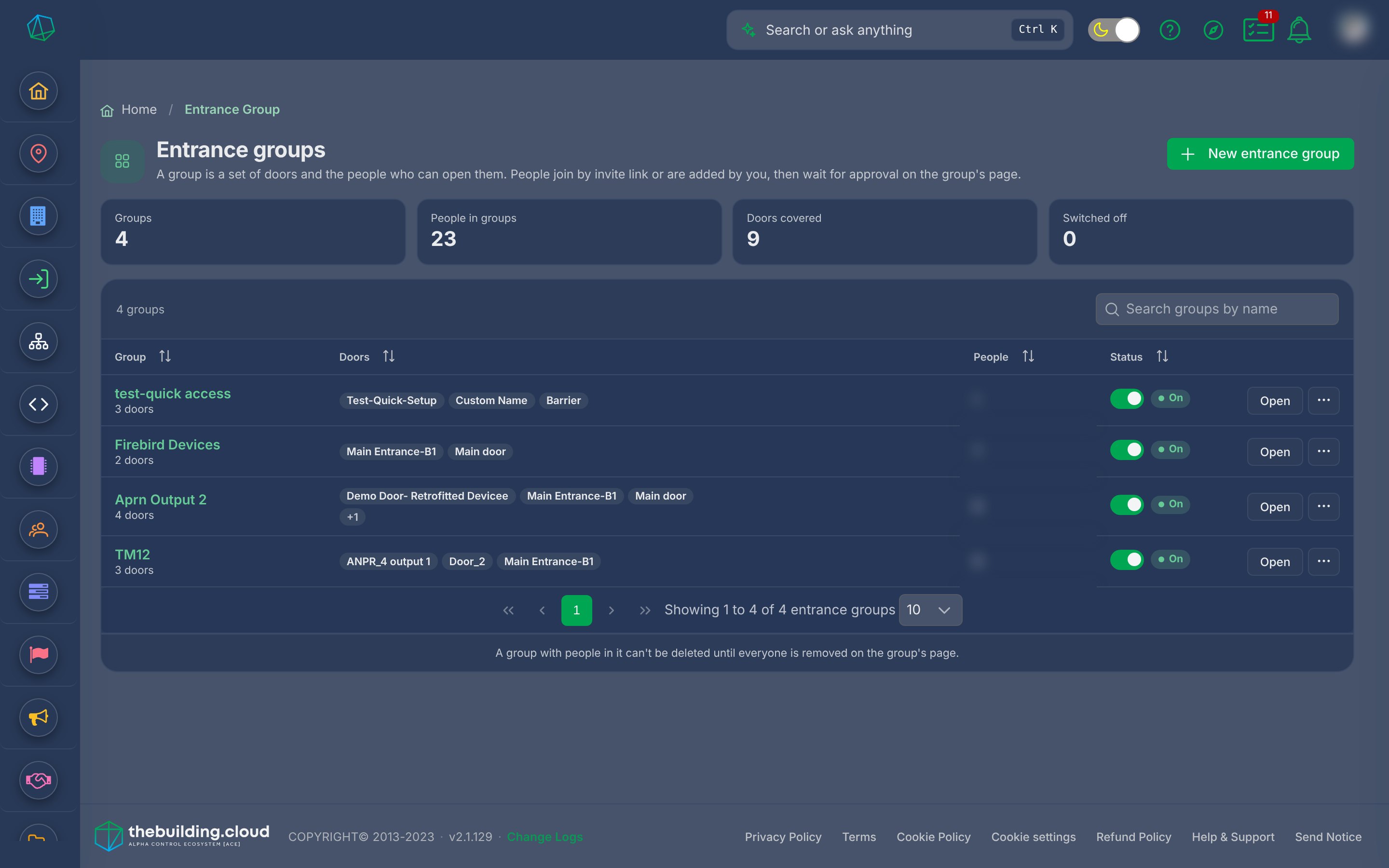
When someone is switched off, removed from a door group or deleted, their PINs, cards and QR codes are automatically taken off the door readers. The PIN codes, cards and QR codes feature also provides PIN time limits. Review these alternative credentials rather than treating passkeys as the only entry route that matters.
Commission security, recovery and safe escape together
Make acceptance a witnessed process, with results attached to the handover documents. Ask your installer to carry out or arrange security testing appropriate to the installation, with permission and an agreed scope.
- Confirm the installed design. Match the drawing to the actual readers, controllers, connections and enabled entry methods.
- Verify communications protection. Obtain evidence for the specified encrypted links, including active OSDP Secure Channel where used.
- Test permissions and removal. Check authorised entry, refusal at an unauthorised door and withdrawal of each enabled credential type.
- Exercise recovery and fallback. Walk through a lost phone, replacement device, resident without a suitable phone and unavailable support contact.
- Test failure and escape arrangements. Witness the agreed power and connectivity failure behaviour, emergency release and restoration procedure with competent people.
NPSA’s automatic access-control guidance recommends commissioning-stage cyber penetration testing and segregation from other IT wherever possible. It also says means of escape should not depend on the access-control system. Record each door’s intended failure behaviour; fail-safe and fail-secure are not interchangeable descriptions.
Recovery needs particular care. The NCSC distinguishes synchronised credentials from device-bound credentials, which can be lost with the device unless another authenticator or recovery route exists. Ask how identity will be checked before replacement access is granted.
Assign responsibility before handover so unresolved questions do not fall between the managing agent, installer and IT provider.
| Party | Suggested responsibility | Handover record |
|---|---|---|
| Property manager | Resident support and access approvals | Named contacts and recovery procedure |
| Access-control installer | Installed configuration and door behaviour | Drawings and witnessed test results |
| IT provider | Network boundaries and connectivity | Agreed network configuration |
Do not accept “use the backup code” as the complete resident plan. Establish who issues it, what it opens, when it stops working and how residents receive help outside office hours.
Where to start
Choose a representative entrance and request its complete authentication-to-lock diagram. Mark every retained Wiegand connection, alternative credential and recovery route. Then ask your installer to turn the gaps into a written scope with acceptance evidence.
Passkeys can strengthen authentication. The defensible claim is that you have assessed and tested the whole installation, not that a phone credential has made every door impossible to attack.
Frequently asked questions
Can passkeys make an existing Wiegand installation secure?
Is passkey door access Flipper Zero-proof?
Does OSDP compatibility mean the reader connection is encrypted?
What happens if a resident loses their phone?
Does TheBuilding.Cloud support existing Wiegand readers?
Sources
How we write
Our articles answer the questions people ask about running buildings. Each one is checked against our product documentation and reviewed by our team before it is published. Spotted something out of date? Tell us and we will fix it.


