Issue reporting
Repairs reported properly, and seen through
Residents report a repair with the details your team needs: the category, a photo, the address, access to the property and whether a vulnerable person lives there.
Then everyone talks in one conversation on the issue, with photos, videos and voice notes, until it is resolved. No more WhatsApp threads, lost emails or paper notes.
Reported by
Residents & staff
Progress
Not Resolved → Resolved
From the resident's report to Resolved
- clear stages: Not Resolved, Processing, Resolved
- 3
- files at a time on a reply: photos, PDFs, videos, voice notes
- 10
- conversation per issue, from report to fix
- 1
- PDF of any issue and its conversation
- 1
How it works
How an issue moves, in four steps
Get the right details first time, then keep the conversation and the progress in one place.
-
1
Report
A resident or staff member reports the issue with the details.
-
2
Notify
The organisation and the right operators are told at once.
-
3
Talk
Questions, photos and updates go in one conversation.
-
4
Resolve
The issue is marked Resolved and the reporter sees it.
One issue, three points of view
Easy to report, easy to keep on top of
Pick who you are to see what issue reporting looks like for you.
Report it once, with everything needed
Residents choose a category, describe the problem, add a photo and say how to get into the property, then follow the replies until it is fixed.
- Questions that fit the category they chose.
- Photos, videos and voice notes in the conversation.
- They see each change of progress.

One list you can keep on top of
The organisation and the operators who can see the issue get a notification and live updates, reply in the conversation and move the issue on.
- Not Resolved → Processing → Resolved.
- Vulnerable occupiers are shown on the issue.
- Filter the list by status and category.
A record of what was reported and fixed
Every reply and every change of progress is kept on the issue, and any issue can be downloaded with its conversation as a PDF.
- Each change shown in the conversation.
- PDF of the issue and its conversation.
- Your own categories and sub-categories.
Issue reporting built for buildings
Get the right details first time, then keep the conversation and the progress in one place.
A form that asks the right questions
Category, description, photo, address, contact details, access to the property and vulnerable occupiers.
Your own categories
Set up categories and sub-categories, each with its own questions for the reporter to answer.
One conversation
Reply on the issue with up to 10 files at a time: photos, PDFs, videos and voice notes.
Clear progress
Not Resolved → Processing → Resolved, with every change shown in the conversation.
Notifications
The reporter, the organisation and the operators who can see the issue get a notification bell and live updates.
PDF of every issue
Download any issue and its conversation as a PDF, and filter the list by status and category.
In the product
Real screens from the dashboard
Taken from our demo organisation on 7 November 2026, with sample buildings and made-up people; unit numbers and names are blurred.
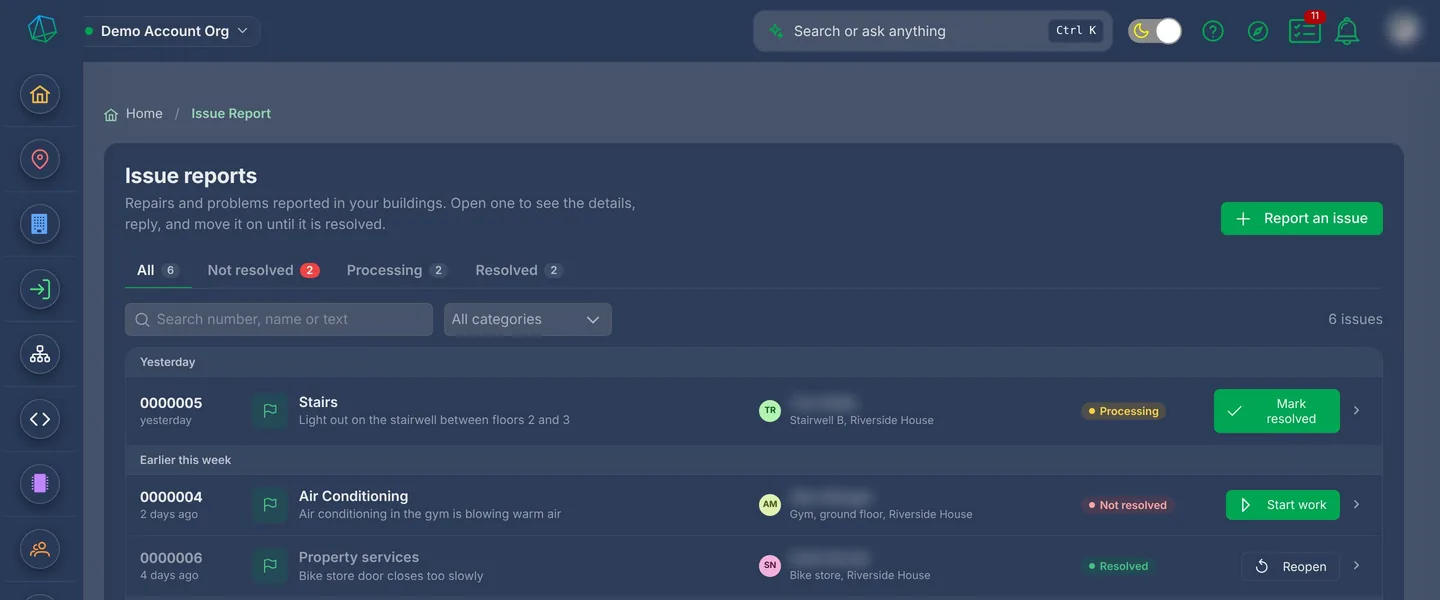
Problems in, fixes out
Issues arrive with their category and location. Start work, mark one resolved or reopen it straight from the list.
Who it's for
For teams who look after buildings and the people in them
Issue reporting gives residents and staff one proper place to report a problem, and gives your team everything they need to fix it.
Managing agents
Repairs from every block arrive in one list, with the address and access details already filled in.
Housing providers
Vulnerable occupiers are highlighted, so the people handling the issue know before they visit.
Facilities teams
Staff report broken doors, lights or heating with a photo instead of an email chain.
Student accommodation
Students report problems in their flat and follow the replies until it is fixed.
Problems it solves
- Repairs reported by phone, email, text and WhatsApp, and some forgotten.
- Missing details: no photo, no address, no idea whether anyone will be in.
- Residents chasing for updates because they can't see progress.
- Nobody knowing a vulnerable person lives at the property.
- Photos and messages about one job spread across inboxes.
- No record of what was reported and when it was fixed.
Works with
Part of your building platform
Issue reports use the same people, organisations and operators as the rest of TheBuilding.Cloud, so the right people see each issue without extra setup.
Operators
Operators see the issues of the entrance groups they look after.
Roles and permissions
Choose which roles may report, view, change status, reopen or delete issues.
Notification bell
New issues, replies and status changes appear in the bell and update live.
Dashboard card
The issues card marks new messages, photos, videos and voice notes.
PDF reports
Download an issue and its conversation to keep or send on.
Help centre
A step-by-step guide shows residents how to report an issue.
Everyday examples
A leak in a flat
A resident picks "Plumbing", answers the category's questions, adds a photo and says they want to be present. The team replies with a visit time in the conversation.
A door that won't close
A caretaker reports the main door with a video. The manager moves it to Processing, the repair is done and the issue is marked Resolved.
A vulnerable resident
The report is ticked for a vulnerable occupier, so it is highlighted for everyone who handles it.
A quick voice note
A resident who finds typing hard sends a voice note in the conversation instead.
Why TheBuilding.Cloud
Why TheBuilding.Cloud for repairs
The right details first time
Categories with their own questions mean fewer calls back to the reporter.
One conversation per issue
Messages, photos, PDFs, videos and voice notes stay together.
Progress people can see
Not Resolved, Processing and Resolved, shown to the reporter.
Care built in
Vulnerable occupiers and access preferences are part of every report.
A record you can keep
Download a PDF of any issue and its conversation.
Included on Pro and Enterprise
Issue reporting is part of the Pro and Enterprise plans.
Questions about issue reporting
Who can report an issue?
What can people attach?
Who is told about a new issue?
Can I set up my own categories?
Can residents report from the app?
Which plan do I need?
Learn more
Report a problem in your building
The step-by-step guide for residents and managers.
Send a message to residents
Keep everyone informed with the Notice Board.
Cloud access control
Doors, groups and codes.
Fire and intruder alarms
Watch panels and alarms in one place.
Plans and pricing
Pro and Enterprise include issue reporting.
Help centre
Every guide in one place.
Related features
Issues use the same buildings and people as the rest of TheBuilding.Cloud, so the person reporting a repair is the same person who opens the doors.
Same people
Residents report with the account they already use
Same buildings
Issues arrive with the address already filled in
After an alarm
Report and track the repair after a fault
Included on Pro & Enterprise
Close the loop on building issues
Give residents a proper way to report problems, and give your team one list they can actually keep on top of.