Smart devices
Smart devices and Device Hub in the same dashboard as your doors
Switch lights, sockets and blinds, and see which devices are online, next to your doors and alarms. Connect Tuya smart devices from their cloud, and devices that speak MQTT, such as Shelly and anything that works with Home Assistant, through our Device Hub.
New devices wait for your approval before anyone can control them, and operators only see the devices in the buildings they manage.
Connect
Tuya cloud and MQTT
New devices
Wait for your approval
Online devices first, one tap to switch
- steps from connect to control
- 4
- sources: Tuya cloud and our Device Hub
- 2
- dashboard card, online devices first
- 1
- devices controllable before you approve them
- 0
How it works
From device to dashboard in four steps
Tuya devices come from your Tuya account; MQTT devices join through Device Hub with their own login for each site.
-
1
Connect the source
Connect your Tuya account, or create a Device Hub login for a site and enter it in your devices.
-
2
Devices appear
Devices that announce themselves, such as Home Assistant discovery, show up with their switches and sensors.
-
3
Approve them
Approve the devices you want to use. Until then they can't be controlled.
-
4
Use them
Switch them from the dashboard card or the building page, and use Tuya devices in automation rules.
Where do they come from?
Your devices, one place
Pick a source.
Tuya smart devices
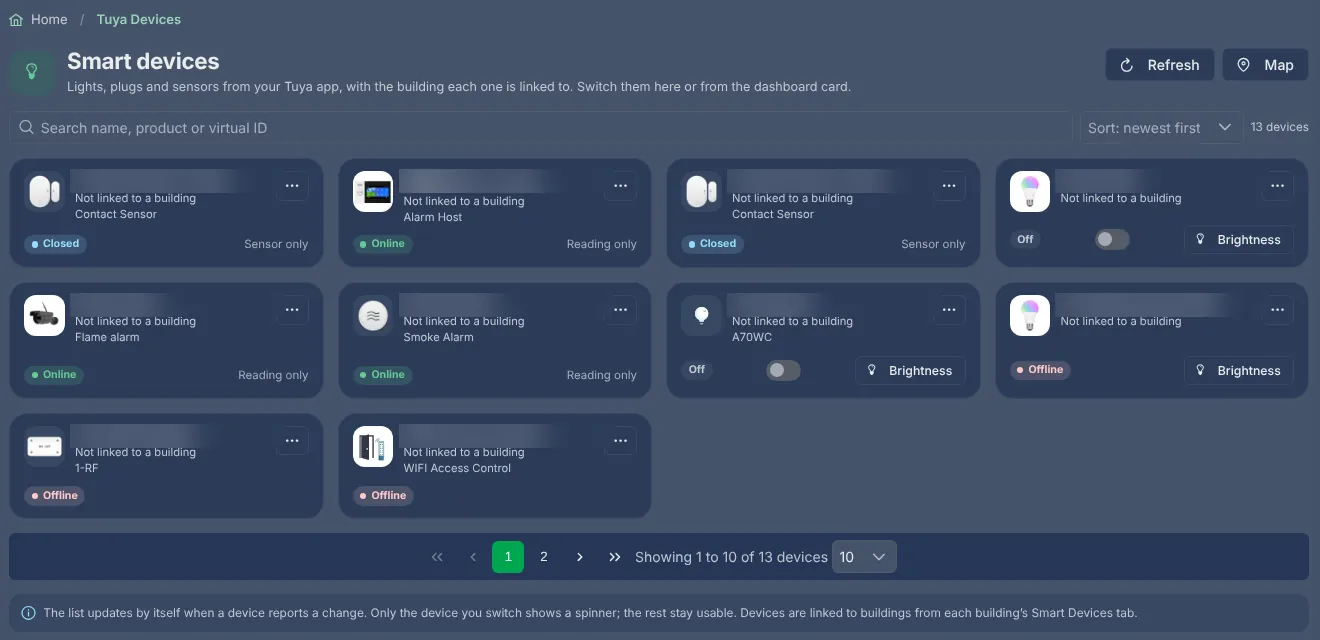
Connect your Tuya account and see your devices with their online state.
- Switch them from the dashboard.
- Open and close curtains.
- Use them in automation rules.
MQTT through our Device Hub
Shelly devices and anything that works with Home Assistant join through our own secure message server.
- A login per site.
- Discovery shows switches and sensors.
- Approval first.
Scoped to buildings
Operators see and control only the devices in the buildings they manage.
- Online devices first.
- Offline ones greyed out.
- Problems stand out.
Smart devices that behave like part of the building
The same people, buildings and permissions that protect your doors also protect your devices.
Tuya smart devices
See your Tuya devices with their online state, and switch them or open and close curtains from the dashboard.
MQTT devices through Device Hub
Shelly devices and anything that works with Home Assistant join through our own secure message server.
Approval first
Every new Device Hub device waits for approval, so nothing appears in the building without you knowing.
A dashboard card
Online devices first, with a quick switch, and offline ones greyed out below so problems stand out.
Scoped to buildings
Operators see and control only the devices in the buildings they manage.
Part of automation
Tuya devices can be switched by automation rules, for example when a door opens or an alarm starts.
In the product
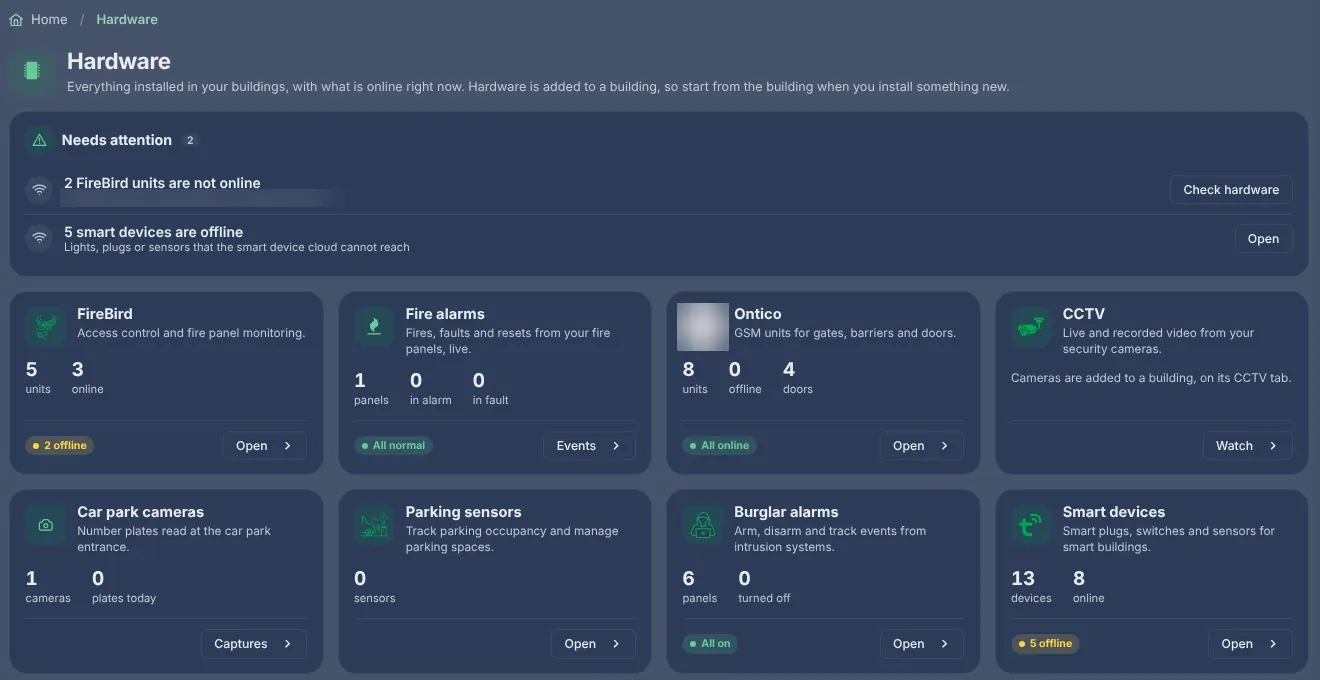
Real screens from the dashboard
Taken from our demo organisation on 7 November 2026. Device names are blurred.
Who it's for
For buildings with more than doors to run
If your building has smart switches, sockets, blinds or sensors, they belong in the same place as your access control.
Offices and shared spaces
Switch meeting room lights and sockets, and see what is left on, from the dashboard.
Residential managers
Look after communal lighting and plant from the same account as your doors.
Installers
Connect Shelly and Home Assistant setups your customers already have.
Serviced and short-let homes
Keep an eye on devices across many homes without visiting each one.
Problems it solves
- Every brand of device has its own app and login.
- Devices go offline and nobody notices.
- Staff can control devices in buildings that aren't theirs.
- New devices appear on the network without anyone approving them.
- Doors, alarms and devices can't work together.
- Building teams have to learn a hobbyist tool to switch a light.
Works with
Works with the devices you already have
Connect what is already installed, and keep your doors, alarms and devices in one view.
Tuya
Devices from your Tuya cloud account, with switches and curtain controls.
Shelly
Shelly devices, including newer generations and the Wall Display, through Device Hub.
Home Assistant
Devices that use Home Assistant discovery appear with their own switches and sensors.
Other MQTT devices
Devices that speak MQTT can join with a Device Hub login for their site.
Automation
Tuya devices can be part of automation rules with doors, cameras and alarms.
Building pages
Each building page has a Device Hub tab for its approved devices.
Everyday examples
Communal lighting
The building manager sees a corridor light switch offline on the dashboard card and sends someone before residents complain.
Lights on at the door
An automation rule switches a Tuya light on in the lobby when the front door opens at night.
An office
Reception switches off the meeting room sockets at the end of the day with one tap.
An installer's site
A Shelly relay on the plant room joins through Device Hub, is approved by the organisation, and the operator for that building can switch it.
Why TheBuilding.Cloud
Why connect devices to TheBuilding.Cloud
One place
Doors, alarms, cameras and devices in one dashboard.
Approval and scope
Nothing is controllable until approved, and only by the right people.
Online at a glance
Online first, offline greyed out, counts in the card header.
Open standards
MQTT and Home Assistant discovery, so you are not tied to one brand.
Secure connection
Each site has its own login to our message server.
Plain screens
Switches and curtain buttons, not configuration screens.
Questions about smart devices
Which devices can I connect?
Is Device Hub switched on for every account?
Can operators control devices?
What can I do from the dashboard?
Are smart devices on every plan?
Can devices start automation rules?
Guides and next steps
Supported devices
Search the devices that work, by category and maker.
Device Hub
Zigbee, Shelly, Tasmota and camera devices.
Automation
Make devices react to doors and alarms.
Multi-site management
Operators and building scope.
Cloud access control
Doors in the same dashboard.
API and AI assistants
Connect your own tools.
Add your first door
Start with your doors.
Plans and pricing
Which plans include smart devices.
Devices that work with your doors and alarms
Smart devices use the same buildings and permissions as the rest of TheBuilding.Cloud, and can take part in automation.
Same buildings
Devices belong to the buildings you manage
Same permissions
Operators reach only their own buildings
Same automation
Doors, alarms and devices in one rule
Smart devices
Bring your smart devices into the building
Connect Tuya, Shelly and Home Assistant devices next to your doors and alarms, with approval and the right access for every team.