Lockdown mode
Lockdown every door in seconds
Press and hold one button and every FireBird door you choose closes and stops opening. Everyone is told at once by push and email, TV screens take over, and you see who is safe.
Start it from the dashboard, a phone, a panic button, a lockdown code at a keypad, another alarm system or an automation. It helps you put your Martyn's Law lockdown and communication procedures into practice; you stay responsible for your own procedures.
Start it with
A press and hold, not typing
Ends
Only when someone ends it
Hold, lock, tell everyone
- press and hold on the dashboard card to start (2 s on the Lockdown page)
- 3 s
- ways to start it, from a wall button to another alarm system
- 7
- at most for an Open once, so a responder can let the police in
- 60 s
- doors that open by themselves when a lockdown ends
- 0
How it works
From the first sign of danger to a safe building in four steps
Built for the worst moment: no typing, big buttons, plain words, and a record of every step.
-
1
Start
Choose where (everywhere, buildings, door groups or a site) and press and hold, or press the panic button. Real or drill.
-
2
Doors secured, everyone told
Every way in is refused at once and each door reports Secured. Push and email alerts go out, TV screens take over.
-
3
Roll call and help requests
People answer "I'm safe" or "I need help". Help requests raise an alarm to your responders with the person's place.
-
4
End and report
An authorised person ends it with a reason. Doors don't open by themselves, and a PDF report is ready for your records.
Who sees what
The right screen for every person
Responders run it, staff and residents answer it, and the building manager prepares it.
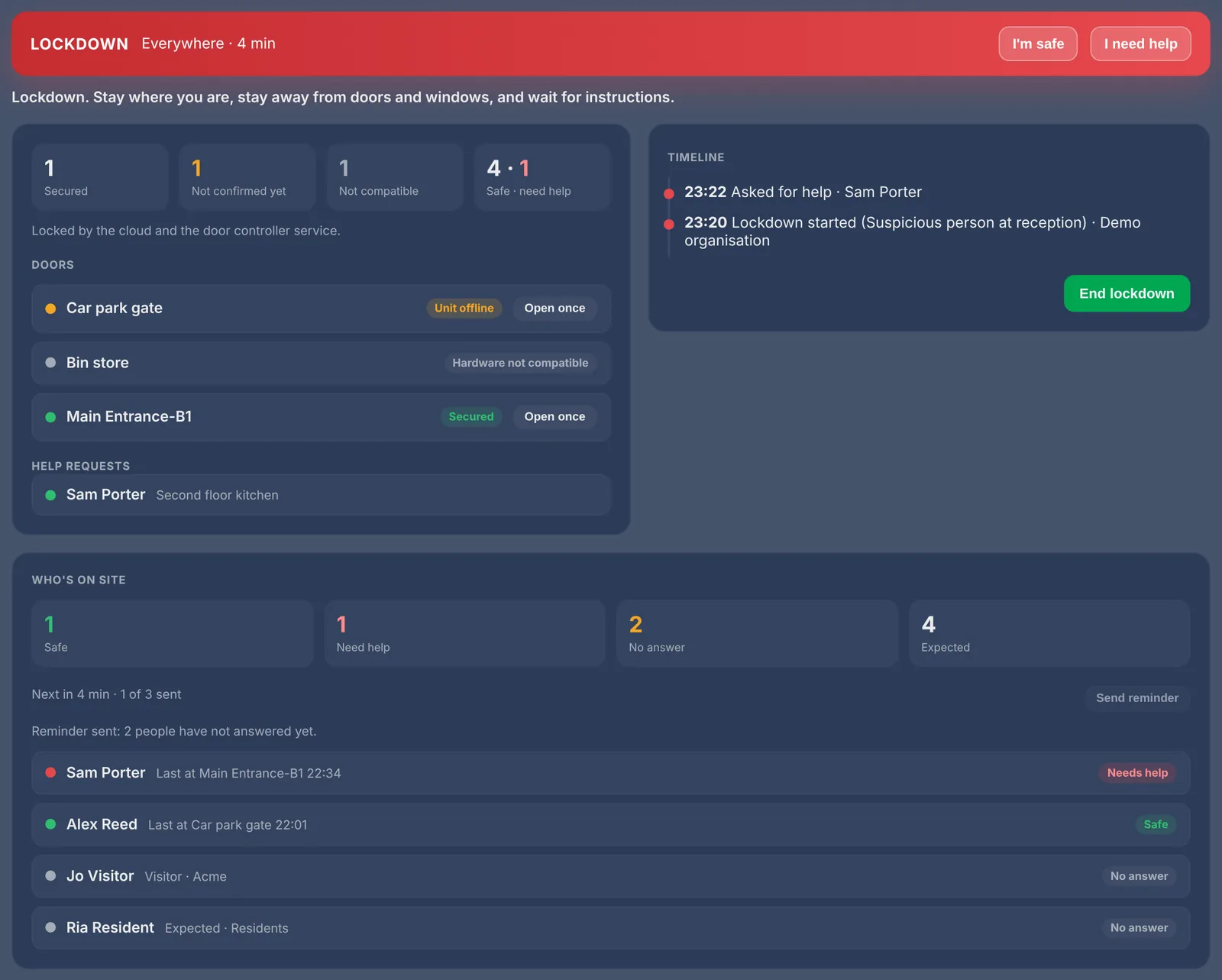
A live board for the people in charge
The organisation, the responders you name and, if you allow it, operators for their own buildings see every door, every answer and every help request on one board, on a computer or a phone.
- Each door shows Secured, Not confirmed yet, Unit offline or Hardware not compatible; failed doors are tried again.
- Open once lets one person through one door for 3 to 60 seconds, with a reason, while the door stays in lockdown.
- "Send reminder" asks people who haven't answered, up to 3 times.
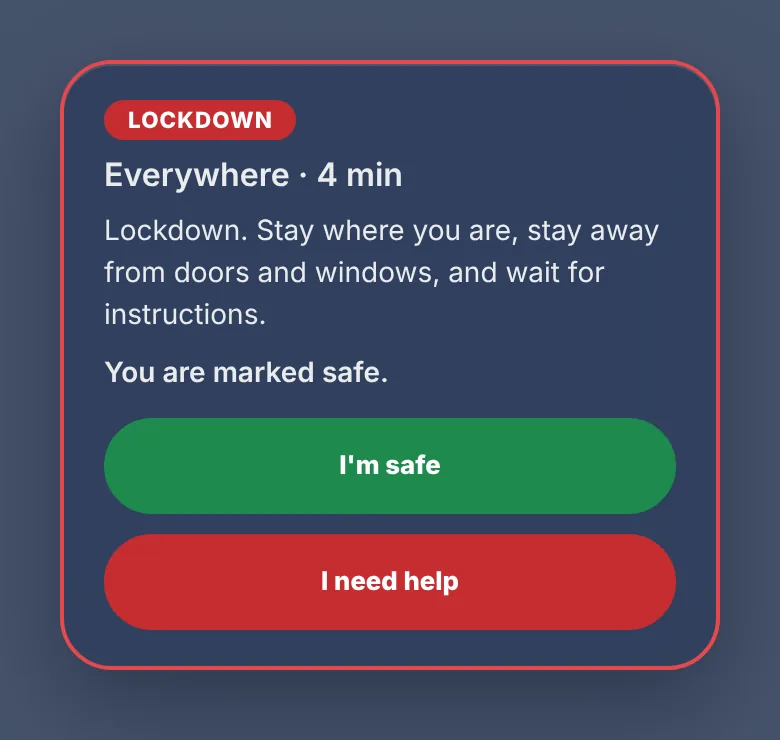
Two buttons: I'm safe, I need help
Everyone signed in sees a red banner on every page; door users, guests and visitors see a lockdown panel on their phone. The email has your own "What to do now" steps and personal answer buttons that need no sign-in.
- "I need help" raises an alarm to responders by push and email, with the person's place and an optional one-time location share.
- The door page and the visitor intercom page say the building is in lockdown.
- Alerts go by push and email, never SMS.
Set it up once, practise it often
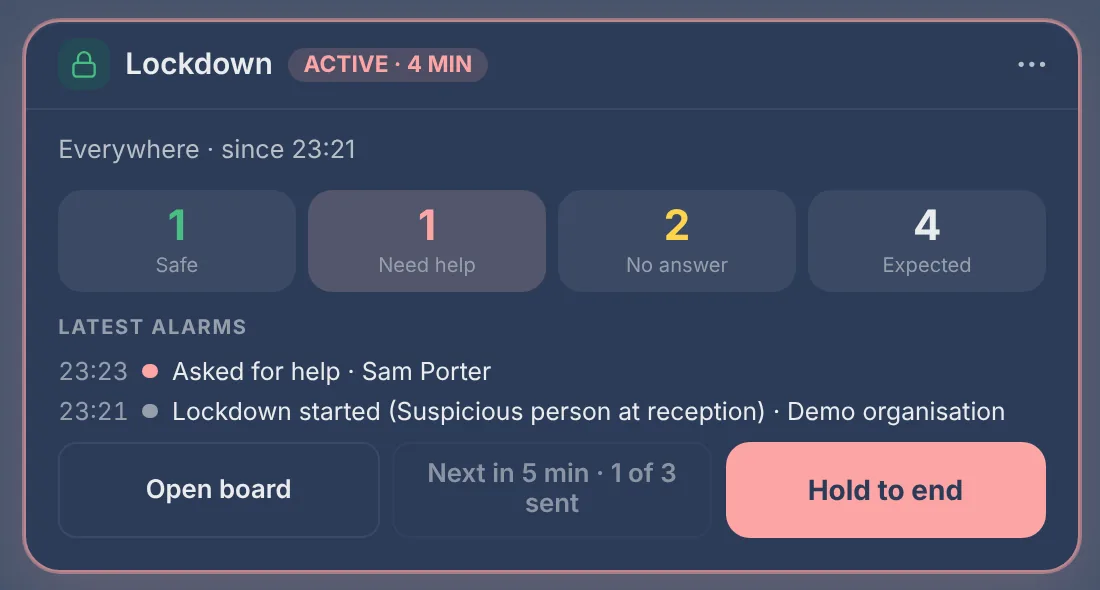
In Setup you choose who is alerted and how, the message staff see, TV takeover, panic buttons, lockdown codes, planned drills and the key for other alarm systems. A dashboard card keeps it one press away.
- Drills are marked DRILL everywhere and can lock the doors or only send the alerts.
- Lockdown codes are shown once, then only their last two digits, and are never billed.
- Lockdown stays off until your organisation switches it on.
Built to work when it matters
A lockdown is checked on every door open, so nothing slips through while the building is locked.
Every way in is refused
App, passkey, keypad PIN, card or tag, QR code, plates, remote opens, visitor passes and automations are refused, and opening schedules are paused, then resumed exactly as they were.
Open once for responders
A named responder can open one door for 3 to 60 seconds, for example to let the police in. Each one is recorded with the reason.
Roll call
Safe, Need help, No answer and Expected: expected means door users who came in today, visitors on site and the people of the locked doors' groups.
Help alarms and alerts
Push and email alerts through the Notice Board, never SMS. "I need help" alarms reach responders until someone marks them Handled.
TV takeover and page messages
TV screens switch to a full-screen lockdown message; the door page and visitor intercom page say the building is in lockdown.
Drills, reminders and a PDF report
Planned drills, reminders while it stays on, and a PDF for each lockdown and drill: timeline, doors, alerts, help requests, overrides, roll call and the end.
Good to know
What lockdown mode does not do
- It covers doors on FireBird controllers connected to the cloud.
- FireBird units in stand-alone mode or offline, and Ontico (Easyset) keypads, are not locked by it. The lockdown board lists them so you know which doors to check by hand.
- Lockdown mode doesn't touch exit buttons or fire release (they're wired on the door), so the way out stays as your installer set it up. Fire evacuation stays with your fire alarm.
- Alerts go by push and email, never SMS, and there is no direct link to the police.
- A lockdown code starts a lockdown; it never opens a door. Lockdown codes work once the updated door controller service is live for your doors.
Martyn's Law
Getting ready for Martyn's Law?
The Terrorism (Protection of Premises) Act 2025 will ask many premises in the UK to have public protection procedures for evacuation, invacuation, lockdown and communication.
Lockdown mode helps you put the lockdown and communication procedures into practice and keep a record of drills. Your organisation stays responsible for its own procedures.
Who it's for
For buildings that need a lockdown plan that works
Martyn's Law will ask many venues and public buildings to have procedures for lockdown and for telling people. Lockdown mode gives your procedure a button, a roll call, drills and a record.
Schools and colleges
Practise lockdown drills each term, see who has answered and keep a report of each drill.
Offices
Lock the front doors, keep staff informed and know who is safe, including visitors signed in today.
Venues
Lock the public entrances in seconds, tell staff at once and put the message on every screen.
Public buildings
Councils, libraries and public offices: one press for the building, a clear record afterwards.
Problems it solves
- Locking every door means running round the building.
- Staff hear about it late, or not at all.
- Nobody knows who is safe and who needs help.
- A code or a schedule can still open a door during a lockdown.
- Drills happen, but there is no record of them.
- The procedure lives on paper that nobody has read.
Works with
What lockdown mode covers
Lockdown mode works with FireBird door controllers connected to the cloud.
FireBird doors
Doors and gates on FireBird controllers connected to the cloud.
Keypads and readers
Codes, tags and QR codes at FireBird keypads and readers.
The app and door page
Unlocking from the TheBuilding.Cloud app, the door page and door keys.
Automations and schedules
Opening rules and door schedules pause and come back afterwards.
TV screens
Building plans shown on TV screens switch to the lockdown message.
Not covered
Ontico (Easyset) keypads, FireBird units in stand-alone mode and units that are offline. Exit buttons and fire release stay as they are.
Everyday examples
Someone dangerous outside
Reception holds the button. The front doors stop opening and staff see the alert and the safe/help buttons.
No computer to hand
A member of staff types the lockdown code at the nearest keypad. The building locks; the door stays shut.
The police arrive
A responder opens the main door once for ten seconds with the reason "police entry", and it is in the report.
The termly drill
A drill starts at the planned time with DRILL on every message, and the report goes in your records.
Why TheBuilding.Cloud
Why use lockdown mode
Seconds, not minutes
One hold locks every chosen door at once.
Nothing slips through
Every way of opening a door is checked against the lockdown.
Everyone told
App, email, the dashboard banner and TV screens at the same time.
Know who is safe
I'm safe and I need help answers, with who is on site.
Practise it
Planned drills, marked DRILL, with a report.
A record
A PDF report of each lockdown and drill; the history lists the last 365 days.
Questions about lockdown mode
Does this meet our Martyn's Law duties for us?
Can people still get out?
Who can start a lockdown?
Does it end by itself?
Is it on for everyone?
Which doors does it cover?
Does it send text messages?
Guides and next steps
Martyn's Law explained
What the law asks of your building and how lockdown mode helps.
Lock down your building
Step-by-step guide to lockdown mode.
FireBird controllers
The door controllers lockdown mode works with.
Notice Board
How alerts reach staff.
Automation
Start or end a lockdown from a rule.
Fire and intruder alarms
Panels and alarms online.
Plans and pricing
See what each plan includes.
Lockdown that works with the rest of your building
The same doors, people, screens and alerts you already run, ready for the day you need them.
On the dashboard
A Lockdown page and a banner on every page
On the doors
Every way of opening refused
For staff
Alerts, safe/help answers and drills
Lockdown mode
Be ready to lock down in seconds
Switch lockdown mode on, add your panic buttons and codes, and plan your first drill.