Video Intercom
A video intercom that rings your residents' phones
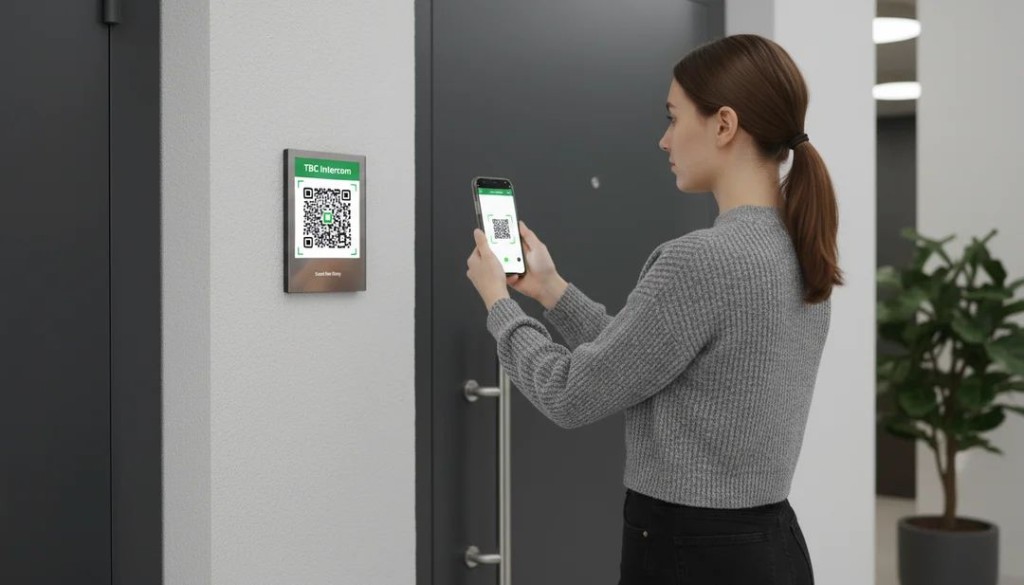
Visitors scan the QR code at the entrance and choose who they want. The right people see them on video, talk to them and open the door from wherever they are.
No handsets to wire into every flat and no panel to replace when it breaks. Calls arrive in the TheBuilding.Cloud app and the web dashboard, and door panel calls answered in the app or dashboard, and missed calls, are kept in the call history (calls that ring on the phone call screen aren't listed yet).
Calls arrive in
App · Dashboard
Open the door
During the call
Scan the QR at the entrance, answer and open from your phone
- QR code at the entrance, no visitor app
- 1
- places to answer: the app and the web dashboard
- 2
- steps from QR scan to open door
- 4
- door panel call outcomes kept: answered, missed, declined
- 3
How it works
From QR scan to open door
A simple flow that visitors understand without instructions.
-
1
Visitor scans
Scans the QR code at the entrance and picks a resident or a group
-
2
Phones ring
The TheBuilding.Cloud app and the web dashboard ring for the people chosen
-
3
See and talk
The resident sees the visitor on video and they talk
-
4
Open the door
One tap opens the door and the visitor hears "door open"
One call, three points of view
Simple at the door, simple on the phone
Pick who you are to see what the video intercom looks like for you.
Scan, pick a name, talk
Visitors scan the QR code at the entrance with their phone camera. The call page opens in the browser, so there is nothing to install.
- Pick a person or a group.
- Ringing, busy or unanswered is always shown.
- A spoken "door open" when they can go in.
Answer the door from anywhere
Residents answer in the TheBuilding.Cloud app on iPhone and Android: they see the visitor, talk to them and open the door during the call.
- Calls ring on the phone they already own.
- They see the visitor; the visitor doesn't see them.
- One tap opens the door.
A call list that keeps itself up to date
The call list comes from your entrance groups, so a new resident is on it as soon as they are approved. Door panel calls answered in the app or dashboard, and missed calls, are kept in the call history; calls that ring on the phone call screen aren't listed yet.
- Only approved members of a group with the door ring.
- Answered, missed and declined door panel calls in one history (calls that ring on the phone call screen aren't listed yet).
- Export the history when you need a record.
An intercom built around the phone
From one front door to a portfolio of blocks: the visitor calls, the right people answer, the door opens and the call is recorded.
Answer on your phone
Residents answer in the TheBuilding.Cloud app on iPhone and Android: they see the visitor and talk to them. Staff can also answer in the web dashboard.
Open the door mid-call
Open the door during the call. It uses the same door rules as your access control, so only people who may open that door can.
The right people ring
Visitors pick a person or a group (first to answer takes the call). Only approved members of an entrance group with that door are listed.
Call history
See door panel calls as answered, missed or declined, with a count of missed calls and an export when you need a record. Calls that ring on the phone call screen aren't listed yet.
Clear feedback for visitors
Visitors always know what is happening: ringing, busy, can't come to the door, and a spoken "door open" when they can go in.
Part of the platform
Uses the same people, doors and entrance groups as access control and visitor management, so there is nothing to keep in step.
In the product
Real screens from the dashboard
Taken from our demo organisation on 7 November 2026. Names are blurred.
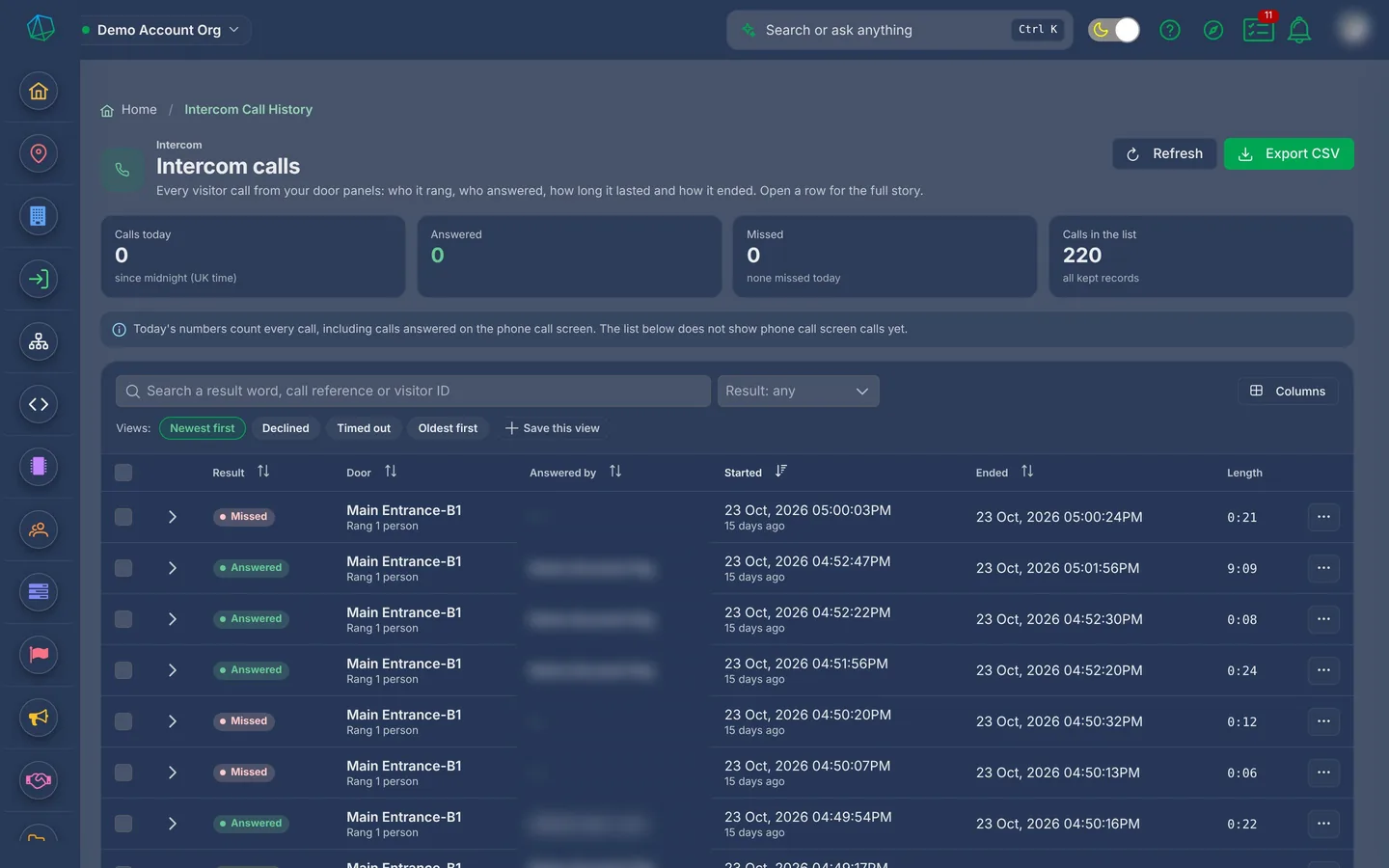
Door panel calls, answered or missed
See which door rang, who answered, how long the call lasted and how it ended, and export the list as CSV.
Who it's for
For buildings where visitors, deliveries and residents meet at the door
A cloud video intercom replaces wired handsets with the phones residents already own, so nobody misses a visitor just because they are not at home.
Blocks of flats
Residents answer the front door from anywhere, and new residents are added to the call list in the dashboard.
Offices and reception desks
Visitors ring a person or a team, and the first to answer lets them in.
Student housing
Students take their own deliveries and visitors without a staffed desk all day.
Gated sites and yards
Drivers call the site office from the gate, and staff open it from their phone.
Problems it solves
- Wired handsets in every flat that are costly to fit and repair.
- Missed deliveries because nobody was home to press the button.
- Panels that need a new list of names every time someone moves.
- Visitors who don't know whether anyone heard them.
- No record of who called and whether the door was opened.
- Old intercoms that can't reach residents who are away.
Works with
Works with your doors and your people
The intercom uses the same people, doors and entrance groups as the rest of TheBuilding.Cloud, so the call list keeps itself up to date.
FireBird and Ontico controllers
Open the door during a call through the controller already on that door.
The TheBuilding.Cloud app
Residents answer on iPhone and Android, see the visitor and open the door.
The web dashboard
Staff and managers can take calls in the dashboard on a computer.
Entrance groups
Only approved members of a group that includes the door are rung.
Building call lists
On sites with several buildings, visitors first pick the building, then the person.
Ontico intercom numbers
Ontico GSM units can also ring phone numbers set up for each apartment.
How buildings use it
A parcel at the front door
A courier scans the QR, picks Flat 12 and the resident answers at work, sees the driver and opens the door so the parcel can go in the lobby.
Reception without a receptionist
A visitor picks "Reception team". Everyone in the group rings and whoever answers first opens the door.
A student block at night
A student's friend calls from the entrance. The student sees who it is on video before opening the door.
A delivery at the gate
A driver calls the yard office from the gate. The manager on site answers on their phone and opens the gate.
Why TheBuilding.Cloud
Why TheBuilding.Cloud for your intercom
No wiring to flats
Calls go to residents' phones, so there are no handsets to install or repair.
Nothing to install for visitors
The visitor page opens in the phone's browser from the QR code.
Only the right people ring
The call list comes from your access rules, so nobody is rung who can't open the door.
Clear for visitors
They see when the call is ringing, busy or unanswered, and hear "door open".
A record of door panel calls
Answered, missed and declined door panel calls in one history you can export (calls that ring on the phone call screen aren't listed yet).
Fits your access control
Doors, people and groups are the same ones you already manage.
Questions about the video intercom
Does the visitor need an app?
How do residents answer?
Can the visitor see the resident?
Who appears on the call list?
What if nobody answers?
Do I need a hardware intercom panel?
Guides and next steps
Answer intercom calls
The resident's guide to the app.
Print door QR codes
Put the intercom QR at each entrance.
Entrance groups
Decide who is on each door's call list.
Passkey door access
Residents open the door without a call.
Cloud access control
Doors, codes and controllers.
Plans and pricing
Compare intercom homes on each plan.
Works with the rest of your stack
The intercom shares its doors, people and groups with the rest of TheBuilding.Cloud, so the person who answers a call is the same person who opens the door with a passkey.
Same doors
Calls open the door through its own controller
Same people
The call list comes from your entrance groups
Same rules
Only people who may open the door can
No wiring to flats
Bring cloud video intercom to your buildings
Give visitors a simple way to call and give residents an intercom they already carry in their pocket.