
On this page
Key takeaways
- Choose whether you need phone-local verification or entrance-camera facial recognition; they are different architectures with different privacy implications.
- Check the complete route from phone verification to door release, including permissions, controller compatibility and behaviour during an outage.
- Offer a usable non-biometric alternative and establish who controls biometric processing before deciding which privacy obligations apply.
- Test enrolment, access removal, failed verification and lost-phone recovery on one entrance before expanding.
You want residents or staff to open a door with your phone-based access system, but “Face ID entry” can describe very different installations. A compatible system lets someone open a door with their phone by using Face ID to authorise a digital credential, then checking permission before releasing the lock. It does not necessarily need a camera at the entrance, and Face ID alone cannot operate an ordinary electric lock.
The first procurement question is simple: where does the face comparison happen, and what does the door system actually receive?
How to open a door with your phone using Face ID
Face ID is Apple's device authentication method, not a universal building-access protocol. Other supported phones may offer fingerprint verification, face verification or a phone passcode. The available method depends on the device and the access service.
In a phone-local design, the device verifies its user and authorises a credential operation. The access system then checks whether that credential has permission for the entrance. It is not the same as sending a photograph to a building camera for recognition.
An entrance-camera system follows a different route: it captures a face at the building and compares it with enrolled biometric information. That brings separate questions about enrolment, bystanders, storage and deletion.
NIST's digital-authentication guidance distinguishes biometric activation from the authenticator it activates and prefers local biometric verification. It expressly excludes physical access, so use it to understand the architecture, not as proof of building compliance.
| Point | Phone-local verification | Entrance-camera recognition |
|---|---|---|
| Capture point | The person's phone | A camera at the building |
| What is checked | Device verification, then access permission | Captured face against enrolled biometric information |
| Procurement focus | Credential flow and device support | Capture scope, enrolment and biometric records |
What the resident actually does
For a QR-and-passkey approach, the QR code takes the person to the door's access page. Scanning it is not, by itself, permission to enter.
TheBuilding.Cloud's passkey door unlock lets users set up a door key on their own phone using face, fingerprint or phone-passcode verification. Door key invitations arrive by email, not SMS.
A typical journey is:
- Receive the invitation. The person opens the “Set up your door key” email on their phone.
- Set up the key. They follow the setup process using their device's supported verification method.
- Go to the entrance. They scan the door's QR code and open its access page.
- Request entry. They tap to open and complete the requested phone verification.
- Pass the permission check. The system checks access before unlocking the door.
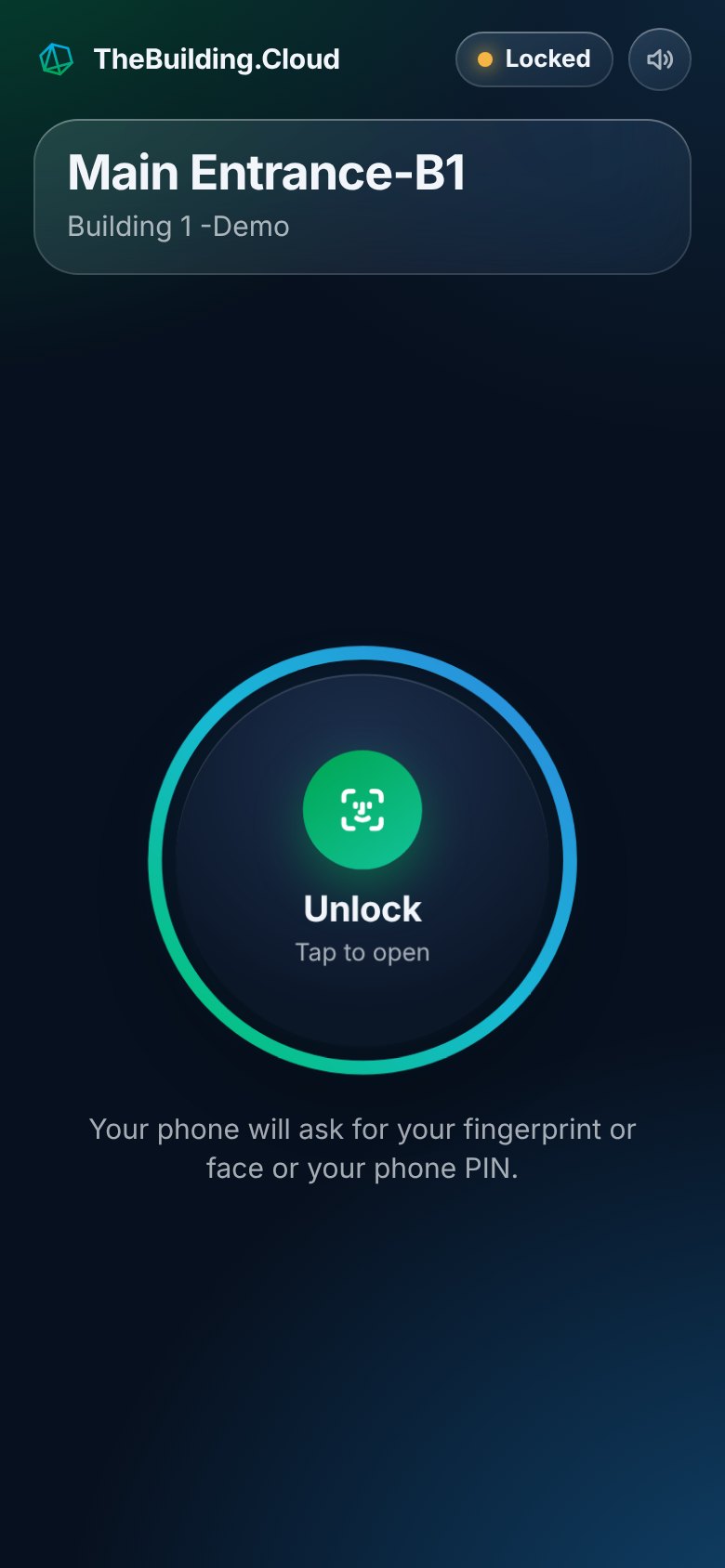
Do not promise that everyone will see a Face ID prompt. Test the actual devices your occupants use, including devices configured with a phone passcode rather than biometrics. Confirm whether fresh verification is requested for each opening; do not assume an already-unlocked phone is sufficient.

Check the lock, controller and connection
A phone credential does not fix a sticking latch, an unsuitable lock or a door closer that cannot pull the leaf shut. Start with the physical entrance, then work back through the controller and connection.
| Part of the installation | What to establish before ordering |
|---|---|
| Door and lock | The door closes and latches reliably, and the release hardware suits its use |
| Controller | The proposed access service can operate the controller and its lock output |
| Existing readers | The reader technology and credential format are supported if you intend to retain them |
| Connection | The entrance has the connectivity the chosen opening method requires |
| Power and outages | The installer documents lock behaviour, backup power and recovery |
| Exit arrangements | People can leave as required by applicable local fire and building rules |
Do not interpret “works with existing access control” as compatibility with every reader, lock or wiring arrangement. Get a written equipment schedule and identify what stays, what changes and who tests the result.
ExampleIn a hypothetical apartment block in Berlin, the main entrance already has an electric release. The installer still needs to check the controller interface, door condition and exit arrangements before proposing phone access. A working release button does not prove the whole installation is ready.
Separate identity checks from door permissions
Successful phone verification answers one question: has the device accepted this user? It does not answer whether that person should enter the plant room, garage or neighbouring building.
Use separate entrance groups for genuinely different access needs. Give a resident the shared entrance they need, rather than every door in the development. Give maintenance staff only the relevant service entrances.
TheBuilding.Cloud's access control manages entrance groups and credentials. When someone is switched off, removed from a door group or deleted, their PINs, cards and QR codes are automatically removed from door readers. Include every issued credential in your offboarding test, not just the phone key.
Ask suppliers to demonstrate these failure cases:
- A recognised user has no permission for the selected entrance.
- Someone photographs the public door QR code.
- A former occupant tries every credential previously issued to them.
- A phone is lost and the user needs access through an alternative route.
- RequestSelect the entrance and request entry
- VerifyComplete the requested phone verification
- AuthoriseCheck permission for this entrance
- ReleaseOperate the authorised door release
If a proposal includes facial-recognition hardware, examine the evidence behind anti-spoofing claims. ISO/IEC 30107-3 covers presentation-attack detection testing and reporting. It does not establish the security of the complete installation. Ask which equipment, configuration and attack types the report covers.
Check privacy responsibilities in each jurisdiction
Keeping a face comparison on a phone changes the data flow. It does not automatically settle who is responsible for the processing or remove every privacy obligation. Map who determines enrolment, purposes, configuration and deletion, and what each party receives.
For a building-camera proposal, also establish whether the camera creates templates from everyone passing the entrance. “We only recognise residents” does not explain what happens to visitors and bystanders.
EU and UK
Under EU GDPR, special-category biometric processing requires both an Article 6 lawful basis and an Article 9 exception. The EDPB's video-device guidance explains that consent-based facial entry should have an alternative, such as a badge or key, without additional cost or restraints.
In the UK, ICO guidance says organisations must complete a DPIA before using a biometric-recognition system. It also explains that local storage alone does not determine controller responsibility. The guidance is under review following the Data (Use and Access) Act, so check its current position before procurement.
United States and Australia
US requirements vary by state. Illinois BIPA, for example, covers scans of face geometry and requires covered private entities to provide specified written information and obtain a written release before collecting or obtaining covered biometric data. It also requires a public retention and destruction policy.
For APP-regulated entities in Australia, OAIC guidance says consent-based collection of sensitive biometric information must also be reasonably necessary. Convenience alone does not establish necessity, and a sign is generally not sufficient consent.
NoteThese requirements do not automatically apply identically to every phone-passkey deployment. Have your privacy adviser assess the actual data flow and responsibilities, rather than classifying the system by its sales label.
Make failed verification an ordinary support task
A resident with a flat phone battery still needs a practical way home. A member of staff who cannot use face verification needs a suitable alternative, not an instruction to try harder.
Plan separately for verification failure, missing connectivity and a lost device. A phone passcode may address the first problem, but it cannot charge a battery or repair a failed connection.
TheBuilding.Cloud's video intercom allows visitors to call residents, who can answer on mobile or web and unlock remotely. It can support an assisted-entry process, but do not treat it as an independent outage fallback without checking its own power and connection requirements.
ExampleFor a hypothetical office in Melbourne, the manager might retain staff cards alongside phone keys and define an attended process for lost devices. The pilot should test both routes at the actual staff entrance, including outside reception hours.
| Situation | Check | Do not assume |
|---|---|---|
| Face verification fails | Supported alternative verification | Automatic passcode availability |
| Battery is flat | Non-phone entry route | Phone remains usable |
| Connection fails | Documented outage behaviour | Offline opening works |
| Phone is lost | Recovery and access removal | Recovery is immediate |
Where to start
Choose one entrance and a pilot group representing the phones and access needs in your building. Record successful entry, failed attempts, support requests and access-removal results.
Before expanding, get written answers on hardware compatibility, fresh verification, outages, alternative access and privacy responsibilities. Compare installation and support costs separately from platform subscription plans.
The useful outcome is not a Face ID demonstration. It is an entrance that admits authorised people, rejects unauthorised requests and gives occupants a workable alternative when their phone cannot help.
Frequently asked questions
Can I open a building door with Face ID on my iPhone?
Does phone-based door access send my face to the building?
Can Android users use the same phone door access system?
What happens if my phone battery dies or Face ID fails?
Is Face ID door access the same as facial-recognition entry?
Sources
How we write
Our articles answer the questions people ask about running buildings. Each one is checked against our product documentation and reviewed by our team before it is published. Spotted something out of date? Tell us and we will fix it.


