For developers and AI
API, webhooks and AI assistants for the systems you already use
Read access logs into your reports, add people from your HR or booking system, open a door from your own app, or simply ask an AI assistant "who opened the car park gate this morning?". TheBuilding.Cloud has a documented API, webhooks and an MCP server for AI assistants.
Everything works with the same permissions as the dashboard: a key or an assistant can do exactly what the person who connected it can do, and nothing more.
Docs
Guides, reference, Postman
AI
MCP server
Your tools, your assistant, your buildings
- requests a minute per signed-in account
- 300
- steps from the quickstart to your first call
- 4
- downloads: the OpenAPI file and a Postman collection
- 2
- MCP server for Claude, ChatGPT and coding tools
- 1
How it works
From idea to integration in four steps
The developer site has a quickstart that takes you from a key to opening a test door.
-
1
Read the quickstart
Start on the developer site with the quickstart and the guides.
-
2
Create an API key
Make a key for your integration in the dashboard; it acts as the account that made it.
-
3
Make your first call
Use the reference or the Postman collection to read doors, people and logs.
-
4
Or connect an assistant
Add our MCP server to Claude, ChatGPT or your coding tool and sign in.
How will you connect?
Your systems, your way
Pick how you want to work with your buildings.
A documented API
Read doors, people and logs, add people and open doors from your own systems.
- Interactive reference for every operation.
- Guides for opening a door and reading the log.
- Clear limits, with headers that show what is left.
Ask your buildings in plain English
Add our MCP server to Claude, ChatGPT or your coding tool and sign in.
- Answers from your own data.
- Asks before changing anything.
- Works with the account you sign in with.
Let us call you
A monthly usage webhook per building, and automation rules that call your system when events happen.
- Monthly usage per building.
- Automation rules can call your URL.
- Pair them with the API for the details.
Everything a developer expects
A public developer site with plain-English guides, a full reference and ready-made files for your tools.
API reference
Every operation documented with a summary and a description, in an interactive reference.
Guides and quickstart
Guides for authentication, opening a door, reading the access log, lists and limits, and errors.
OpenAPI and Postman
Download the OpenAPI file and a Postman collection with environments, built from the same source.
AI assistants (MCP)
Our MCP server lets assistants work with your buildings in plain English, and asks before changing anything.
Webhooks
Receive a monthly usage webhook per building, and let automation rules call your system when events happen.
Fair, clear limits
300 requests a minute per signed-in account, with headers that show what is left.
In the product
Real screens from the dashboard
Taken from our demo organisation on 7 November 2026. Key names and key details are blurred.
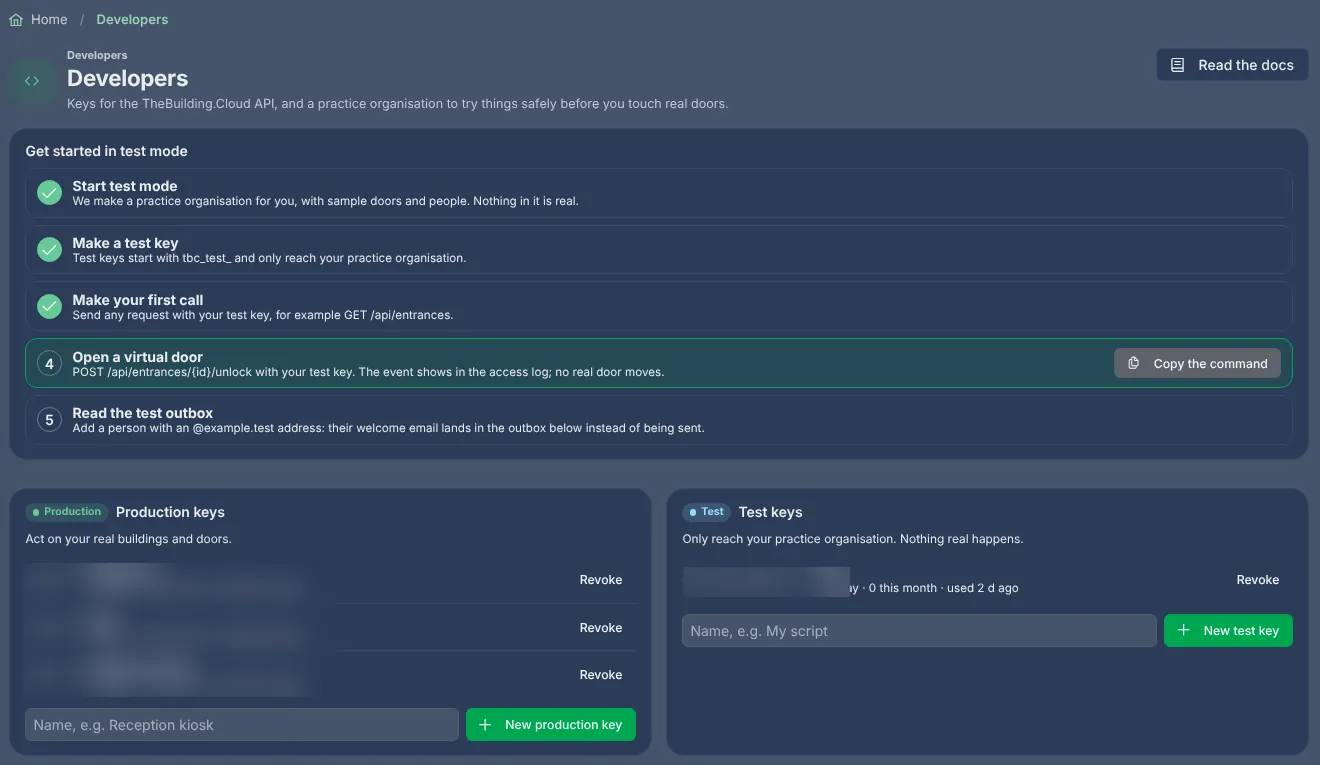
Keys and a safe place to practise
Make production and test keys, and follow five steps in test mode with a practice organisation where no real door moves.
Who it's for
For teams who want buildings in their own tools
Use the API when your building data should flow into other systems, and the MCP server when people want to ask in plain English.
Developers and integrators
Connect bookings, HR, billing or your own apps to doors and people.
Property and facilities teams
Ask an AI assistant about access and doors without learning reports.
Operations and finance
Pull access logs and monthly usage into the tools you already report from.
Installers and partners
Automate setup and checks across many customers' sites.
Problems it solves
- Building data is stuck in one dashboard.
- People are added twice: once in HR, once in access control.
- Reports on who opened what are built by hand.
- Undocumented integrations break without warning.
- Staff want answers, not another screen to learn.
- Giving a tool access means giving it more access than it needs.
Works with
Works with your tools
Standard formats and standard protocols, so your tools can talk to your buildings.
Claude
Add the MCP server as a custom connector in Claude on the web, desktop or Claude Code.
ChatGPT
Add the MCP server in ChatGPT's developer mode connectors.
Coding tools
Cursor, VS Code with GitHub Copilot, Windsurf and command-line assistants can use the MCP server too.
Postman
Import the ready-made collection and environments.
Any HTTP client
API keys are sent as a standard bearer token.
Automation rules
A rule can call your webhook with the details of an event.
Everyday examples
Ask, don't search
A facilities manager asks their assistant who opened the car park gate this morning and gets the answer from the access log.
New starter
An HR system adds a new member of staff to the right entrance group on their first day.
Usage into billing
A monthly webhook sends each building's usage to the finance system after the subscription payment.
An alarm to your system
An automation rule calls your service desk's webhook when a fire panel reports a fault.
Why TheBuilding.Cloud
Why build on TheBuilding.Cloud
Same permissions
Keys and assistants act as the account that connected them, no more.
Documented
Public guides and a full reference, kept in step with the platform.
Stable
Existing fields, operations and answers are never renamed or removed.
Safe by default
The reference never sends your dashboard session, and assistants ask before changes.
Plain English
Guides written for people, with examples you can copy.
AI-ready
An MCP server and llms.txt files, so assistants understand the platform.
Questions about the API and AI assistants
Where is the documentation?
How do I authenticate?
What can an AI assistant do?
Which webhooks are there?
Are there rate limits?
Can you help us connect a specific system?
Will my integration break when you release?
Guides and next steps
Your buildings, wherever you work
The API and the MCP server use the same people, doors and permissions as the dashboard and the app.
Same permissions
Nothing a key can do that its account can't
Same data
Doors, people, groups and logs
Same automation
Rules can call out to your systems
API and AI assistants
Connect your buildings to everything else
Use the API, webhooks and our MCP server to bring doors, people and logs into your own tools and assistants.