Student housing (PBSA)
Student housing access that survives the first week of term
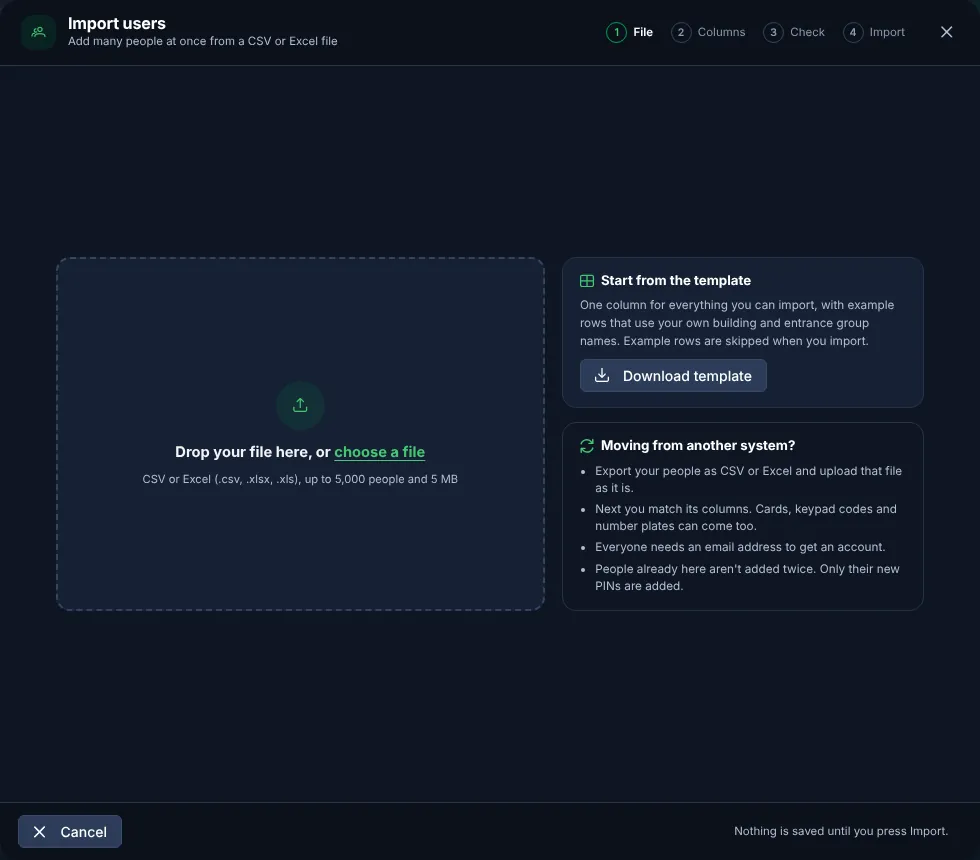
Hundreds of students arrive in the same weekend, swap rooms in week two and leave in June. TheBuilding.Cloud imports them in four checked steps, gives each one a door key on their phone and keeps the laundry, study rooms and bike store to the people who live there.
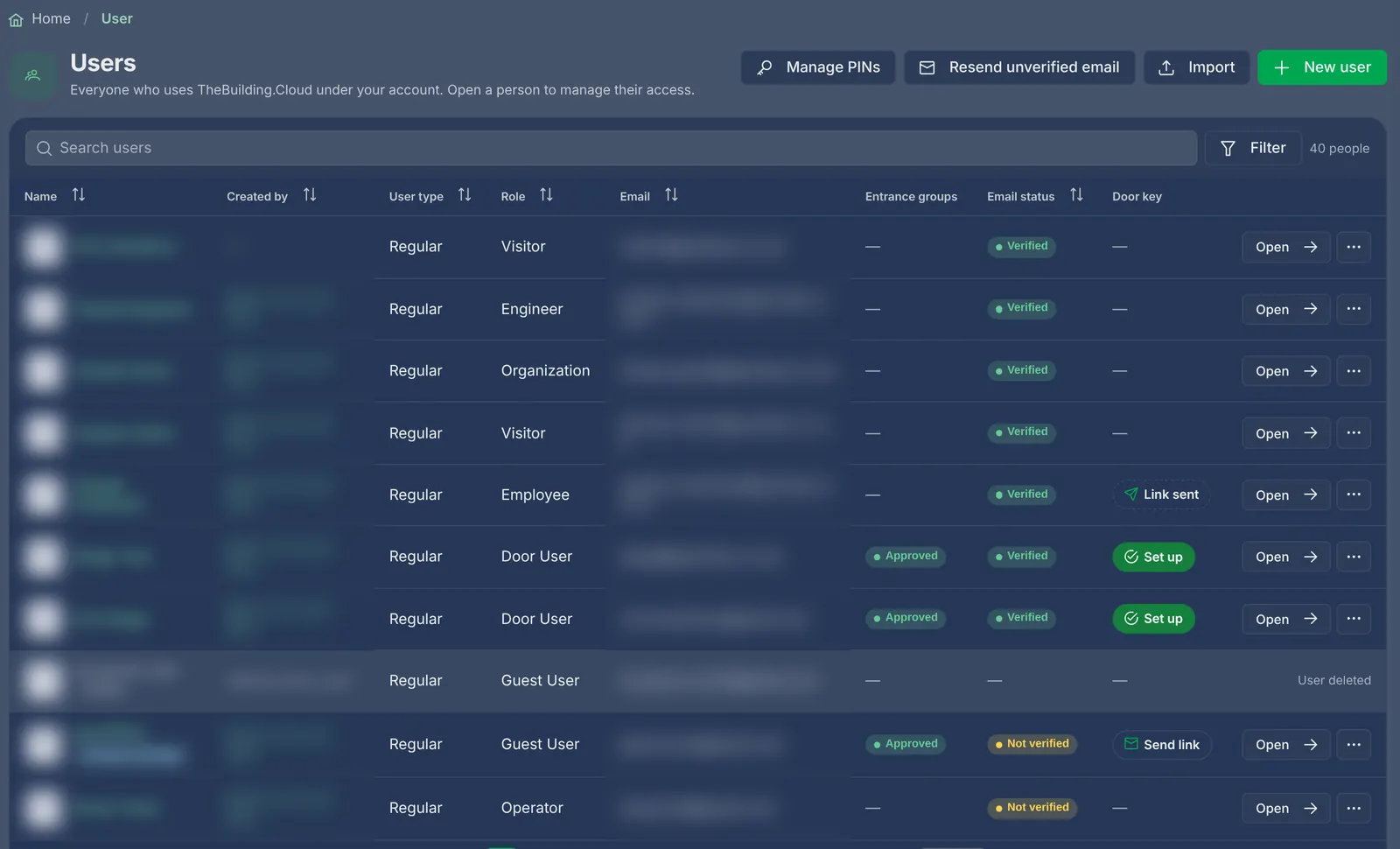
Your team watches every block from one dashboard, answers the door from the app and takes a student off every door with one change. Students report repairs with photos instead of queueing at reception.
Arrivals
Imported in four checked steps
Move-outs
Off every door at once
Arrivals weekend, without the queue
- checked steps to import a whole intake
- 4
- people in one import file
- 5000
- longest guest access, then it ends by itself
- 30 days
- default distance for location-checked opens
- 100 m
How it works
An academic year in four steps
From the first arrivals weekend to the last check-out, without a box of fobs.
-
1
Import the intake
Drop in a spreadsheet of students and their rooms, check what will happen, then import.
-
2
Arrive with a door key
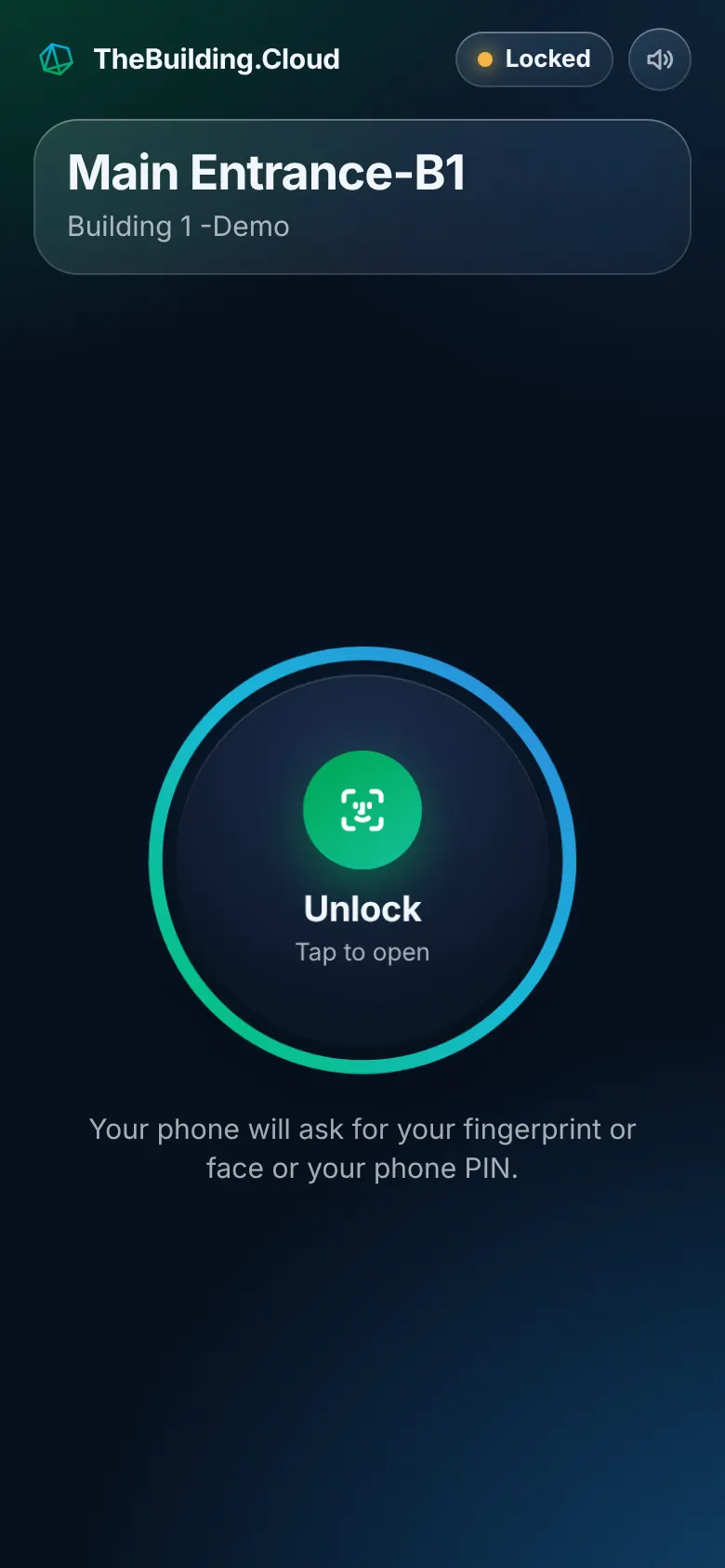
Each student sets up a door key from one email and opens their block, floor and room.
-
3
Room swaps in week two
Move a student to another entrance group and their access follows on every door.
-
4
Summer move-out
Switch the leavers off and their door keys, codes and guests stop working at once.
How TheBuilding.Cloud helps student accommodation
Built for buildings where hundreds of access changes land in the same week.
Switch Systems
Import students, PIN codes and card numbers from a CSV or Excel file, checked before anything is created.
See Switch SystemsPasskey Door Unlock
Students open doors with their own phone. Lost phone? Switch them off and their access stops everywhere.
See Passkey Door UnlockGuest Access
Students add a visiting friend or parent for up to 30 days, and it ends by itself.
See Guest AccessIssue Reporting
Repairs with photos, the room and access details, in one conversation until they are fixed.
See Issue ReportingNotice Board
Fire alarm tests, room inspections and welcome news to one block or every building.
See Notice BoardLockdown Mode
Lock the FireBird doors of one block or every building in seconds, and see who is safe.
See Lockdown ModeLockdown and Martyn's Law
Lockdown for halls and blocks
Higher education premises are among the uses Martyn's Law (Terrorism (Protection of Premises) Act 2025) lists. Whether student accommodation is covered depends on how it is used, who runs it and how many people can be there; check the Home Office guidance or take advice. Whatever the law asks of you, lockdown mode gives you a fast, practised way to secure a block and reach every student.
Start it in seconds
Press and hold on the dashboard or the Lockdown page, or start it from a panic button, a lockdown code at a FireBird keypad, another alarm system or an automation.
Every way in refused
Codes, cards, phones, plates, visitor passes and remote opens are refused on the FireBird doors you chose. It doesn't touch exit buttons or fire release, which are wired on the door.
Everyone told at once
Push and email alerts through the Notice Board (never SMS), a red banner for everyone signed in, and TV screens that switch to a lockdown message.
Know who is safe
Roll call with Safe, Need help, No answer and Expected, drills that follow the same steps, and a PDF report for your records.
Lockdown works on FireBird doors connected to the cloud; the board shows any door it can't reach. It helps you put your lockdown and communication procedures into practice; you stay responsible for your own procedures. This is general information, not legal advice.
In the product
What your accommodation team sees
Real screens from the dashboard and app, taken from our demo organisation. Personal details are blurred or made up.
Who it's for
Built for student accommodation teams
Private providers, university halls and the operators who run them.
Accommodation providers
Every block and every intake in one dashboard.
Residence teams
Arrivals, room swaps and move-outs without a box of fobs.
Maintenance teams
Repairs with photos, the room and access details.
Students
A door key on their phone, guests they can invite and repairs they can report.
The problem
- Arrivals weekend means queues for fobs at reception.
- Room swaps in the first weeks mean reprogramming fobs by hand.
- Lost fobs are a cost and a security risk.
- Friends follow students in because there's no simple guest pass.
- Repairs arrive in every channel at once.
- Leavers keep fobs that still open the doors.
Works with
Works with
TheBuilding.Cloud works with the doors, readers and phones you already have.
Your old system's export
Import people, PIN codes and card numbers from a CSV or Excel export, with presets for 29 systems.
Any modern phone
Phone door keys use passkeys: the phone's own fingerprint, face or screen lock. Nothing to install for a door key.
FireBird controllers
Our own controllers for doors, gates and barriers, with online status, signal and remote firmware updates.
Keypads, cards and fobs
PIN codes, cards, tags and fobs on FireBird doors and supported controllers, managed from the same profile.
The TheBuilding.Cloud app
iPhone and Android: answer door calls with video, open doors and get building news. Older app versions keep working.
TV screens
Visualiser screens show a live plan of the building, and switch to a full-screen message during a lockdown.
A typical week
Arrivals weekend
The new intake is imported on Thursday. Most arrive on Saturday with a door key already on their phone.
A room swap
A student moves from Block A to Block D. One change, and their doors follow.
A parent visits
A student adds their dad as a guest for the weekend, and his access ends on Monday.
A fire alarm test
Block C hears about Wednesday's test by app notification the day before.
Why TheBuilding.Cloud
Why student accommodation teams choose TheBuilding.Cloud
Built for volume
Import a whole intake in four checked steps.
No fob queue
Door keys arrive by email before students do.
Room swaps in seconds
Entrance groups move students between blocks.
Leavers off every door
One change ends a student's access everywhere.
Safer shared spaces
Laundry, study rooms and bike stores for residents only.
Practised lockdown
Drills and real lockdowns follow the same steps.
Questions from student accommodation providers
Can we import a whole intake at once?
Do students need an app?
Can we keep the cards students already use?
Can it link to our student records system?
Do you handle tenancies or rent?
What happens when a student loses their phone?
Does lockdown work on every door?
Guides and next steps
Set up your door key
How residents get a door key on their phone.
Entrance groups
Group doors and the people who use them.
Guest access
Add a guest and choose when it ends.
Report a problem
How residents raise repairs.
Lockdown
Set up and run a lockdown.
Plans and pricing
See what each plan includes.
Other homes and living sectors
Student accommodation shares a lot with co-living and build to rent.
Same platform
The same doors, people and app
Same rules
Students only open their own doors
Same record
Every open is logged
Student housing
Make arrivals weekend the easy part
Book a demo and see a term-start import, a room swap and a move-out in a few minutes.