
Live CCTV · RTSP
Cloud CCTV & RTSP live monitoring
Paste an RTSP URL. Watch live in the platform.
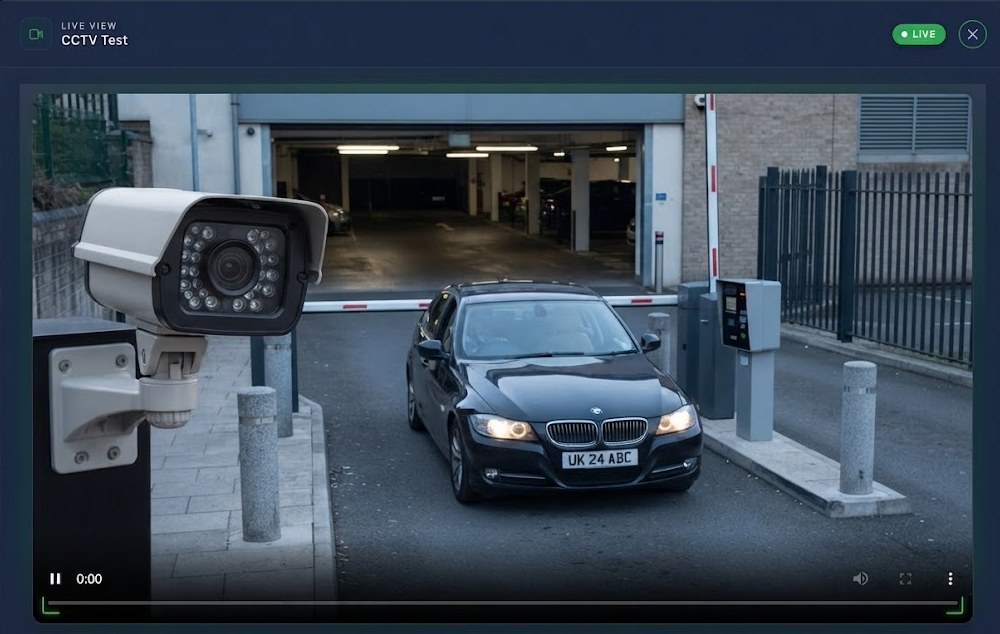
Connect cameras with an RTSP stream URL. Open Live View from CCTV Devices and see the feed in-browser—with device ID, building context, and a clear LIVE status.
No separate NVR app required for day-to-day monitoring. Operators stay inside TheBuildingCloud while streams play over your RTSP source.


Live View
Main entrance

rtsp://stream.example/entrance
Built for RTSP live monitoring
Add the stream URL once, then open Live View whenever operators need eyes on site.
RTSP URL on each device
Store the camera’s RTSP stream URL on the CCTV device record in the platform.
In-browser Live View
Play the live feed inside a Live View modal—pause, volume, and fullscreen controls included.
LIVE status at a glance
A clear LIVE badge shows the stream is active while you monitor the entrance or zone.
Device & building context
See device ID and building name under the player so operators know exactly which feed they are watching.
Role-based access
Only authorised staff can open live streams from CCTV Devices.
Same building OS
Keep cameras next to access, alarms, parking, and automation—not a separate silo.
Better together
Pairs with
Cameras plug straight into access control and automation. Every door event can open a camera, capture a snapshot, or alert your team by phone, email, or notification.
Fire & Intruder Alarms
Visual confirmation on alarm events
Learn moreAccess Control
See who entered after an unlock
Learn moreAutomation
Camera-aware if/then scenes
Learn moreVideo Intercom
Extra eyes at the entrance
Learn moreAutomation flow
CCTV on every access event
Access → Open camera → Snapshot
Access → Automation → Phone · Email · Notification
How it works
From URL to live picture
Add RTSP URL
Attach the stream address to a CCTV device.
Open Live View
Launch from CCTV Devices in the dashboard.
Watch the stream
Live picture plays with device & building details.
One platform · Every camera
Live cameras inside
your building OS
Connect RTSP cameras once and monitor them from the same place you manage doors, alarms, and parking.
-
Live View in the browser
No separate NVR app for everyday monitoring.
-
Right feed, right building
Device and building context under every stream.
-
Only the right people
Role-based access to CCTV Devices and Live View.
Stream
RTSP · In-browser