Every way in, one list
PIN codes, cards and QR codes for every door you run
Give each person the way in that suits them: a keypad code, a card or fob, a QR code, a gate remote, their number plate or a door key on their phone. You create it once on their profile and TheBuilding.Cloud sends it to every door they may open.
Each code follows the person's entrance groups and its own time limit. Remove a person from a group, switch them off or delete them, and their codes come off the doors' readers without anyone visiting the site.
Types
Code, card, QR, remote, plate and more
Time limits
When, and how many times
One person, several ways in, one switch to stop them all
- kinds: keypad, card, QR, remote, number plate, caller ID
- 6
- steps from profile to every door
- 4
- edit to a time limit updates every code using it
- 1
- visits to site to add or remove a code
- 0
How it works
From profile to door in four steps
A code is part of the person, not of a single door, so it reaches every door in their groups by itself.
-
1
Open the person
Find the resident, member of staff or guest in Users and open their PIN codes tab.
-
2
Choose the type
Pick a keypad code, card or fob, QR code, remote, number plate or caller ID, and type or generate the number.
-
3
Set a time limit
Leave it on Unlimited, or choose a time limit that decides when and how many times it works.
-
4
It reaches the doors
TheBuilding.Cloud sends the code to every door in the person's active entrance groups.
Which way in?
A way in, for everyone
Pick a credential.
Keypad codes
Type a code or let the dashboard make a random one. It works on every keypad door in the person's groups.
- Random or typed.
- Time limits for cleaners and contractors.
- Removed when access ends.
Cards, tags, fobs and remotes
Add the number printed on the card, or learn a remote for gates and barriers.
- FireBird readers accept it straight away.
- Remotes for gates and barriers.
- Caller ID for controllers that open on a call.
QR codes and number plates
A QR code to download or print, and number plates for car park cameras.
- Print-ready QR file.
- Keep it private like a key.
- Plates open the barrier for residents and staff.
All your credentials, without the spreadsheet
Codes, cards and remotes live with the person, so you always know who holds what, and stopping someone is one change.
Keypad codes
Type a code or let the dashboard make a random one. It works on every keypad door in the person's groups.
Cards, tags and fobs
Add the number printed on the card or fob. Readers on FireBird doors and supported controllers accept it straight away.
QR codes
A QR code is made for the person. Download it as a picture or a print-ready file, and keep it private like a key.
Number plates
Add a vehicle number plate so car park cameras can open the barrier for residents and staff.
Gate remotes and caller ID
Learn remote fob codes for gates and barriers, or add a phone number for controllers that open on a call.
PIN time limits
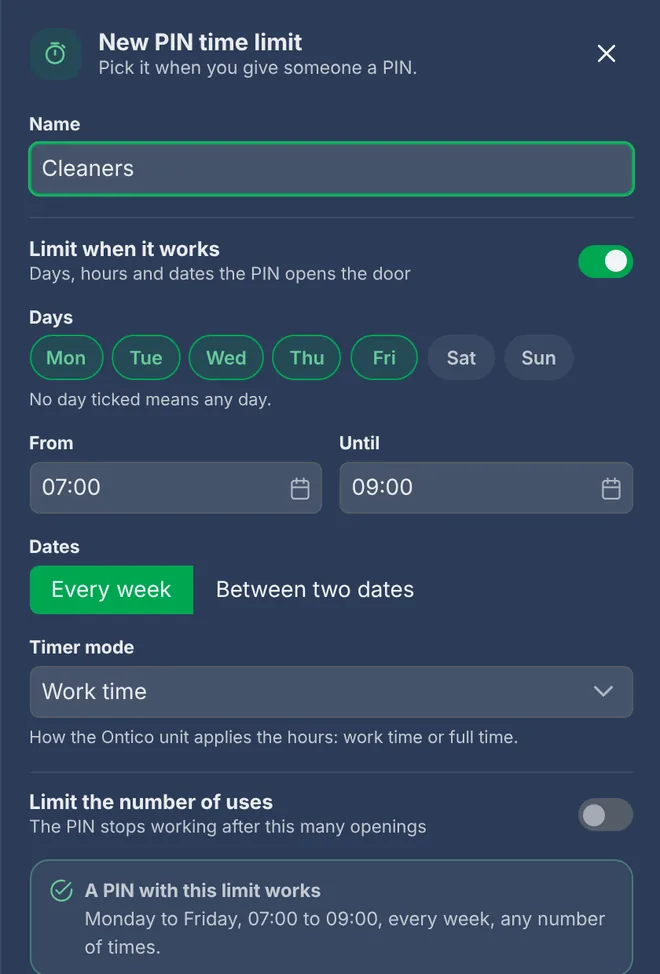
Limit when a code works and how many times, for cleaners, contractors and short stays. Edit a limit and every code using it is updated.
In the product
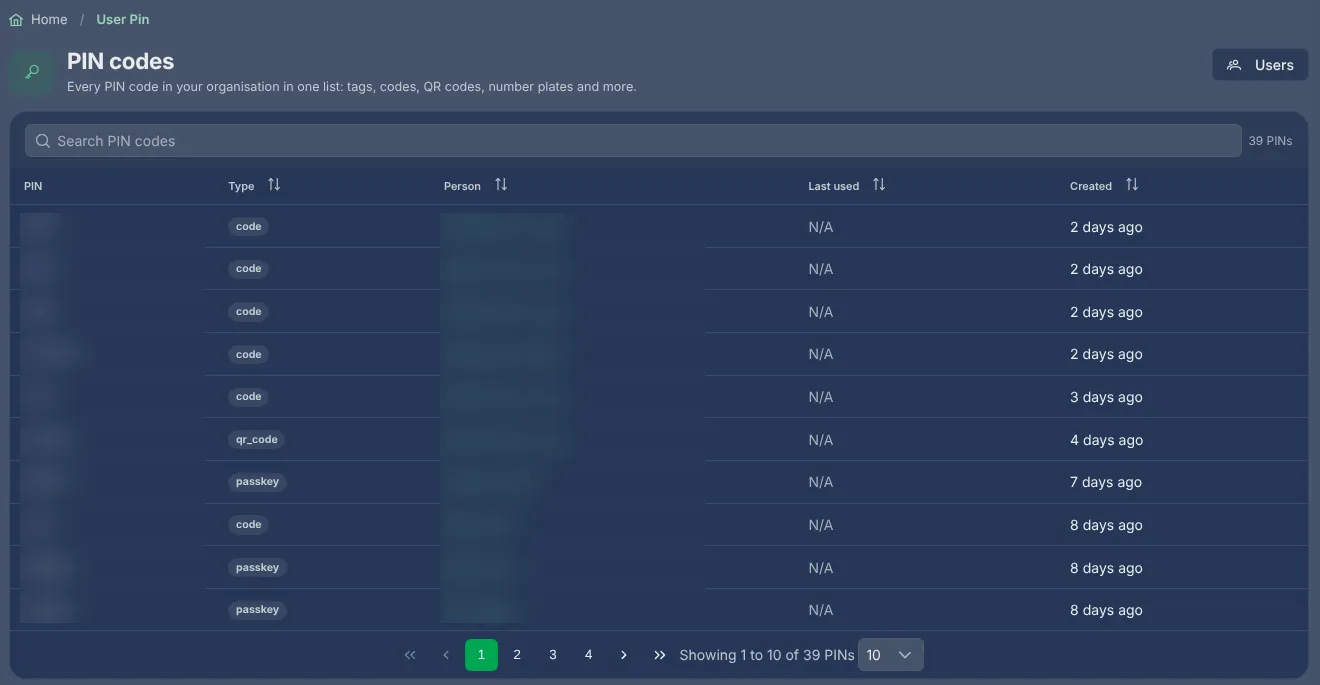
Real screens from the dashboard
Taken from our demo organisation on 7 November 2026. Codes and names are blurred.
Who it's for
For sites that still need codes, cards and remotes
Phones are great, but plenty of people and doors still need a keypad code, a fob on a keyring or a remote in the car. This is where you manage all of them.
Managing agents
Keep keypad and fob access for residents who prefer them, without a separate system for each block.
Facilities teams
Give contractors a code that only works in working hours, and see every person's codes on one tab.
Gated sites and yards
Hand out gate remotes and number plate access, and take them back by switching the person off.
Installers
Set up a customer's doors once and let them manage their own people and codes afterwards.
Problems it solves
- Codes are written on a whiteboard or shared in group chats and never changed.
- Nobody knows which fobs are still in circulation.
- A contractor's code keeps working long after the job is done.
- Every door or gate has its own list, so one leaver means several site visits.
- Number plates and gate remotes are managed somewhere else entirely.
- Changing who may use a door takes days instead of minutes.
Works with
Works with the doors and readers you connect
Codes go to the controllers on each door. What a door accepts depends on the reader or keypad fitted there.
FireBird controllers
Our own controllers receive keypad codes, cards, QR codes and remote codes for their readers and relays.
Ontico GSM controllers
Connected Ontico units receive codes for their outputs, so existing gates and doors keep working.
Car park cameras
Number plates added as codes let cameras open barriers for the right vehicles.
Phone door keys
A door key on the phone is one more way in alongside codes, cards and remotes.
Entrance groups
Groups decide which doors a person can open, so their codes follow the group.
User import
Bring codes and card numbers in from a spreadsheet when you move from another system.
Everyday examples
A block of flats
A resident without a smartphone gets a fob for the main door and the bin store. When they move out, the agent deletes them and the fob stops working on both doors.
An office
The cleaning company gets a keypad code that works on weekdays between 6 pm and 9 pm, and nowhere else.
Student housing
Each student's QR code is ready before they arrive, so they can open the front door on day one.
A gated site
Staff cars are added by number plate and the barrier opens as they arrive. A lost gate remote is removed in seconds.
Why TheBuilding.Cloud
Why manage codes with TheBuilding.Cloud
One list per person
See every code, card and remote a person holds on one tab, with its type and time limit.
Switch-off that reaches the door
Removing someone takes their codes off the readers, not just off a list.
Time limits you can reuse
Make a limit once, use it for many people, and change it in one place.
Phones and codes together
Offer a door key on the phone and keep codes for people who need them.
Safe re-enable
Switch a person back on and their codes go back on the right doors.
Plain-English screens
Simple forms with hints, so anyone in the office can manage access.
Questions about PIN codes, cards and QR codes
Which types of code can I create?
Do I add a code to each door?
What is a PIN time limit?
What happens when someone leaves?
Can I change a code's type later?
A code doesn't work. What should I check?
Guides and next steps
Create a PIN code
Step by step, with every PIN type.
PIN code or tag not working
What to check first.
Entrance groups
Decide who can open which door.
Passkey door access
Let people open doors with their phone.
Switch from your old system
Import people, codes and card numbers.
Plans and pricing
See what each plan includes.
Part of your access control, not a separate list
Codes use the same people, doors and entrance groups as the rest of TheBuilding.Cloud, so one change updates every way a person gets in.
Same groups
Codes reach the doors in the person's entrance groups
Same switch-off
Suspend a person and all their codes stop
Same dashboard
Doors, people, codes and logs side by side
PIN codes and credentials
Put every code, card and remote in one place
Give people the way in that suits them, and stop it on every door with one change when they leave.