Move without retyping
Switch from your old system with your people and codes intact
Export your users from the system you have today, drop the file into TheBuilding.Cloud, and import residents, staff, PIN codes and card numbers in four checked steps. Nothing is created until you have seen what will happen.
We have ready-made column presets for exports from 29 access control and door entry systems, and you can save your own. The import runs in the background, so a large estate doesn't tie up your afternoon.
Files
CSV and Excel
Presets
For 29 systems' exports
File, columns, check, import
- checked steps from file to doors
- 4
- file types: CSV and Excel
- 2
- people created twice
- 0
- saved preset for your next import
- 1
How it works
From old export to live doors in four steps
The import is a short guided process on the Users page, with a check that changes nothing.
-
1
Choose the file
Upload the CSV or Excel export from your old system.
-
2
Match the columns
Say where the file is from, or let us detect it. Every column stays editable.
-
3
Check it
A dry run shows who will be created, who already exists and any rows with problems.
-
4
Import
People and codes are created in the background. Close the window and come back to the progress.
Moving from another system?
Bring everyone, safely
Pick a step.
Presets for common systems
Pick where the file is from and the columns are matched for you.
- Unknown columns matched by name.
- Every column stays editable.
- Save your own preset.
A dry run first
See who will be created, who already exists and any rows with problems.
- Inactive rows left out.
- Card numbers previewed.
- Nothing created yet.
In the background
People and codes are created in the background; close the window and come back.
- Safe to run again.
- Hold welcome emails.
- Send them when doors are ready.
Built for real exports, not perfect ones
Old systems export messy files. The import is designed to cope, and to be safe to run again.
Presets for common systems
Pick the system your file came from and the columns are matched for you. Unknown columns fall back to name matching.
Your own presets
Corrected the columns for your file? Save them as your organisation's preset for next time.
Card number formats
Convert card numbers with site codes, full numbers or hex values into the number your doors check, with a preview.
Safe to run again
Someone already in your organisation is never created twice; only their new codes are added.
Skips inactive rows
A status column marked inactive, disabled or lost is left out, so old fobs don't come back to life.
You decide on emails
Organisations can hold back the welcome emails during the import and send them when the doors are ready.
In the product
Real screens from the dashboard
Taken from our demo organisation on 7 November 2026.
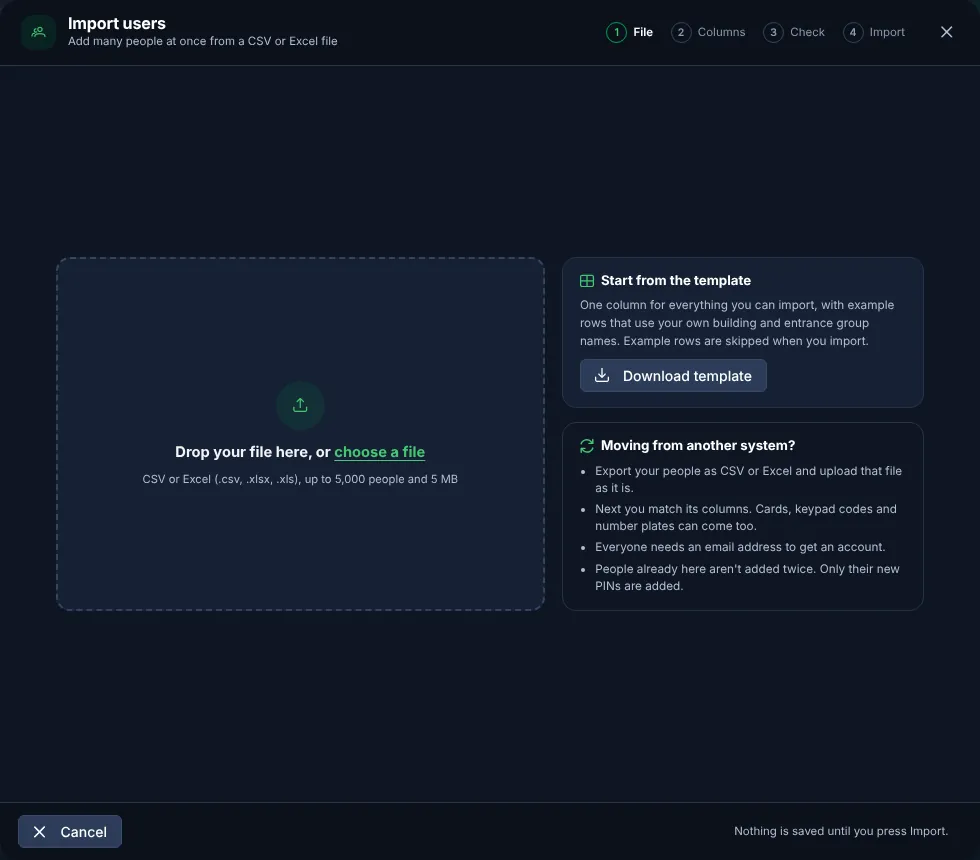
Start with the file you already have
Drop your old system's export, or start from our template. Nothing is saved until you press Import.
Who it's for
For sites moving to the cloud
Switching systems is usually held back by one thing: the list of people and their fobs. This takes that worry away.
Managing agents
Move a block's residents and fobs across in one afternoon, not one week of data entry.
Facilities teams
Bring every member of staff and their card across when you replace an old system.
Installers
Migrate customers from the system you are replacing with a file, not a clipboard.
Housing providers
Import an estate's worth of residents in the background, with checks first.
Problems it solves
- Retyping hundreds of names and card numbers by hand.
- Card numbers that look different in every system.
- Duplicate people when a file has one row per card.
- Lost and disabled fobs sneaking back in.
- Welcome emails going out before the doors are ready.
- Being afraid to run an import twice.
Works with
What comes across
The import brings in the people and codes; you choose the groups and doors they get.
People
Names, emails, phone numbers and roles, created with the same rules as adding someone by hand.
PIN codes and cards
Keypad codes, card and fob numbers and other codes, with their time limits.
Entrance groups
Put people into the right groups, so they open the right doors from day one.
Buildings
Link residents to their building as you import them.
Existing hardware
Keep connected Ontico GSM controllers, or fit FireBird controllers to doors, gates and barriers.
Phone door keys
Once imported, people can get a door key on their phone as well as their card.
Everyday examples
A block of flats
The agent exports 400 residents from the old system, picks its preset, and imports them with their fob numbers. Re-running it after a fix adds nothing twice.
An office move
A file with one row per card is read as one person with several cards, so nobody is duplicated.
Site-coded cards
Card numbers exported as site code plus number are converted to the number the doors check, with a preview before import.
A planned switch-over
Welcome emails are held back during the import and sent when the doors go live.
Why TheBuilding.Cloud
Why switching to TheBuilding.Cloud is easier
Checked before it changes
A dry run shows every problem first.
Runs in the background
Large imports run at a safe pace and survive closing the window.
No duplicates
Existing people are matched, never created again.
Personal data handled with care
Imported rows are cleared after import and removed after a few days.
One import at a time
An organisation runs one import at a time, so nothing overlaps.
Stoppable
Cancel an import, then import the rest later.
Questions about switching systems
Which files can I import?
What if my system isn't on the preset list?
Will my card numbers work?
What if I import the same file twice?
Do I need new hardware?
Who can import?
Guides and next steps
Switch once, then run everything in one place
After the import, your people, codes and doors work with every other part of TheBuilding.Cloud.
Same rules as by hand
Imported people follow your normal limits and roles
Same doors
Groups decide who opens what
More ways in
Add phone door keys alongside imported cards
Switch systems
Bring your people with you
Import residents, staff and their codes from your old system, checked first and safe to run again.