Reach the right people
Notice Board for messages residents actually see
Tell residents about a lift repair, staff about a fire drill, or one block about a water shut-off. Write it once, choose who gets it and how, check the numbers, and send.
Messages go by email or as a notification in the TheBuilding.Cloud app and web dashboard, with optional attachments. Big sends go out gradually and you can follow, or stop, every one.
Channels
Email, app and dashboard
Audience
Buildings, groups or people
One message, the right people, every channel they use
- attachment limit on an email notice
- 3 MB
- people: sends this big go out gradually
- 1000+
- steps from draft to delivered
- 4
- ways to send: email or app notification
- 2
How it works
From draft to delivered in four steps
Every send is checked before it goes, so the right people get it and nobody gets it twice.
-
1
Choose how to send
Email for longer news and attachments, or a notification in the app and dashboard for quick updates.
-
2
Choose who gets it
Pick buildings, entrance groups, operators, engineers or named people, then refine the list.
-
3
Write the message
Add a subject and your message, and attach a PDF, document or picture if you need one.
-
4
Check and send
The Reach panel shows how many people get it and who is skipped. Review, then send.
Who is it for?
The right message, for each audience
Pick who you are writing to. The same form handles every one of them.
Building news for residents
Lift repairs, water shut-offs and parcel room changes, sent to the entrance groups that need them.
- Choose one block or every building you manage.
- Leave out people waiting for approval.
- Attach a letter or a floor plan.
Messages for the people who run the building
Fire drills, rota changes and site notes for your operators and engineers.
- Send to operators or engineers only.
- Hand-pick named people with search.
- Quick app notifications for short updates.
Safe for the whole portfolio
Large sends go out gradually and you can follow or stop each one from Recent notices.
- Type SEND to confirm 1,000 people or more.
- See sent, failed and skipped counts.
- Stop a send that is still going out.
Building news, done properly
The Notice Board is built for anything from a note to one entrance to a message for every resident you manage.
Target precisely
Send to one entrance group, a building, your operators or engineers, or hand-pick people with search.
Refine the audience
Leave out suspended accounts, people waiting for approval or people without the app, and watch the numbers update.
See the reach first
Before you send, see how many people the message will reach and why anyone is skipped.
Follow every send
Recent notices show progress and how many were sent, failed or skipped, and you can stop a send that is still going out.
Attachments
Attach a PDF, Word, Excel, CSV, text or image file to an email, up to 3 MB.
Safe for big sends
Sends to 1,000 people or more go out gradually and ask you to type SEND to confirm.
In the product
Real screens from the dashboard
Taken from our demo organisation on 7 November 2026. Message details are blurred.
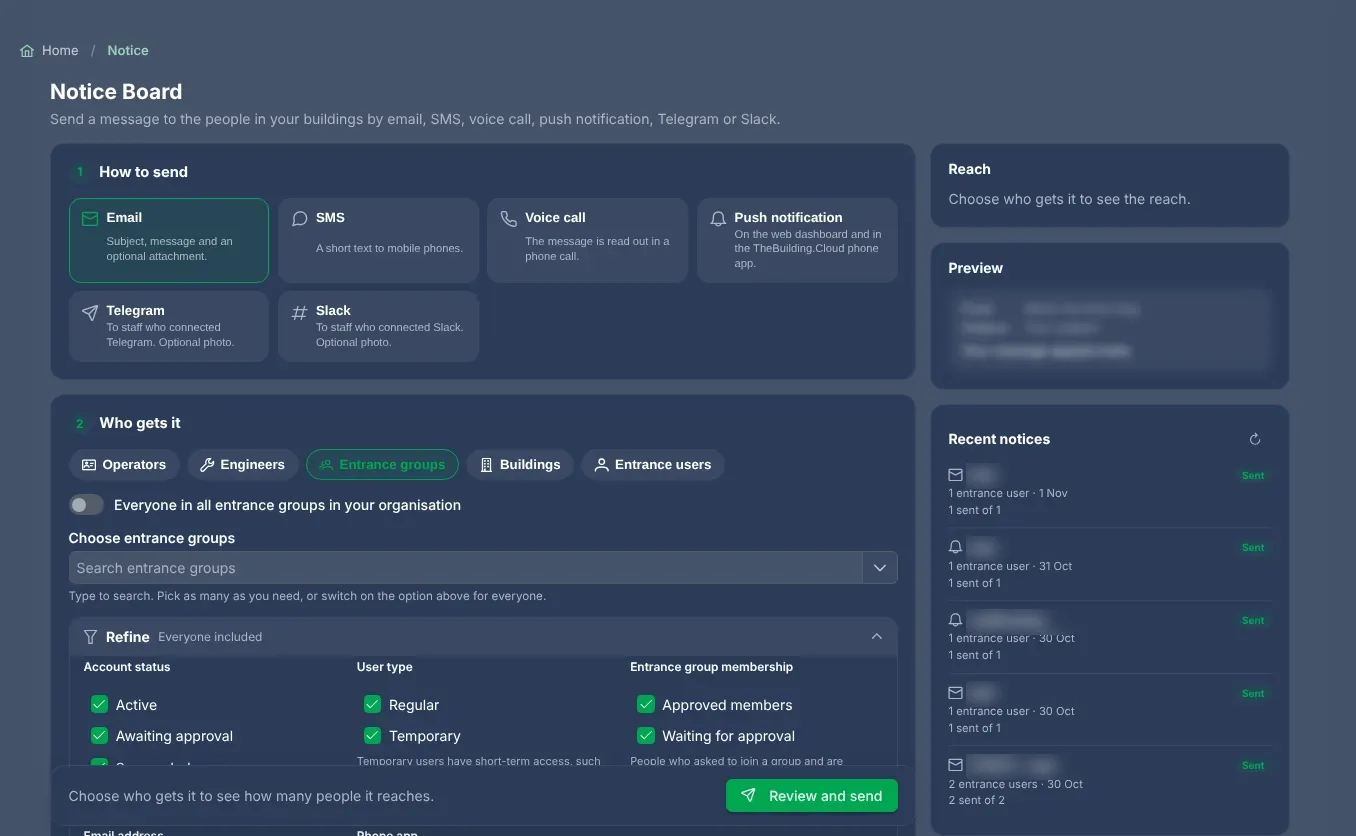
One form for every channel
How to send, who gets it with filters for account status, user type and group membership, the reach before you send, and the notices already sent.
Who it's for
For everyone who keeps a building informed
If you have ever stuck a notice by the lift and hoped people read it, this is for you.
Managing agents
Tell one block about works, or every resident in your portfolio about a change, from one place.
Building managers
Remind residents about bin days, deliveries or a fire alarm test.
Facilities teams
Update staff and contractors about access changes and planned outages.
Operators
Send news to the entrance groups you manage, and nothing beyond them.
Problems it solves
- Paper notices go unread or get torn down.
- Email lists are out of date as people move in and out.
- You can't tell who received a message and who didn't.
- A message meant for one block reaches the whole estate.
- Sending to thousands of people from a normal inbox gets blocked.
- Staff updates and resident updates live in different tools.
Works with
Uses the people you already manage
Audiences come from your buildings, entrance groups and people, so they are always current.
Entrance groups
Message the approved members of a group, such as one block or one floor.
The TheBuilding.Cloud app
App notifications appear on residents' phones.
The web dashboard
Notifications also show as a pop-up for people signed in on the web.
Our house email layout, with your subject and optional attachment.
Telegram and Slack
Organisations can also reach staff who have connected these apps.
Issue reports
When a resident replies with a problem, follow it up as an issue report.
Everyday examples
Planned works
The agent emails Block B about lift maintenance next Tuesday, with the contractor's notice attached as a PDF.
A water shut-off
A quick app notification to everyone in two buildings, sent the moment the supplier calls.
A fire drill
Staff and engineers get a heads-up the day before, residents get a separate note.
Parcel room news
One entrance group hears that the parcel room has new opening hours.
Why TheBuilding.Cloud
Why send building news from TheBuilding.Cloud
Always-current lists
Audiences come from the people and groups you already manage.
Scoped to your buildings
Operators only reach the people in the groups they manage.
Built for scale
Large sends go out in batches at a safe pace, and each person gets it once.
Stoppable
Spot a mistake? Stop a send that is still going out.
Transparent
Sent, failed and skipped counts for every notice.
Respectful
People who opt out of news emails stay out, and service emails are kept separate.
Questions about the Notice Board
How are messages sent?
Can I send to one building only?
Why are some people skipped?
Can I take a message back?
Who can use the Notice Board?
Can residents reply?
Guides and next steps
Send a message to residents
Step by step, from channel to Reach.
Report a problem
How residents raise issues.
Entrance groups
Set up the groups you message.
Issue reporting
Follow up problems residents report.
The mobile app
Where app notifications arrive.
Plans and pricing
See what each plan includes.
Part of how you run the building
The Notice Board uses the same people and groups as your doors, so the people who live or work somewhere are the people who hear about it.
Same groups
Message exactly the people who use a door
Same app
Notifications arrive where residents answer the intercom
Same rules
Operators stay inside the buildings they manage
Notice Board
Tell the right people, the first time
Send building news by email or app notification to exactly the people who need it, and see that it arrived.