Fire & Intruder
Fire and intruder alarms that reach the right people
Connect a FireBird unit to your fire panel and see what the panel is saying from anywhere: fire, fault and reset, grouped into clear incidents. Intruder alarm events arrive in the same platform.
Automation rules tell the right people at once, by email, SMS, voice call, push, Telegram or Slack, so a fault at 3am is not found by the morning shift.
FireBird
Live panel status
Intruder alarms
SIA DC-09 events
Panel activity, incidents and alerts in one place
- panel lines read: fire, fault, reset and acknowledge
- 4
- ways to tell people: email, SMS, voice call, push, Telegram, Slack
- 6
- kinds of alarm in one place: fire panels and intruder alarms
- 2
- dashboard for alarms, doors, cameras and repairs
- 1
How it works
From panel signal to the right person in four steps
FireBird reads the panel, the platform groups what it says, and your rules decide who hears about it.
-
1
Fit a FireBird unit
A FireBird unit is connected to the fire panel and added to the building in TheBuilding.Cloud.
-
2
Panel lines arrive
Fire, fault, reset and acknowledge lines are read from the panel and grouped into incidents.
-
3
Rules decide who to tell
Automation rules send alerts by email, SMS, voice call, push, Telegram or Slack.
-
4
Look back any time
See each panel's state and history, and make fire test reports as a PDF.
One platform, every alarm
See what each panel is saying, and react faster
Pick a part of the system to see how it works.
Your fire panel, online
A FireBird unit connected to the panel sends its fire, fault, reset and acknowledge lines to the cloud. They are grouped into incidents, and each panel shows its state at a glance: fire until reset, faults until reset.
- Zone and loop details where the panel sends them.
- Each FireBird unit can hold your alarm receiving centre (ARC) settings.
- Online and offline status for every unit.
- PDF fire test reports for the building's records.

Intruder alarm events in the same place
Intruder alarm panels that report using SIA DC-09 send their events here, listed by account, zone and type, next to your fire panels and doors.
- Events listed with account, code, zone and type.
- Arming stays on the alarm itself.
- Alarm events sit next to your fire panels and doors.
Rules that tell people and act
Fire, fault, input and offline events can start an automation rule. It can tell the right people and act on the building at the same time.
- Email, SMS, voice call, push, Telegram or Slack.
- Open a door or gate through FireBird, or switch a relay.
- Open a camera on screen when an alarm comes in.
- Automation is part of the Enterprise plan.
Fire and intruder alarms in one place
See what each panel is saying, react faster and keep a clear history of every incident.
FireBird on your fire panel
A FireBird unit connected to the panel sends its fire, fault, reset and acknowledge lines to the cloud.
Intruder alarm events
Intruder alarm panels that report using SIA DC-09 send their events here, listed by account, zone and type.
Alerts by rule
Automation rules send a fire or a fault to the right people by email, SMS, voice call, push, Telegram or Slack.
Online and offline
See when a FireBird unit goes offline, and use it as an alert, before a fault becomes a blind spot.
Act on an alarm
A rule can open a door or gate through FireBird, switch a relay, or open a camera on screen when an alarm comes in.
History and test reports
Panel lines are grouped into incidents, and fire test reports can be made as a PDF.
Device Hub
Already have an intruder panel?
Texecom, Paradox, DSC, Interlogix, Risco, Visonic, Honeywell Vista and Qolsys panels can join through a bridge program at the site and the Device Hub, next to your doors and fire panels.
Areas, zones and faults
See which areas are set, which zones are open and any faults, live.
Set and unset safely
Once your organisation allows it, people with the alarm permission set and unset from the panel's page.
Typed codes never kept
Where the panel asks for its code, it is typed each time and never stored or shown.
Starts automations
A panel's state can start an automation rule, and its new state can be checked in that rule's conditions.
What each panel can do depends on its bridge; some stay read only. Your alarm installer can tell you whether your panel can use one.
In the product
Real screens from the dashboard
Taken from our demo organisation on 7 November 2026, with sample buildings and made-up people; unit numbers and names are blurred.
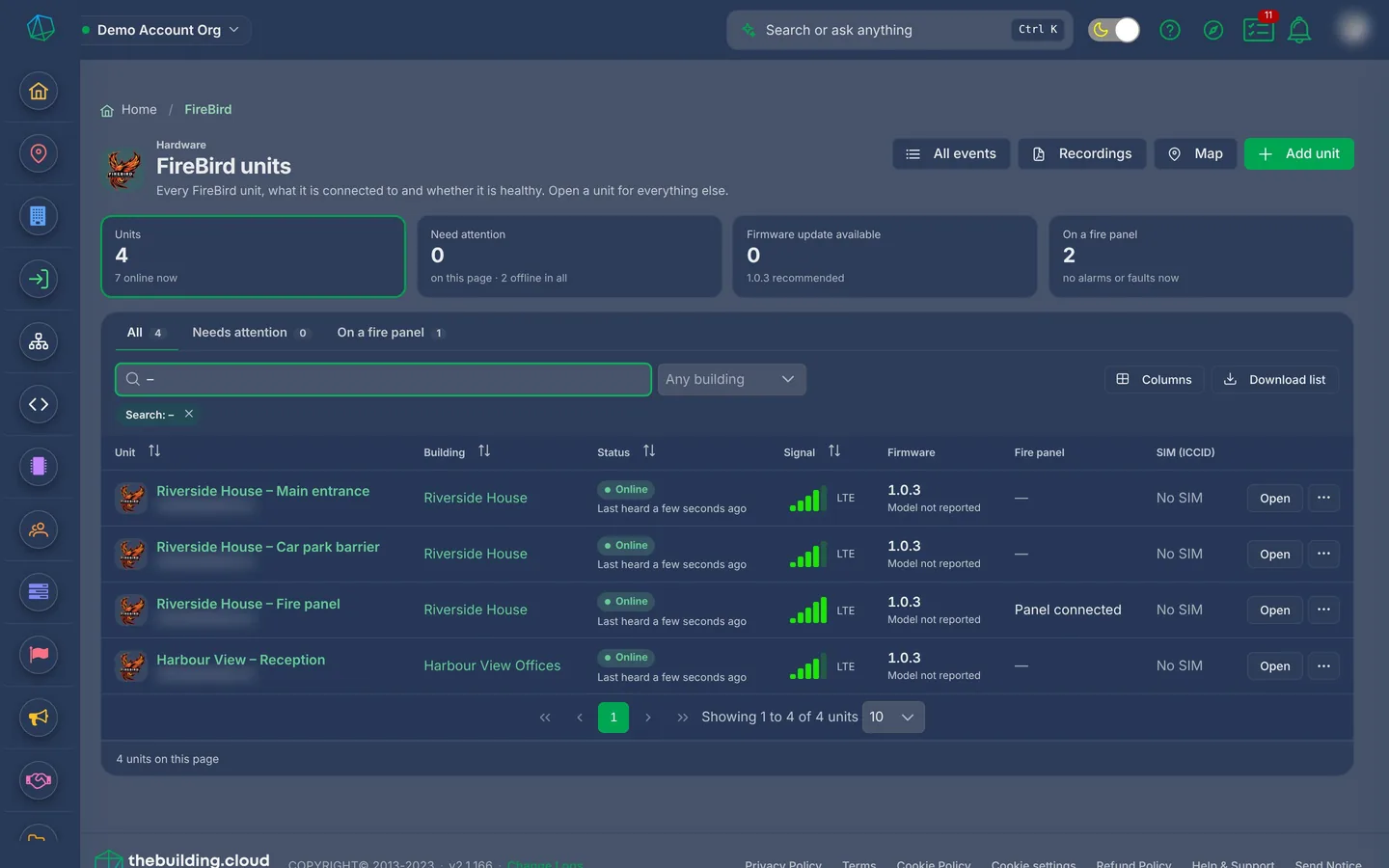
Every unit, online and on its panel
See at a glance which FireBird units are online, how strong their signal is, which firmware they run and which ones report from a fire panel.
Who it's for
For the people responsible when the alarm goes off
If you look after buildings with fire panels or intruder alarms, seeing what they are saying from anywhere saves trips to site and gets the right person moving sooner.
Managing agents
Know at once when a panel in one of your blocks shows a fire or a fault.
Fire and security installers
See your customers' panels from your desk and arrive knowing what the panel reported.
Facilities managers
Get faults to the on-call person by text, call or Telegram, day or night.
Schools and public buildings
Keep a clear history of incidents and test reports for every building.
Problems it solves
- Faults that sit on a panel display until someone walks past.
- Call-outs where the engineer doesn't know what the panel said.
- No easy record of when a fire, fault or reset happened.
- Panels that went offline without anyone noticing.
- Alerts that only reach one person who may be asleep.
- Separate tools for fire, intruder alarms and doors.
How it works
How it works
-
1
Fit a FireBird unit
A FireBird unit is connected to the fire panel and added to the building in TheBuilding.Cloud.
-
2
Panel lines arrive
Fire, fault, reset and acknowledge lines are read from the panel and grouped into incidents.
-
3
Rules decide who to tell
Automation rules send alerts by email, SMS, voice call, push, Telegram or Slack.
-
4
Look back any time
See each panel's state and history, and make fire test reports as a PDF.
Works with
What connects
FireBird is our own hardware, made for the platform. Intruder alarms join through the SIA DC-09 reporting standard.
FireBird units
Read the fire panel's lines and report online, offline and signal status.
Alarm receiving centres
Each FireBird unit can hold your alarm receiving centre (ARC) settings.
SIA DC-09 intruder panels
Events with account, code, zone and type are received and listed.
Automation rules
Fire, fault, input and offline events can start a rule (Enterprise plan).
Live CCTV
A rule can open a camera on screen when an alarm comes in.
Doors and gates
A rule can open a door or gate through FireBird.
Everyday examples
A fault in the night
A panel in a residential block reports a fault at 2am. A rule sends an SMS to the on-call engineer and an email to the managing agent.
A fire signal at an office
The panel reports fire. A rule calls the facilities manager and posts in the team's Slack, and the incident is kept with the time of each line.
A unit drops offline
A FireBird unit loses its connection. The offline event starts a rule that tells the installer to check it.
Test day
After the weekly test, the manager makes a PDF fire test report for the building's records.
Why TheBuilding.Cloud
Why TheBuilding.Cloud for alarms
Our own hardware
FireBird is made for the platform and is updated remotely.
Clear incidents
Panel lines become incidents and a state you can read at a glance.
Alerts where people are
Email, SMS, voice call, push, Telegram or Slack.
Offline is an alert too
Know when a unit stops reporting.
Test reports on file
Make PDF fire test reports for each recording period.
One platform
Alarms, doors, cameras and repairs in the same dashboard.
Questions about alarm monitoring
Does this replace my fire alarm maintenance or my ARC?
What does FireBird read from the panel?
How do alerts reach people?
Can I set or unset an intruder alarm from the platform?
Will I know if a unit goes offline?
How do I connect a FireBird unit?
Learn more
Connect a FireBird controller
Set up a unit step by step.
FireBird hardware guides
Controllers, wiring and manuals.
Automation
Rules that act on fire and fault events.
Live CCTV
Open the right camera when an alarm comes in.
Issue reporting
Track the repair after a fault.
Plans and pricing
FireBird units and alarms on each plan.
Respond with the rest of the platform
Alarms use the same buildings, doors and people as the rest of TheBuilding.Cloud, so one event can start everything that should happen next.
Doors and gates
A rule can open a door or gate through FireBird when an alarm comes in
Cameras
Open the right camera on screen to see what is happening
Repairs
Report and track the repair after a fault
Fire and intruder alarms
Bring your fire and intruder alarms online
Give your team one place to see panel activity, get alerts and look back at what happened.