Care homes
Visitors, staff and families safely let in, day and night
Families visiting at all hours, agency staff who change every week, a GP on Tuesday and doors that need to stay controlled for residents. TheBuilding.Cloud signs visitors in, gives staff codes that only work on their shifts and lets regular family visitors open the door with their own access.
The home manager sees every visit and every door open in one dashboard, and sends families news by email or app notification. Exit buttons and fire release stay as they are, wired on the door.
Visitors
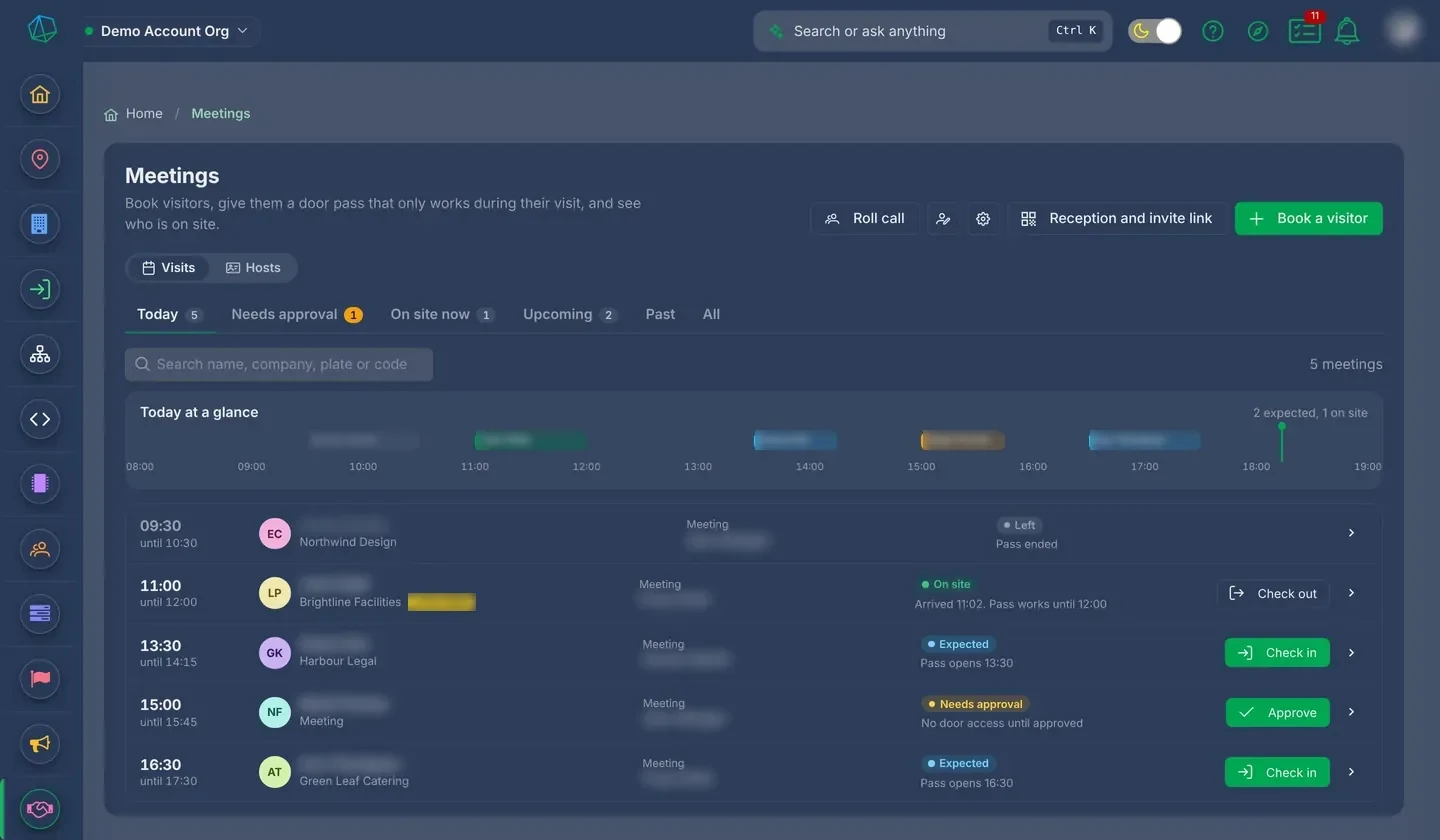
Signed in, with a pass
Agency staff
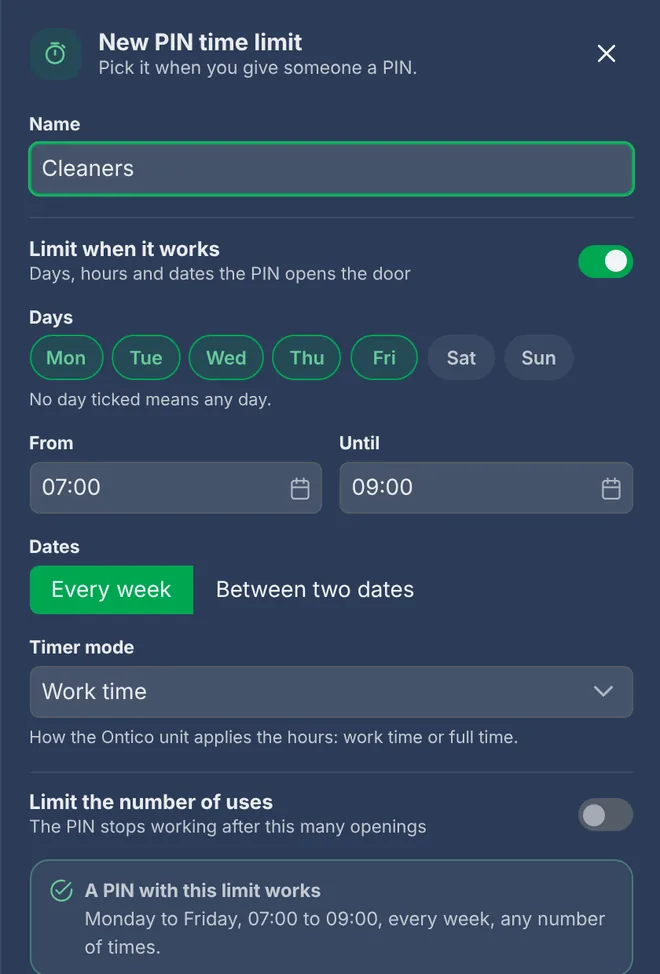
Codes for their shifts only
The right people in, at the right time
- longest family or carer access in one go
- 30 days
- warning emails before an ended guest is deleted
- 3
- ways to send news: email or app notification
- 2
- longest Open once for a responder
- 60 s
How it works
A day at the home in four steps
Visitors, staff and families, each with the right access at the right time.
-
1
Staff on shift
Permanent and agency staff open doors with codes or cards limited to their shifts.
-
2
Visitors sign in
Visitors sign in on the reception tablet; booked visitors arrive with a pass.
-
3
Family come and go
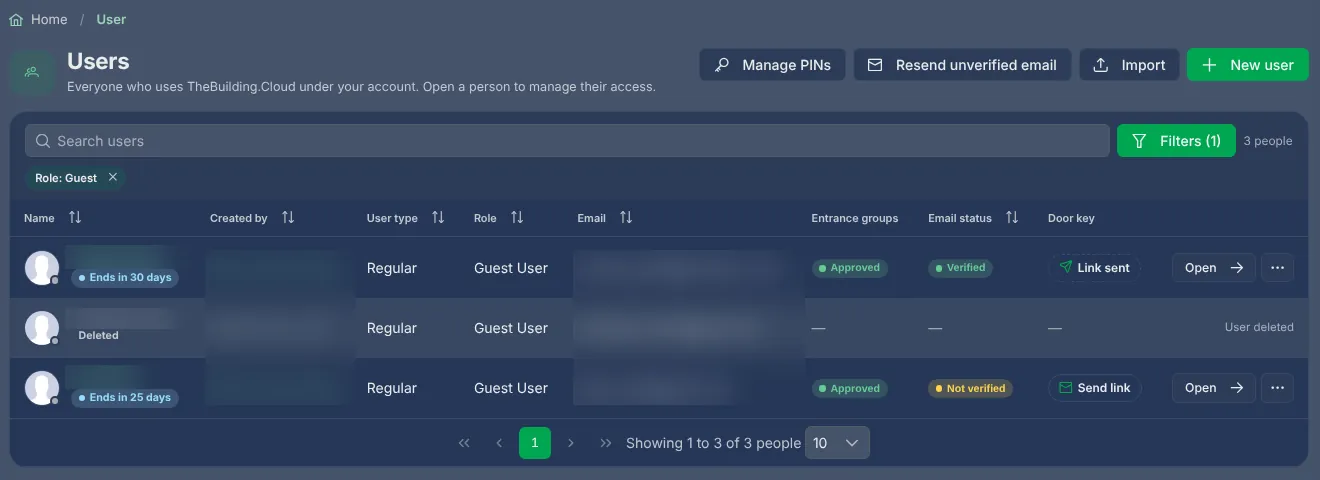
Regular family visitors get their own access for up to 30 days at a time.
-
4
Families kept informed
Visiting changes and events reach families by email or app notification.
How TheBuilding.Cloud helps care homes
The features that matter when safety and welcome both count.
Visitor Management
A reception tablet for sign-in, passes for booked visitors and a record of every visit.
See Visitor ManagementPIN Codes, Cards & QR
Codes with time limits for agency staff and night shifts, cards for permanent staff.
See PIN Codes, Cards & QRGuest Access
Regular family visitors get access for up to 30 days, with reminders before it ends.
See Guest AccessNotice Board
Visiting times, events and works to families and staff, by email or app notification.
See Notice BoardVideo Intercom
Visitors at the door call the staff on duty, who see them and open the door from the app.
See Video IntercomIssue Reporting
Staff report repairs with photos, and maintenance replies in one conversation.
See Issue ReportingLockdown and Martyn's Law
Lockdown for care settings
Health care is among the uses Martyn's Law (Terrorism (Protection of Premises) Act 2025) lists, so a care home may be covered, depending on the services provided and how many people can be there at once; check the Home Office guidance or take advice. In a care home, lockdown has to protect residents without trapping anyone; lockdown mode locks the FireBird doors you choose and leaves exit buttons and fire release alone.
Start it in seconds
Press and hold on the dashboard or the Lockdown page, or start it from a panic button, a lockdown code at a FireBird keypad, another alarm system or an automation.
Every way in refused
Codes, cards, phones, plates, visitor passes and remote opens are refused on the FireBird doors you chose. It doesn't touch exit buttons or fire release, which are wired on the door.
Everyone told at once
Push and email alerts through the Notice Board (never SMS), a red banner for everyone signed in, and TV screens that switch to a lockdown message.
Know who is safe
Roll call with Safe, Need help, No answer and Expected, drills that follow the same steps, and a PDF report for your records.
Lockdown works on FireBird doors connected to the cloud; the board shows any door it can't reach. It helps you put your lockdown and communication procedures into practice; you stay responsible for your own procedures. This is general information, not legal advice.
In the product
What the home manager sees
Real screens from the dashboard and app, taken from our demo organisation. Personal details are blurred or made up.
Who it's for
Built for care homes and care groups
Residential and nursing homes, and the groups that run several.
Home managers
Every visit, door and repair in one dashboard.
Care group operations
Every home in one account, each with its own team.
Care staff
Codes for their shifts and visitors who reach them at the door.
Families
Their own access, and news from the home by email.
The problem
- Visitors sign a paper book at all hours.
- Agency staff share a door code that never changes.
- Family wait at the door while staff are busy with residents.
- News about visiting changes doesn't reach every family.
- Nobody knows who opened the side door last night.
- Repairs are written on scraps of paper.
Works with
Works with
TheBuilding.Cloud works with the doors your home already has.
FireBird controllers
Our own controllers for doors, gates and barriers, with online status, signal and remote firmware updates.
Keypads, cards and fobs
PIN codes, cards, tags and fobs on FireBird doors and supported controllers, managed from the same profile.
The TheBuilding.Cloud app
iPhone and Android: answer door calls with video, open doors and get building news. Older app versions keep working.
Visitor passes, door key invitations and notices go by email, never SMS.
TV screens
Visualiser screens show a live plan of the building, and switch to a full-screen message during a lockdown.
Your old system's export
Import people, PIN codes and card numbers from a CSV or Excel export, with presets for 29 systems.
A typical week
An agency nurse
A code for night shifts this week, on the staff doors only, that ends on Sunday morning.
A daughter's weekly visit
She has her own access for four weeks and opens the front door with her phone.
The GP's round
The GP is booked as a visitor and arrives with a pass for the front door.
Visiting changes
Every family hears about the new visiting times by email the same afternoon.
Why TheBuilding.Cloud
Why care homes choose TheBuilding.Cloud
Visits on record
Every visitor signed in and searchable.
Shift-only codes
Agency staff codes that end by themselves.
Family welcome
Regular visitors with their own access.
Families informed
News by email or app notification.
Exits left alone
Exit buttons and fire release stay on the door.
Every home in one place
Care groups see all their homes.
Questions from care homes
Does it replace our nurse call or care records?
Can agency staff codes end by themselves?
Can family members have their own access?
Does lockdown trap residents?
Do families get text messages?
Is there a record of every visit?
Guides and next steps
Other public, education and care sectors
Care homes share a lot with later living and healthcare.
Same platform
Visitors, staff and doors together
Same rules
Codes only work when they should
Same record
Every visit and open logged
Care homes
A welcome for families, control for staff
Book a demo and see a visitor signed in, an agency code that ends by itself and a notice to families.