Cloud timers
Door schedules that open and close on time
Open the front door for office hours, close the car park gate every night, or keep the hall open for an event on Saturday. Set it once in the dashboard and our cloud timers do it, every day, without a timer box on the wall.
Each schedule shows a preview of its next times before you save, can run past midnight, and can be paused, edited or removed from one list for all your doors.
Actions
Open then close, open, close, trigger
When
Once, repeating or on a calendar
Open at 8, close at 6, every weekday
- things a schedule can do: open then close, open, close, trigger
- 4
- ways to say when: once, repeat, calendar or your own timer code
- 4
- retry limit, so a door never opens late
- 5 min
- filled in for you by Keep open for a while
- 2 h
How it works
A timetable for any door in four steps
Schedules are built in plain words, with a preview, so you can check the times before anything happens at the door.
-
1
Pick the door
Open the door's Schedules section, or use the Unlock Schedules list and choose the entrance.
-
2
Say what it does
Open then close, Open, Close or Trigger, the same short pulse as the Unlock button.
-
3
Say when
Once, repeat every so often, on a calendar of days and months, or type it yourself.
-
4
Check and save
The preview shows the next times. Save, and the cloud timer runs it from then on.
What should the door do?
Four kinds of schedule, one simple form
Pick one to see a day at the door. The same four choices are the first question in the schedule form.
Opening hours and events
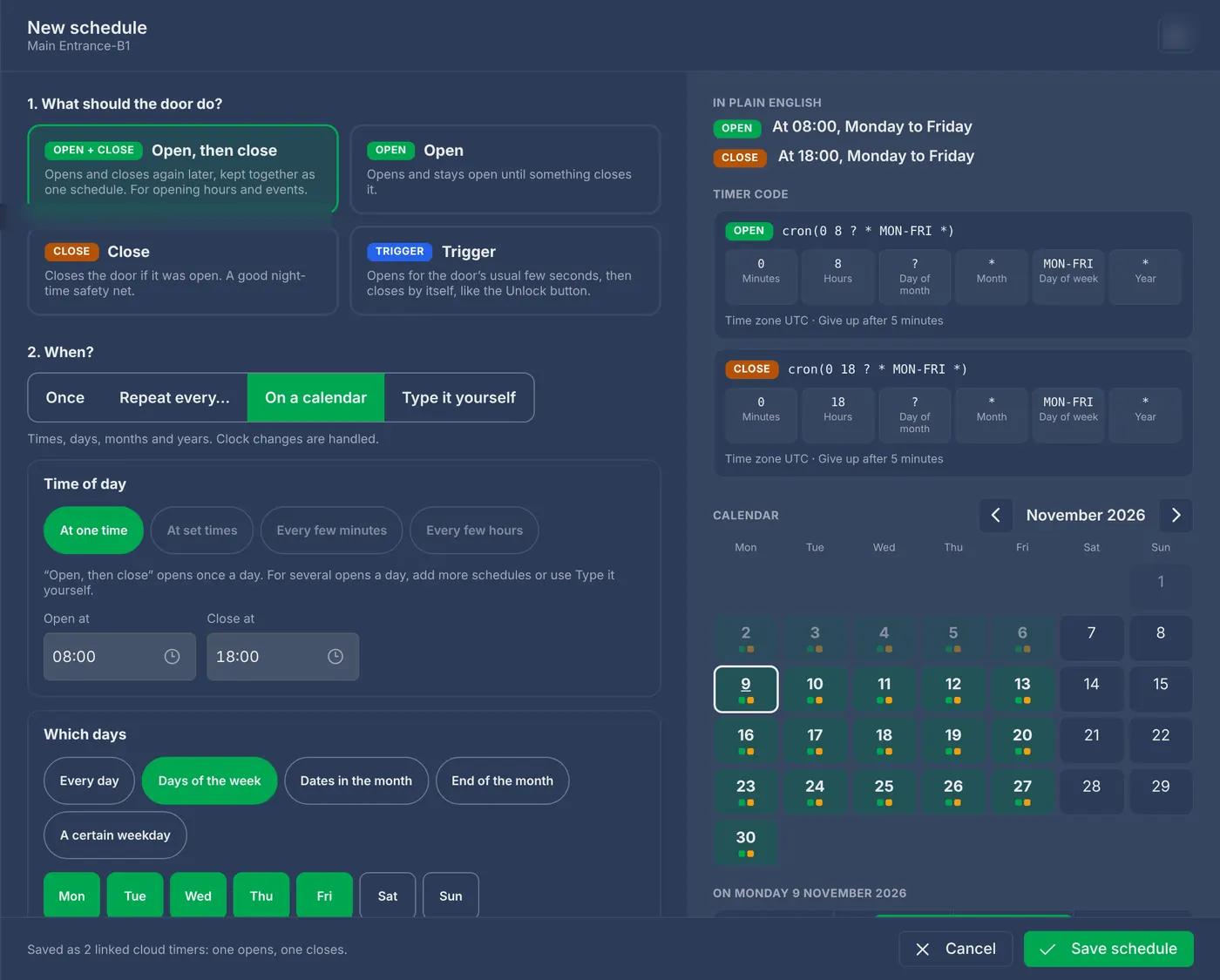
The door opens at one time and closes again later, kept together as one schedule. Use it for office hours, shop hours or a one-off event.
- The open and the close always stay together.
- It can close the next morning, for a late event.
- The form refuses times a late open could clash with.
One day at the door
Office hours, Monday to Friday
- 08:00 Front door opens for the day
- 18:00 Closes again, as part of the same schedule
Saved as two linked cloud timers: one opens, one closes.
Open and stay open
The door opens and stays open until something closes it: a Close schedule, an automation rule or someone on the door page.
- Good for a gate that should be open for a busy period.
- Pair it with a Close schedule for a nightly close.
- Pausing it keeps any close that was already due.
One day at the door
Yard gate for the morning deliveries
- 07:00 Gate opens and stays open
- 22:00 A separate Close schedule shuts it at night
A nightly safety net
The door closes if it was left open. Run it every night so a door held open by day never stays open overnight by mistake.
- Works on its own or alongside opening hours.
- The form calls it "a good night-time safety net".
- Times follow your time zone, or the site's own.
One day at the door
Every night at 22:00
- 22:00 Closes the door if it was left open
A short pulse, like the Unlock button
The door opens for its usual few seconds, then closes by itself, exactly as if someone pressed Unlock. Handy for a door or barrier that should let someone through at a set time.
- Same short pulse as the Unlock button.
- No close to plan: the door closes itself.
- Repeat it every so often, or on chosen days.
One day at the door
Bin store gate on collection day
- 07:30 Opens for a few seconds for the collection crew
- 12:30 And again after the midday round
Opening hours, handled
Everything you need to run doors and gates on a timetable, with safety nets for the times things go wrong.
Open, then close
Opening hours and events as one schedule, so the open and the close always stay together.
Closes the next morning
A schedule can open in the evening and close after midnight; the form says so plainly.
Nightly safety close
A Close schedule shuts a door that was left open, as a safety net every night.
Keep open for a while
One button on the door page fills in a schedule to keep it open for two hours from the next five-minute mark.
Time zones
Times use your time zone, and a schedule can have its own when a site is in another country.
One list for every door
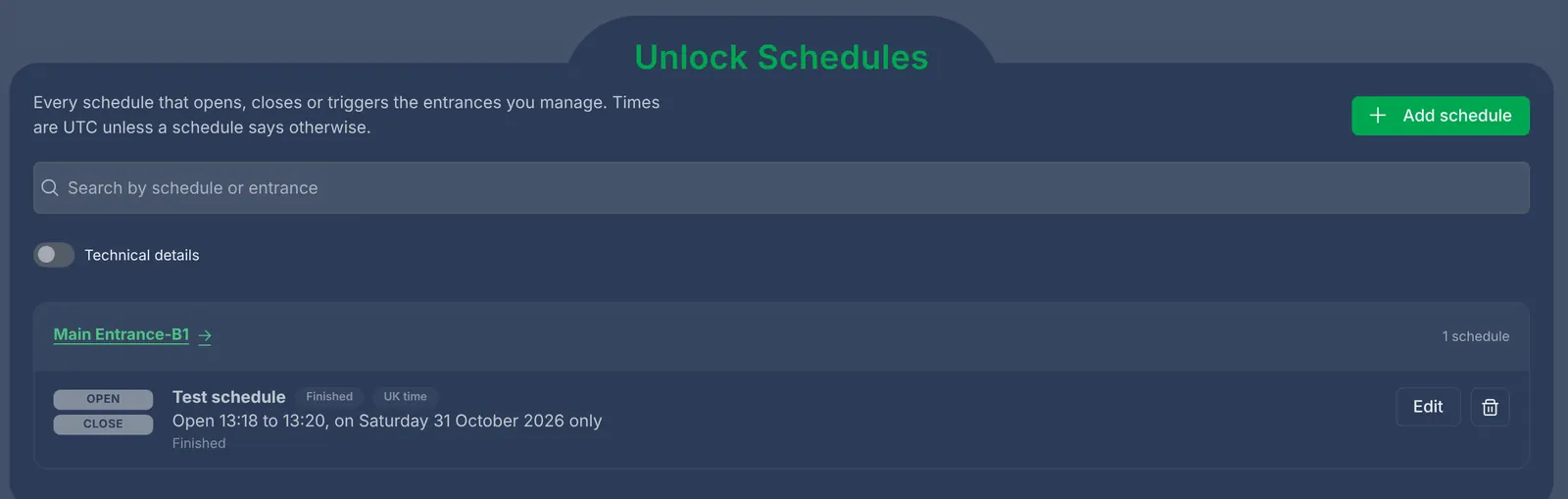
See, pause, edit and delete every schedule across your doors on the Unlock Schedules page.
In the product
Real screens from the dashboard
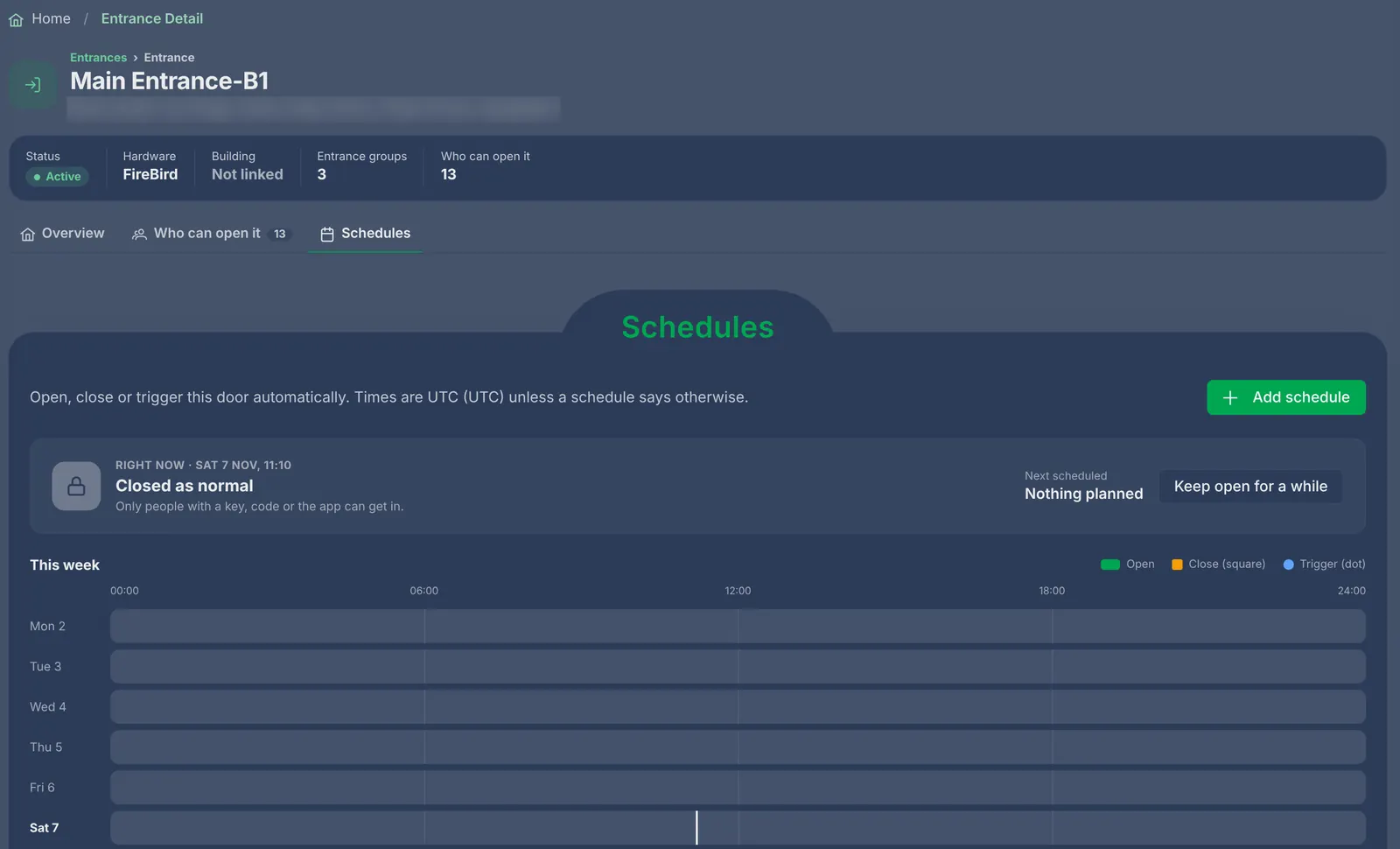
Taken from our demo organisation. The form, the door page and the list of every schedule, exactly as you will use them.
Who it's for
For doors that should follow a timetable
Door schedules suit any door or gate that should be open at set times, and closed and secure the rest of the time.
Offices and reception
Let visitors walk in during office hours and keep the door locked outside them.
Shops and community spaces
Open the entrance for opening hours and events, without a key holder on site.
Car parks and yards
Leave a barrier or gate open at busy times and closed overnight.
Residential blocks
Open the post room or bin store gate on collection days.
Problems it solves
- Someone has to be on site to open up and lock up.
- Doors are left open overnight by mistake.
- Timer boxes on the wall are hard to change and drift.
- Events and bank holidays need someone to remember.
- Opening hours differ between buildings and countries.
- Nobody can see at a glance what opens when.
Works with
Works with your connected doors
A schedule opens or closes the door through its own controller, the same way the Unlock button does.
FireBird controllers
Schedules switch the door's output on a FireBird controller.
Doors, gates and barriers
Anything opened by a connected controller output can follow a timetable.
PIN time limits
Use time limits for when a code works; use schedules for when the door itself opens.
Automation
Use schedules for set times and automation rules for things that should react to events.
Door page
Each door shows its own schedules, with a Keep open for a while button.
Every door, one list
The Unlock Schedules page shows schedules across all your entrances.
Everyday examples
An office
The front door opens at 8:00 and closes at 18:00, Monday to Friday. A Close at 22:00 every night is the safety net.
A community hall
An Open then close for a Saturday event, set once and gone when it has run.
A late-night venue
The side door opens at 20:00 and closes at 02:00 the next morning, shown in the form as "Closes the next morning".
Bin collection day
The bin store gate opens every Thursday morning for the collection crew and closes again at midday.
Why TheBuilding.Cloud
Why run your doors on cloud timers
No timer box
Schedules live in the cloud, so changing hours is a few clicks, not a site visit.
Never hours late
Each run has a retry limit, so a door never opens long after it should have.
Safe changes
Pausing or editing a schedule while it holds a door open keeps the close that was due.
Plain words
Build schedules from Once, Repeat and calendar choices, with a live preview.
Clash checks
The form warns when a schedule can't work as written, and says why Save is off.
See it all
One list for every door, with pause switches and edit buttons.
Questions about door schedules
What can a schedule do?
Can a schedule run past midnight?
Is this the same as a PIN time limit?
Who can set schedules?
Do all doors have schedules?
What happens to my older schedules?
Guides and next steps
Open and close doors on a timetable
Set up your first schedule.
Add your first door
Connect a door before you schedule it.
Automation
Rules that react to events.
Cloud access control
Doors, groups and people.
FireBird controllers
The hardware that opens the door.
Plans and pricing
See what each plan includes.
Timetables that sit with the rest of your doors
Schedules use the same doors and controllers as everything else, and show up on the door page next to people's access.
On the door page
Each door shows its own schedules
On one list
Every schedule across your sites in one place
With automation
Schedules for times, rules for events
Door schedules
Let your doors keep their own hours
Set opening hours, nightly closes and one-off events once, and let cloud timers run them.