
On this page
Key takeaways
- Choose a system that lets you withdraw one person’s access without changing everyone else’s code wherever practical.
- Give each code an owner, a defined set of doors and an end date where the system supports it.
- Treat safe escape as a separate design requirement: nobody should need to remember an entry code to get out.
- Test the entrance with its actual users and provide an alternative where a keypad is unsuitable.
- Define why you keep access logs, who can read them and when they are deleted.
A door passcode can save you issuing keys, but a shared number becomes difficult to control once residents, contractors and former staff know it. A door passcode is a PIN or combination entered on a keypad to release a lock. For managed buildings, prefer individually withdrawable codes, time limits where available, and an exit arrangement that does not depend on knowing the code.
The keypad is only one part of the decision. You also need a process for issuing access, dealing with a disclosed code and keeping the entrance usable during a fault.
Choose the right door passcode system
Mechanical combination locks, standalone electronic keypads and centrally managed access systems can all accept codes. Their management arrangements differ. Check the particular model rather than assuming every electronic keypad supports individual users, remote changes or event logs.
| Approach | What to establish before buying | Main management concern |
|---|---|---|
| Mechanical combination lock | How the combination changes and who must attend | A shared-code change affects everyone who uses it |
| Standalone electronic keypad | Code capacity, individual deletion, time limits and programming method | Changes may require someone at the door |
| Centrally managed keypad access | Supported readers, permissions, withdrawal process and fault behaviour | Someone must own the user list and check changes reach the door |
A keypad controls entry; it does not necessarily let a resident identify a visitor. Treat visitor calling and resident credentials as separate requirements. The Secured by Design Residential Guide makes that distinction between door-entry systems and authorised-user proximity access.
For a busy communal entrance, my preference is individually managed credentials rather than one permanent code for the whole building. That gives you a practical way to remove access without notifying every resident.
Choose and share codes carefully
There is no universal best PIN length for every door. The keypad’s capabilities, permitted attempts, exposure and management process all matter. Ask your installer what happens after repeated incorrect entries and whether that behaviour could inconvenience legitimate users.
Avoid obvious sequences, repeated digits, the building number and codes copied from publicly known dates. Do not reuse the installer’s programming code as the everyday entry code. Keep administrative credentials separate from those issued to residents or contractors.
Share a code directly with its intended user, alongside the door name, permitted times and reporting contact. Do not put a permanent communal code on a public notice or include it in a widely forwarded contractor document.
For mechanical PIN-code locks, ProtectUK recommends changing codes after a staff member leaves, after a security breach, or every six months. That is a published recommendation for those locks, not a statutory six-month deadline for every electronic system.
Issue, change and withdraw access deliberately
Write down the procedure before handing out the first code. Name a primary administrator and a deputy, and make sure both can deal with an urgent disclosure without relying on one person’s availability.
Use this sequence for each new credential:
- Confirm the person and purpose. Establish who needs entry and who has authorised it.
- Select the doors. Give access only to the entrances needed for that task or tenancy.
- Set the permitted period. Use working hours and an end date where supported, especially for contractors.
- Issue and test. Deliver the code privately and check it works at the intended reader, including any restrictions.
- Withdraw and verify. Remove access when the need ends, then confirm the old credential is refused.
- AuthoriseConfirm the person and business need.
- Select doorsAllow only the entrances needed.
- Set limitsDefine permitted times and an end date.
- IssueShare privately and test at the reader.
- WithdrawRemove access and verify refusal.
TheBuilding.Cloud’s PIN codes and time limits support days of the week, times, start and end dates, and usage limits. Editing a time limit re-sends every code using it to the doors. Switching someone off, removing them from a door group or deleting them automatically removes their PINs, cards and QR codes from the readers.
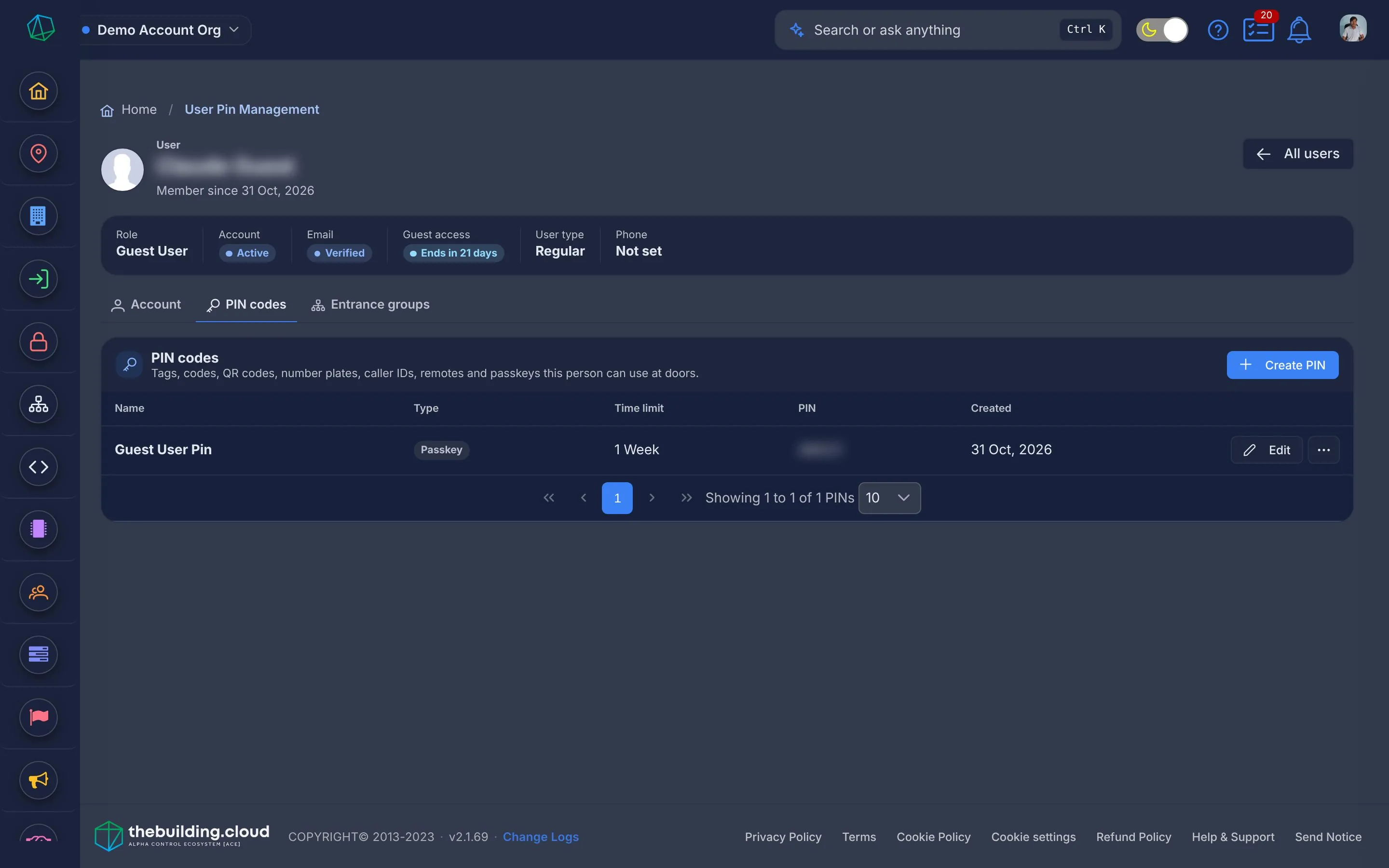
Automatic withdrawal does not replace an operational check. Include confirmation at the reader in your handover or incident procedure, particularly if equipment has been offline.
ExamplePicture a 40-flat block in Manchester with a main entrance and a separate plant-room door. A cleaning contractor needs the main entrance during agreed working hours, not the plant room. Give that contractor a separate, restricted credential rather than the residents’ shared code, then withdraw it when the contract ends.
If a shared code becomes public, arrange its replacement, notify legitimate users privately and test that the old code no longer works. Confirm that nobody has retained the disclosed number as a secondary code.
Keep escape independent of the entry code
Do not select a keypad lock until the installer has assessed the door’s function. A communal entrance, office escape door and plant-room door can need different hardware arrangements.
NSI’s explanation of safe escape and NCP 109 says the design assessment should cover escape routes, occupancy, fire-resisting doors, compartment lines, hardware compatibility and multiple escape actions. It also distinguishes the guidance used in England, Wales, Scotland and Northern Ireland.
For England’s buildings other than dwellings, Approved Document B Volume 2 says code-controlled security should be overridable from the escape side. Its guidance for electrically powered locks addresses release on fire-alarm activation, power loss or system error, and operation of a security override, specifying a Type A call point described in BS 7273-4.
Those provisions are not a universal wiring specification for every lock or building. Have the competent designer establish which guidance and release arrangement apply to your particular door.
Ask for the following evidence at handover, not just a demonstration that the PIN opens the entrance.
| Design point | Evidence to request |
|---|---|
| Door function | Recorded door assessment |
| Escape hardware | Demonstrated escape-side operation |
| Emergency release | Documented release arrangement |
| Fault behaviour | Recorded fault tests |
| Maintenance | Logbook and service schedule |
NoteA dashboard unlock button or remote software command is not a substitute for the escape-side hardware and emergency release arrangements specified for the door.
Make entry usable for residents and visitors
Test the complete journey: reaching the keypad, finding the buttons, entering the code, recognising acceptance and opening the door before it relocks. Mounting height alone does not establish accessibility.
England’s Approved Document M Volume 2, covering buildings other than dwellings, addresses door-entry use by deaf and hard-of-hearing people, people who cannot speak, wheelchair users and people with limited dexterity. It also warns that building-control approval does not by itself establish compliance with wider Equality Act obligations.
Ask actual users what they can operate reliably. Provide an appropriate alternative where entering or remembering a code is unsuitable; do not assume that a phone-only option suits everyone either.
For visitors, TheBuilding.Cloud’s video intercom lets residents answer on the mobile app or web and release the door remotely. Its passkey door access offers a different resident credential: users confirm with their phone’s face recognition, fingerprint or phone passcode rather than typing a building PIN.
These are different mechanisms. A phone passcode used to confirm a passkey is not a shared code programmed into the entrance keypad.
Use access logs for a defined purpose
A shared code cannot establish which person physically entered. Even an individually allocated credential records its use, not proof that its owner was the person at the door. Tailgating also remains an operational issue that a code alone cannot solve.
Before enabling or exporting logs, define their purpose, who can see them and the retention period. Explain the recording to affected people and restrict access to those who need it.
The ICO’s guidance on monitoring workers recognises PINs and swipe cards as access and attendance tools, but warns about monitoring people’s movements and repurposing records. Do not quietly turn security logs into staff performance records. The guidance carries an under-review notice following the Data (Use and Access) Act, so check its current wording before setting policy.
Where to start
Walk one entrance with your installer and the person who manages access. Establish who knows its code, how you would remove one user, what happens during a fault and how everyone gets out.
If the hardware is suitable, TheBuilding.Cloud’s access control and entrance groups let you organise which doors people can open. Start with an accurate people-and-doors list, then test issuance and withdrawal before expanding to other entrances.
Keep the handover record, emergency-release instructions and maintenance schedule together. A well-managed code is useful; an undocumented shared number is a future access problem.
Frequently asked questions
What is a door passcode?
How often should a door access code be changed?
How do I change or reset a door keypad code?
Can a passcode lock be fitted to a fire escape door?
Is a door passcode the same as a passkey?
Sources
How we write
Our articles answer the questions people ask about running buildings. Each one is checked against our product documentation and reviewed by our team before it is published. Spotted something out of date? Tell us and we will fix it.


