Visitor Management
Visitor management that makes the pass for you
Book the meeting and TheBuilding.Cloud does the rest: the visitor gets a QR code to open the door and a visitor card by email, so they arrive ready to walk in.
Visitors can also register themselves from an invitation link. When the meeting is completed, their QR code and number plate stop working on your doors.
Visitors
Booked in advance
Pass
QR code + visitor card
Book the meeting, send the pass, open the door
- booking makes the QR code, the card and the plate pass
- 1
- meeting states: Scheduled and Completed
- 2
- steps from invitation to completed meeting
- 4
- ways to book: by your staff or from an invitation link
- 2
How it works
The visitor's journey, start to finish
From the invitation to the end of the meeting, TheBuilding.Cloud handles the pass for you.
-
1
Invite
Staff creates a meeting or shares an invitation link with the visitor
-
2
Register
The visitor or the host fills in the visitor's details and the meeting
-
3
Access
The QR code and visitor card are emailed and sent to the doors
-
4
Complete
The meeting is marked completed and the visitor's codes stop working
What you get
Everything you need for professional visitor management
Meetings, visitor passes and door access in one place, with no separate visitor system to run.
Step-by-step booking and invitation links
Book a meeting in a few guided steps, or share an invitation link and visitors register themselves before they arrive.
- Visitor photo
- Host employee
- Date and times
- Visitors fill in their own details
- A link for your organisation
- Card to download at the end

The pass and the card make themselves
Booking a meeting creates the visitor's QR code and a printable PDF visitor card with the photo, the meeting details and the visitor's codes.
- QR code for the doors
- Sent to the doors automatically
- PDF visitor card
- Visitor photo on card
- Unique meeting code
Access that ends with the meeting
Every meeting is Scheduled until you mark it Completed. Completing or deleting it removes the visitor's codes and plate pass from your doors.
- Scheduled and Completed
- Complete in one click
- Codes removed from the doors
- Number plate on the booking
- Plate pass for the gate
- Removed with the meeting
Meetings, passes and door access in one place
Meetings, visitor passes and door access in one place, with no separate visitor system to run.
Step-by-step booking
Book a meeting in a few guided steps: the visitor's details and photo, the host employee, the purpose, the date and the start and end times.
Invitation links
Share an invitation link and visitors register themselves before they arrive: their details, the meeting and the person they are seeing.
Automatic visitor pass
Booking a meeting creates the visitor's QR code (and a number plate pass if you add their car) and sends it to your doors, so they can walk in without waiting at reception.
Visitor cards
Each meeting makes a printable PDF visitor card with the photo, the meeting details and the visitor's codes. It is emailed to the visitor and can be downloaded.
Scheduled and completed
Every meeting is Scheduled until you mark it Completed. Completing or deleting it removes the visitor's codes from your doors.
Visitor vehicles
Add the visitor's number plate to the meeting and it becomes a pass too, on controllers that open gates by number plate. Change the plate and the pass changes with it.
In the product
Real screens from the dashboard
Taken from our dashboard on 7 November 2026 with sample visits; visitor and host names are made up and blurred.
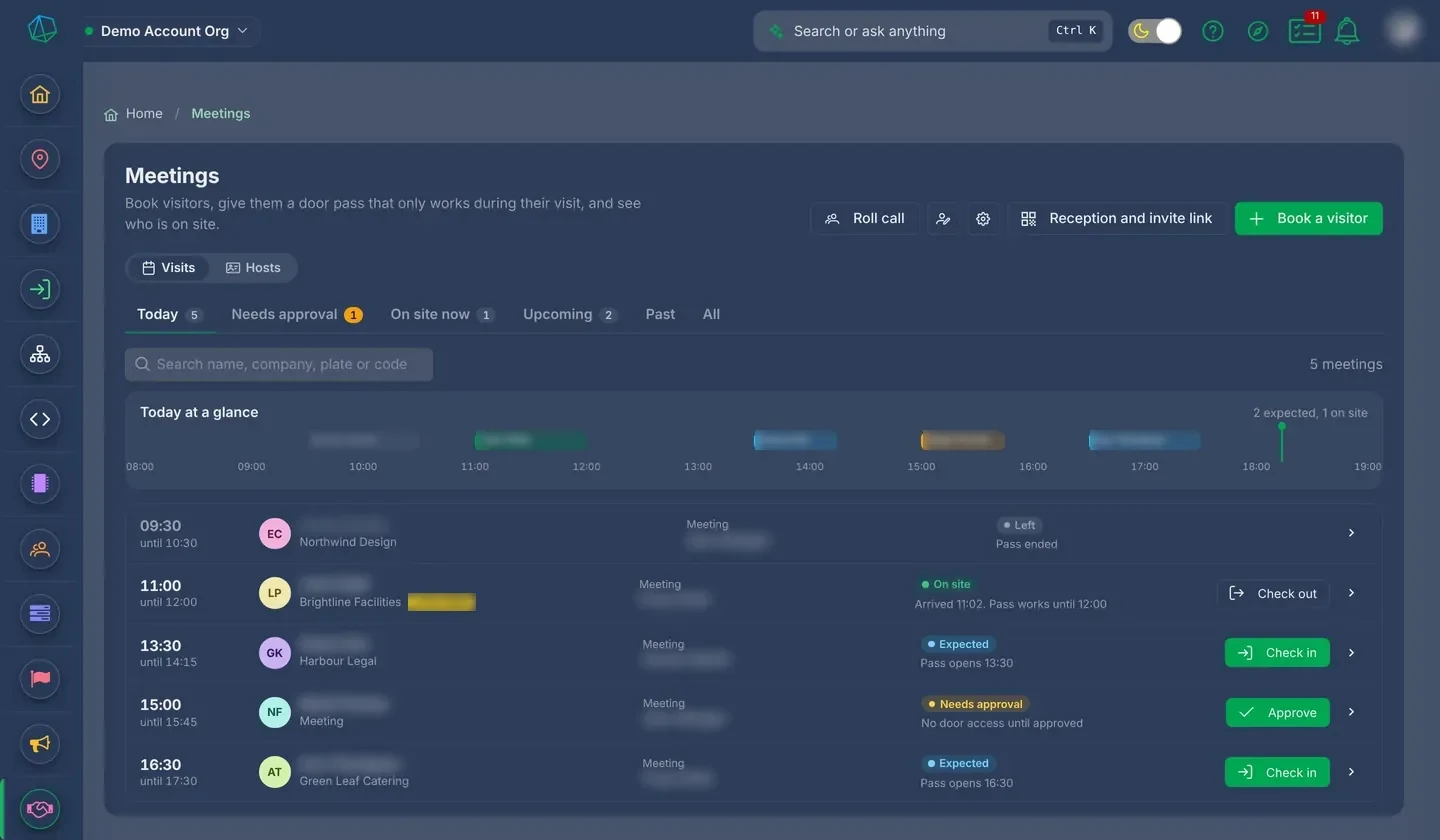
The day at a glance
A timeline of today's visits, who is on site now, who still needs approval, and one button to check each visitor in or out.
Who it's for
For anyone who welcomes visitors
If people visit your building for meetings, viewings or appointments, visitor management saves your team from making codes by hand and chasing who still has one.
Offices and shared workspaces
Hosts book their own visitors, and reception sees who is expected.
Front desks and concierges
Visitors arrive with their pass on their phone, so the desk can welcome them instead of issuing codes.
Managed residential buildings
Viewings and contractor visits get a pass that is removed when the visit is completed.
Sites with visitor parking
Add the visitor's number plate and it works as a pass on gates that read plates.
Problems it solves
- Making a door code for every visitor and remembering to delete it.
- Visitors waiting at reception while someone finds their host.
- Paper sign-in books that nobody reads.
- Old visitor codes that still open the door weeks later.
- Visitors' cars stuck at the barrier.
- A separate visitor system that doesn't know your doors.
Works with
Works with your doors and gates
Visitor passes are sent to the same doors and controllers as everyone else's codes, using an entrance group so visitors only open the doors you choose.
FireBird and Ontico controllers
The visitor's QR code goes to the doors in the meeting's entrance group.
Number plate gates
A plate on the booking becomes a pass on controllers that open gates by plate.
Visitor kiosk QR
A QR code at reception can start the visitor's own registration.
Employees as hosts
Hosts are the employees in your organisation, picked on each booking.
The visitor card and booking details are emailed to the visitor.
Video intercom
Visitors without a booking can still call someone from the door.
Everyday examples
A client meeting
A manager books a client for Tuesday at 10:00. The client receives their visitor card and QR code by email and opens the front door with it on the day.
A flat viewing
A letting agent books a viewing. The pass works for the viewing and is removed when the agent marks the visit completed.
A contractor on site
A contractor's van plate is added to the booking, so the yard gate opens for them on arrival.
A visitor who registers themselves
The host shares an invitation link. The visitor enters their details, picks the meeting and the host, and downloads their card at the end.
Why TheBuilding.Cloud
Why TheBuilding.Cloud for visitors
The pass makes itself
Booking the meeting creates the QR code, the card and, if given, the plate pass.
And removes itself
Completing or deleting the meeting takes the codes off your doors.
No app for visitors
The card and QR code arrive by email and work on the phone.
Only the doors you choose
Visitor passes use an entrance group, so visitors only open its doors.
Same platform as your doors
No second system to keep in step with your access control.
Included on Pro and Enterprise
Visitor management is part of the Pro and Enterprise plans.
Questions about visitor management
How does a visitor get in?
When does the visitor's access end?
Can visitors register themselves?
Who can book visitors?
Which plan do I need?
Does it record when visitors leave?
Learn more
Help centre
Step-by-step guides for managers and residents.
Cloud access control
Doors, entrance groups and codes.
Video intercom
For visitors who arrive without a booking.
Parking and ANPR
Number plates at the gate.
Plans and pricing
Pro and Enterprise include visitor management.
Guest access
For longer stays, up to 30 days.
Built into your building platform
Meetings aren't a separate add-on: they use the same doors, entrance groups and controllers as your access control.
Access control
Visitor codes go to the same doors and controllers as everyone else's
Entrance groups
Visitor passes use an entrance group, so visitors only open its doors
Number plates
A visitor's plate opens gates on controllers that read number plates
Available on Pro & Enterprise plans
Make every visit simple
Replace hand-made codes and paper passes with visitor passes that create and remove themselves.