Retirement and later living
Easy entry for residents, carers and family
Residents who don't want another gadget, carers who visit three times a day, family who come at the weekend and a small team that can't be at the door all the time. TheBuilding.Cloud lets residents see who is at the door and open it, and gives carers and family their own access that ends when it should.
Residents choose what suits them: a phone door key, a keypad code or a fob. Staff see every door, every call and every repair in one dashboard, and send news to the whole community or one building.
Residents
Door key, code or fob
Carers and family
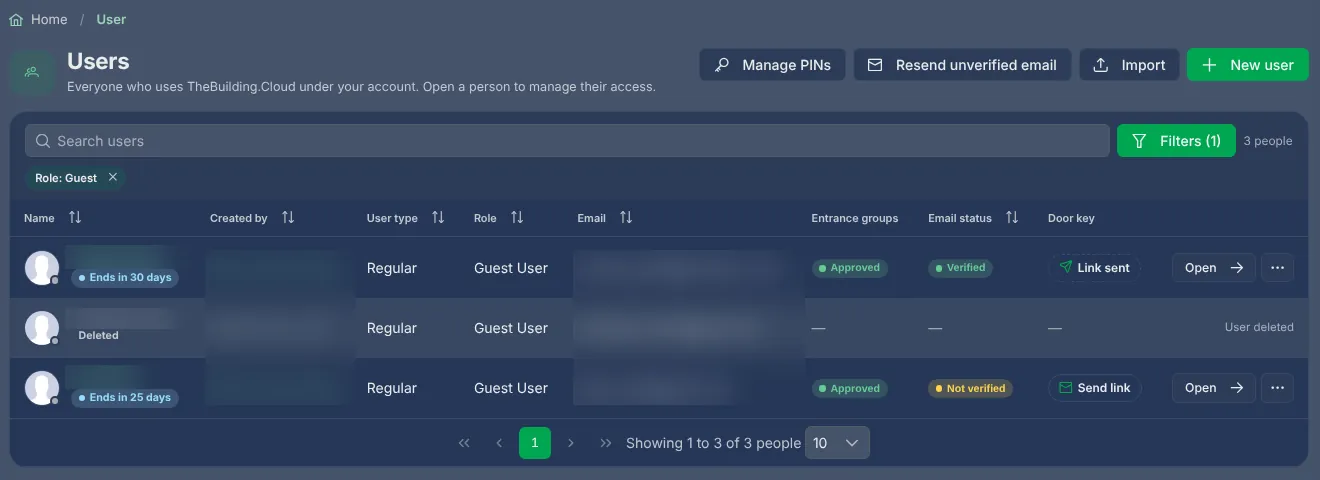
Access that ends when it should
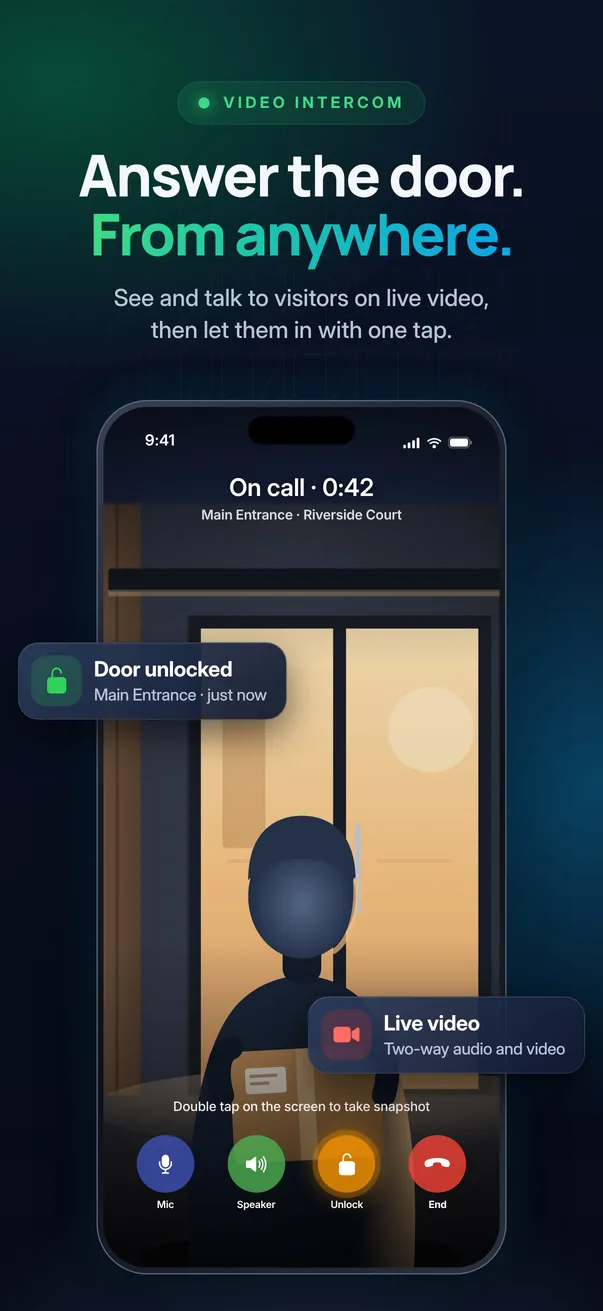
See who it is, then open the door
- longest guest access, then it ends by itself
- 30 days
- ways to open a door: door key, passcode or both
- 3
- ways to send news: email or app notification
- 2
- files per reply on a repair
- 10
How it works
A day in the community in four steps
Residents keep their independence; staff keep an eye on what matters.
-
1
Residents come and go
With a door key, a keypad code or a fob, whichever they prefer.
-
2
Carers arrive
Carers open the doors they need with their own access, on the days they visit.
-
3
Family visit
Family scan the QR code at the entrance and the resident sees them on video before opening.
-
4
The community hears
Staff send news about events, works or a fire alarm test by email or app notification.
How TheBuilding.Cloud helps later living operators
Simple for residents, clear for staff, and safe for everyone.
Video Intercom
Residents see the visitor before opening, and visitors always hear a spoken "door open" when they can go in.
See Video IntercomGuest Access
Carers and family get access for up to 30 days at a time, with reminders before it ends.
See Guest AccessPIN Codes, Cards & QR
A keypad code or a fob for residents who would rather not use a phone, with time limits for visiting staff.
See PIN Codes, Cards & QRNotice Board
Activities, works and safety notices to the whole community or one building.
See Notice BoardIssue Reporting
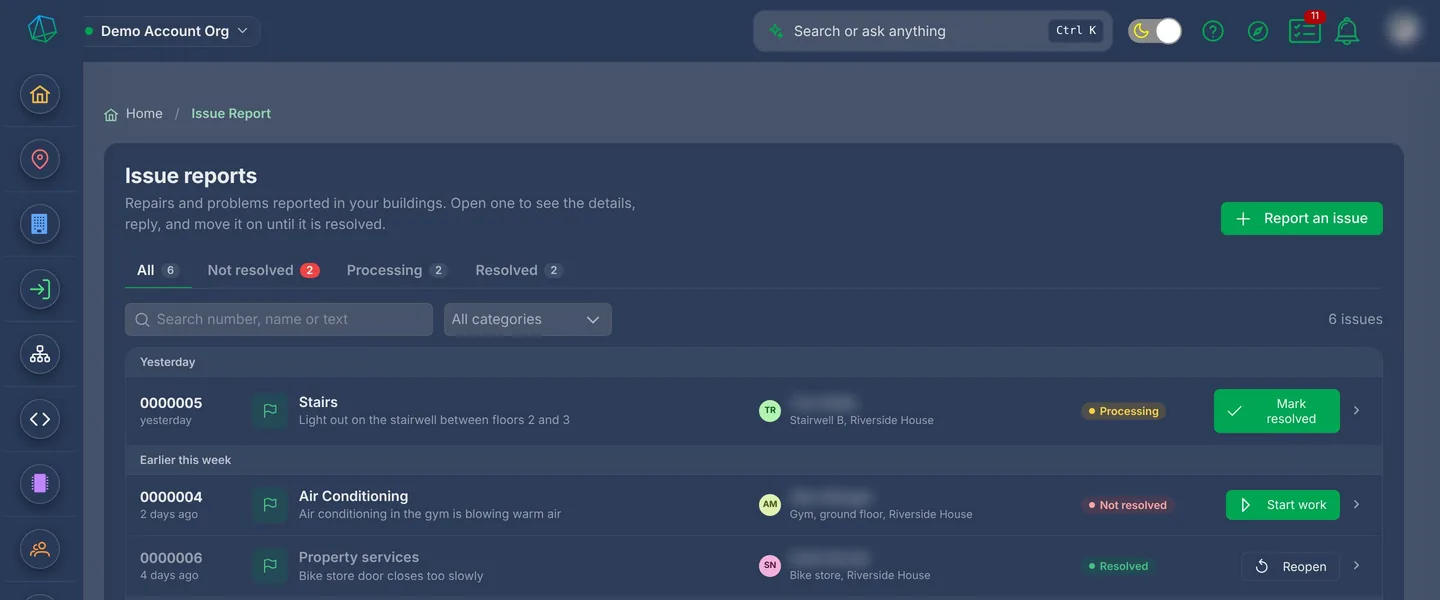
Residents or staff report a repair with a photo, and whether a vulnerable person lives there.
See Issue ReportingMobile App
Residents answer the door on a phone or tablet, and staff manage doors on the go.
See Mobile AppIn the product
What residents and staff see
Real screens from the dashboard and app, taken from our demo organisation. Personal details are blurred or made up.
Who it's for
Built for retirement communities and the people who run them
Retirement villages, later living apartments and housing with care.
Later living operators
Every community and every door in one dashboard.
Community managers
Know who came in, and send news to the right residents.
Carers and visiting staff
Their own access, only on the days they work.
Residents and families
See who is at the door, and let family in without a spare key.
The problem
- Residents struggle with small fobs and stiff keys.
- Carers need a spare key under a plant pot.
- Family arrive when nobody is at reception.
- Staff can't tell who came into the building.
- Activities posters by the lift reach only some residents.
- Repairs wait until someone visits.
Works with
Works with
TheBuilding.Cloud works with the doors and devices your community already has.
The TheBuilding.Cloud app
iPhone and Android: answer door calls with video, open doors and get building news. Older app versions keep working.
Keypads, cards and fobs
PIN codes, cards, tags and fobs on FireBird doors and supported controllers, managed from the same profile.
FireBird controllers
Our own controllers for doors, gates and barriers, with online status, signal and remote firmware updates.
Any modern phone
Phone door keys use passkeys: the phone's own fingerprint, face or screen lock. Nothing to install for a door key.
Visitor passes, door key invitations and notices go by email, never SMS.
TV screens
Visualiser screens show a live plan of the building, and switch to a full-screen message during a lockdown.
A typical week
Morning care visit
The carer opens the front door with their own code, which only works on the days they visit.
Sunday lunch
The resident's daughter calls from the entrance, the resident sees her and opens the door.
Activities week
Every resident hears about the quiz night and the garden party by email.
A broken light
A resident reports a broken landing light with a photo. Maintenance replies when it's fixed.
Why TheBuilding.Cloud
Why later living operators choose TheBuilding.Cloud
Choice for residents
Door key, keypad code or fob: whatever suits them.
See before you open
Video calls from the entrance to a phone or tablet.
Carers without spare keys
Timed access that ends when it should.
Clear for staff
Every door open and call on record.
News that reaches everyone
Email or app notification, to one building or all.
Visitors reassured
A spoken "door open" so nobody is left wondering.
Questions from later living operators
Is this a care alarm or telecare system?
What if a resident doesn't use a smartphone?
How long can a carer's access last?
Can staff answer the door for a resident?
Can family members be added by residents themselves?
Is there a record of who came in?
Guides and next steps
Answer intercom calls
Calls in the app and the dashboard.
Guest access
Add a guest and choose when it ends.
Create a PIN code
A keypad code with a time limit.
Send a message to residents
From channel to Reach.
Report a problem
How residents raise repairs.
Plans and pricing
See what each plan includes.
Other sectors with residents and care
Later living shares a lot with care homes and housing providers.
Same platform
The same doors, people and app
Same rules
Visitors only open the doors you allow
Same record
Every open is logged
Later living
Let family in without a spare key
Book a demo and see a resident answer the door, a carer arrive and a notice reach the community.