Parking & ANPR
Parking that knows the cars
Your ANPR camera reads each number plate and TheBuilding.Cloud logs it (with its photo when the camera sends one), then opens the barrier for cars on your list. Residents, staff and visitors drive in without a fob or a call.
Plates live next to your doors, people and automation rules, so one plate read can open a gate, email the team or switch on the lights.
Plate detected
AB12 CDE · Authorised
Action
Barrier open · Main entry
Plate detected, synced to the platform, barrier open
- photo kept with each plate read the camera sends one for
- 1
- kinds of plate rule: any, listed or unlisted plate
- 3
- steps from plate read to open gate
- 4
- ways to tell the team: email, SMS, push, Slack, Telegram
- 5
How it works
How plate reads work
The camera reads the plate, the platform logs it and your rules decide what happens next.
-
1
The camera reads the plate
Your ANPR camera reads the number plate as the car arrives.
-
2
TheBuilding.Cloud gets it
The plate, and its photo when the camera sends one, arrive in the platform and are logged with the time and building.
-
3
Your rules check it
Rules can act on any plate, a plate on your list or a plate that isn't.
-
4
The gate opens
A rule opens the barrier through its controller and can email or alert the team.
What you get
Car park control from one dashboard
Cameras, barriers, sensors and rules, managed in the same place as the rest of your building.
Number plate reads
Every plate your camera reads is logged with the time and the building, plus its photo when the camera sends one, and can be searched and exported.
- Camera reads show in the dashboard and in the TheBuilding.Cloud app.
- The car park camera log can be searched and exported.
- Old reads are cleared automatically.

Visitor parking
Add a visitor's plate to their meeting and it works as a pass on gates that read plates. It is removed with the meeting.
- No calls to the office from the barrier.
- The pass works on the day of the meeting.
- Removed when the meeting is completed.
Barrier and gate control
Open a barrier or gate from the dashboard, or let an automation rule open it when a listed plate is read.
- Open, close or pulse a barrier or gate through FireBird.
- Register parking sensors by their ID and see their latest messages.
- A sensor that has been quiet for a day is flagged so you can check it.
Car park control from one dashboard
Cameras, barriers, sensors and rules, managed in the same place as the rest of your building.
Number plate reads
Every plate your camera reads is logged with the time and the building, plus its photo when the camera sends one, and can be searched and exported.
Parking sensors
Register parking sensors and see their latest messages. A sensor that has been quiet for a day is flagged so you can check it.
Visitor parking
Add a visitor's plate to their meeting and it works as a pass on gates that read plates. It is removed with the meeting.
Barrier and gate control
Open a barrier or gate from the dashboard, or let an automation rule open it when a listed plate is read.
Rules for plate reads
Run a rule when any plate, a listed plate or an unlisted plate is read: open a gate, send an email or alert the team.
Logs on the phone too
Camera reads show in the dashboard and in the TheBuilding.Cloud app, with the vehicle photo when the camera sends one.
In the product
Real screens from the dashboard
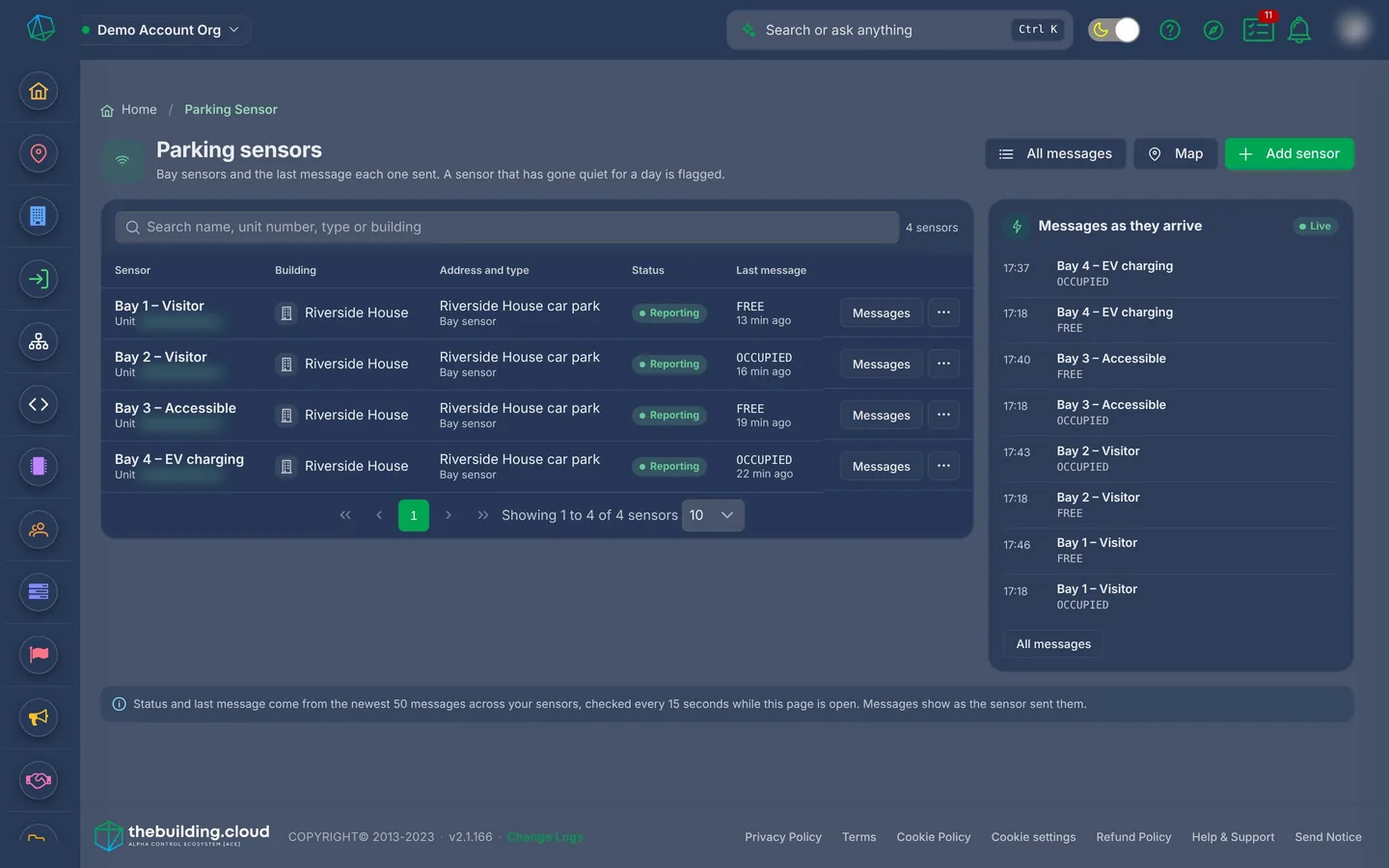
Taken from our demo organisation on 7 November 2026, with sample buildings and made-up people; unit numbers and names are blurred.
Bay sensors with a live feed
Each bay shows whether it is free or occupied and when it last reported, while new messages appear on the right as they arrive.
Who it's for
For sites where cars come and go
If your residents, staff or visitors drive in, number plate recognition lets the right cars in and keeps a record of every one.
Residential car parks
Residents' cars open the barrier, and you see every vehicle that came in.
Office and business parks
Staff park without a fob, and visitors' plates are added with their meeting.
Yards and depots
Know which vans and lorries came through the gate and when.
Managing agents
Watch the car parks of several sites from one dashboard.
Problems it solves
- Fobs and remotes for barriers that get lost or shared.
- Visitors stuck at the barrier calling the office.
- No record of which car came in and when.
- Staff opening the gate by hand all day.
- Unknown cars parking where they shouldn't, with nobody told.
- Separate systems for the gate and the doors.
Works with
Works with your cameras, gates and doors
Plate reads arrive from your ANPR camera and drive the same controllers and rules as the rest of the building.
ANPR cameras
Cameras that send their plate reads (and photos, if the camera sends them) to TheBuilding.Cloud.
FireBird controllers
Open, close or pulse a barrier or gate from an automation rule.
Ontico GSM controllers
Open an entrance from a rule, and use number plates as a pass on supported units.
Parking sensors
Register sensors by their ID and see the messages they send.
Smart switches
Switch on lights or a gate switch through linked smart devices.
Email, SMS, Slack and Telegram
Tell the right people when a plate is read.
Everyday examples
A residents' car park
Each resident's plate is on the list. Their car opens the barrier, and any other car is logged, with its photo when the camera sends one, for the manager to check.
Visitor parking at an office
A client's plate is added to their meeting. The gate opens for them on the day and the pass is removed when the meeting is completed.
A depot gate at night
An unlisted plate arrives after hours. The rule sends a Telegram message to the on-call manager with the plate.
Lights on arrival
A listed car arrives in the dark. The rule opens the gate and switches on the car park lights.
Why TheBuilding.Cloud
Why TheBuilding.Cloud for parking
A record of every car
Each read is kept with its photo when the camera sends one, so you can check what happened.
Lists you control
Keep the list of plates in the rule and change it any time.
Visitors included
Plate passes come with visitor bookings and go when the meeting is completed.
One platform
The same dashboard runs your doors, intercom and car park.
Alerts where your team is
Email, SMS, push, Slack or Telegram when a plate is read.
Logs anywhere
Read the plate log in the dashboard or the TheBuilding.Cloud app.
Questions about ANPR parking
Which cameras can I use?
How does the barrier open for the right cars?
Can visitors use their number plate?
Do you show free spaces?
How many cameras are included?
Can I export the plate log?
Parking events that drive building workflows
When a listed plate arrives late at night, open the gate, switch on the lights through a smart switch and email security, using the same automation rules as fire panels and doors.
Listed plate
Open gate + email
Visitor meeting
Plate pass
Unlisted plate
Alert to Slack or Telegram
No fobs at the barrier
Let known cars straight in
No fobs at the barrier, no calls to the office and a record of every car that came in.