Ends by itself
Guest access that never outstays its welcome
Give a friend, a carer, a short-stay guest or a family member access to the doors they need, for up to 30 days. When the end date comes, their access stops on its own: no one has to remember to take it back.
Guests open doors with a door key on their phone, set up from one email. Residents can add their own guests to their own doors, and you stay in control of the rules.
Longest stay
30 days, then more if you choose
After it ends
Suspended, then removed
Up to 30 days of access, then it stops by itself
- longest a guest's access can last
- 30 days
- days: warning emails before deletion
- 14/7/1
- after suspension, an old guest is tidied away
- 90 days
- steps, and nobody has to remember to take access back
- 4
How it works
A guest from start to finish in four steps
Every guest has an end date, so temporary access really is temporary.
-
1
Add the guest
Add them with their name and email, choose their doors through entrance groups and pick when access ends.
-
2
They set up a door key
The guest gets a "Set up your door key" email and saves the key on their phone.
-
3
They come and go
They open their doors by scanning the QR code by the door and confirming with face, fingerprint or screen lock.
-
4
It ends by itself
On the end date the guest is suspended, their codes come off the doors and the door page says access has ended.
Who adds the guest?
Guests for everyone, with an end date
Organisations, operators and residents can all add guests, each to the doors they look after.
Let a visiting parent in yourself
A door user can add guests to their own entrance groups without calling the office.
- Only your own entrance groups.
- Pick when access ends, up to 30 days.
- The guest sets up their own door key.
Contractors, carers and short stays
Give access to exactly the doors needed and let the end date take it back.
- Every guest has an end date.
- Codes come off the doors when access ends.
- Re-enable for another 30 days in one step.
Suspended, warned, then tidied
A suspended guest keeps their codes until someone decides. Warning emails go out before anything is deleted.
- Emails 14, 7 and 1 days before deletion.
- Re-enabling puts everything back.
- Deleted 90 days after suspension if nobody acts.
Short stays without the loose ends
Guest access is built for people who should only have a key for a while, with safe defaults and clear emails.
An end date for every guest
Choose when access ends, up to 30 days away. If nobody chooses, it is 30 days from when the guest was added.
Residents add their own guests
A door user can add guests to their own entrance groups, so a resident can let in a visiting parent without calling the office.
Suspended, not lost
When access ends the guest is suspended. Their codes come off the doors but are kept, so re-enabling puts everything back.
Warning emails first
The person who added the guest, or the organisation, gets emails 14, 7 and 1 days before a suspended guest is deleted.
More time in one step
Re-enable the guest for up to another 30 days from their profile, or from the button in the reminder email after a confirmation page.
Tidy by default
A guest nobody re-enables is deleted 90 days after suspension, so old accounts don't pile up.
In the product
Real screens from the dashboard
Taken from our demo organisation on 7 November 2026. Names and email addresses are blurred.
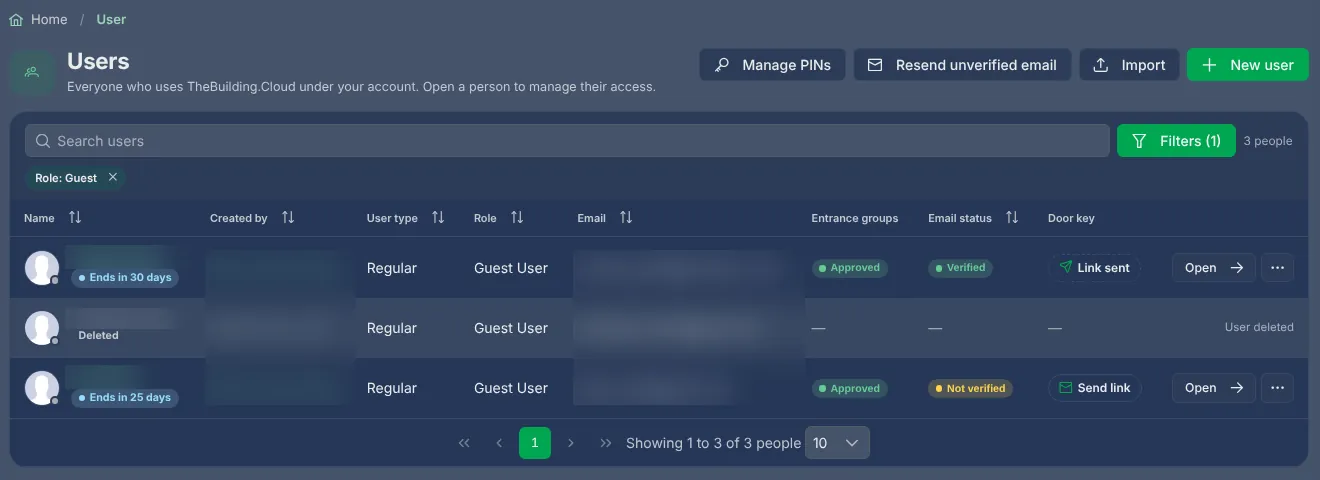
Every guest and when their access ends
Filter the users list to guests and see at a glance how many days each one has left, whether their email is verified and whether their door key link went out.
Who it's for
For anyone who lets people in for a while
Guest access suits buildings where people need a key for days or weeks, not for good, and where forgotten access is a real risk.
Residents
Let a visiting relative, a carer or a house-sitter in for the length of their stay, from your own account.
Managing agents
Know that temporary access ends by itself, without a list of end dates to chase.
Short-let hosts
Give each stay its own door key that stops when the booking does.
Offices and sites
Give visiting staff or trainees access for a project, without making them permanent users.
Problems it solves
- Temporary keys and codes are never taken back.
- Someone has to remember every guest's end date.
- Residents ring the office every time a relative visits.
- Old guest accounts build up and nobody knows who they are.
- Ending access means a site visit to change a code.
- Giving a guest more time means starting again from scratch.
Works with
Works with the rest of your access
A guest is a person like any other, just with an end date, so they use the same doors, groups and readers.
Phone door keys
Guests get a passkey door key and open doors from the QR code by the door.
Entrance groups
Guests only open the doors in the groups you choose.
FireBird and Ontico controllers
Guest codes are sent to the doors and taken off again when access ends.
Video intercom
Visitors who only come once can still call a resident from the door instead.
Visitor management
For meetings and day visits, use visitor invites rather than guest accounts.
The mobile app
Managers can see and manage guests from the TheBuilding.Cloud app too.
Everyday examples
A visiting parent
A resident adds their mother as a guest for two weeks. She opens the main door and lift lobby with her phone, and her access ends the day she flies home.
A carer
A carer gets 30 days of access. Before it ends, the resident re-enables them for another 30 days in one step.
A short let
Each guest gets access for the length of their stay and nothing longer, so the next guest never finds an old code still working.
A project team
Visiting engineers get access to the plant room for a fortnight while the work is done.
Why TheBuilding.Cloud
Why guest access on TheBuilding.Cloud is safer
Always an end date
There is no such thing as a guest without one, even from older apps that don't send it.
Stops on the doors
Ending access takes codes off the readers, not just off a list.
Nothing lost on suspension
Codes are kept, so re-enabling a guest is instant.
Warnings before deletion
Three reminder emails before anything is deleted.
Confirm before acting
Email buttons open a confirmation page first, so a mail scanner can't act for you.
Residents can help themselves
Fewer calls to the office, with the same rules enforced.
Questions about guest access
How long can guest access last?
What does the guest see when access ends?
Who can give a guest more time?
When is a guest deleted?
Should regular visitors be guests?
Does a guest need an app?
Guides and next steps
Guest access
How long it lasts and how to give more time.
Add people and choose doors
Add a guest step by step.
Set up your door key
What your guest does with the email.
Passkey door access
How guests open doors with their phone.
Visitor management
Invites for meetings and day visits.
Plans and pricing
See the guest allowance on each plan.
Temporary access that fits the rest of your building
Guests use the same doors, groups and door keys as everyone else, with an end date on top.
Same doors
Guests only open their entrance groups' doors
Same door keys
A passkey on their phone, set up from one email
Same switch-off
Suspended guests lose every way in
Guest access
Let guests in without leaving the door open behind them
Give access for as long as it is needed, and let it end by itself.