
On this page
Key takeaways
- Write a door schedule covering users, permissions, escape arrangements and failure behaviour before requesting quotations.
- Choose credentials around the people using each entrance, including residents without smartphones and contractors needing limited access.
- Compare access control software by administration, connectivity, security and documented offline behaviour, not just its dashboard.
- Require commissioning at every controlled entrance, including power-loss tests and any integrated systems.
- Budget for maintenance, subscriptions, credential replacement and administration, and assign responsibility for removing access and reviewing records.
Managing a building means letting authorised people in without leaving doors open to everyone else. Building access control systems manage who can enter which areas and when, using credentials, readers, controllers, locking hardware and software. Choose the system around each door’s purpose, safe escape and daily administration, then require an installer to demonstrate that it works.
This guide covers technology choices, software, design, installation and running costs for UK properties.
How building access control systems work
A person presents a credential, such as a fob, PIN or mobile door key. A controller checks their permission and, if access is allowed, signals the lock to release. The decision may happen locally or involve a connected service, depending on the design.
The NPSA guide to automatic access control systems includes databases, power, communications and access policies alongside readers and controllers. A building access management system needs all these parts, not just a reader beside the entrance.
People
Permissions
Equipment
Operations
Management software is where administrators assign doors, set schedules, cancel credentials and review events. The physical installation still determines whether a door closes, latches and releases correctly. A better dashboard cannot fix a damaged closer.
For smart building access control, specify each connection separately: intercom, parking, alarms or other systems. State what event causes what action, who receives a notification and what happens if the connection fails. Integration is not, by itself, evidence of safe operation.
Match access technologies to people and areas
Start with a permission schedule: user group, allowed doors, permitted times and the person approving changes. Include cleaners, carers, deliveries and emergency maintenance, not just permanent occupants.
ExamplePicture a 40-flat block in Manchester with a main entrance, cycle store and plant room. Residents need the entrance, authorised cyclists need the store, and maintenance contractors need restricted plant-room access. Giving everyone every door would simplify setup but weaken security.
Compare building access control technologies against those requirements:
| Technology | Useful where | Check before choosing |
|---|---|---|
| Cards and fobs | Users need a physical credential without a phone | Reader compatibility, replacement and cancellation |
| Individual PINs | Carrying a credential is inconvenient | Code sharing, keypad usability and exposed-code replacement |
| Mobile app or passkey | Users can use their own phones | Onboarding, connectivity, lost phones and an alternative method |
| Biometric reader | A documented need justifies biometric recognition | Privacy assessment, legal conditions and alternatives |
| Video intercom | Visitors need someone to approve entry | Call answering, remote release and unanswered-call procedures |
Test the proposed entrance with people who have impaired sight, limited dexterity or no suitable smartphone. Accessible credentials are only part of the task: opening force, approach space and powered-door operation also matter.
For government building access control, ask the departmental security lead to define site-specific assurance, visitor and procurement requirements before tendering. Do not assume an ordinary commercial specification is sufficient, or that a particular credential makes the whole installation suitable.

Design safe escape and failure behaviour
Controlling entry must not prevent safe escape. Have a competent designer or installer assess each opening with the person responsible for the fire risk assessment, considering its occupants, use and escape strategy.
The NSI explanation of safe escape and NCP 109 Issue 4 distinguishes requirements across England, Wales, Scotland and Northern Ireland. There is no single door specification you can apply indiscriminately across UK buildings.
Relevant standards address different functions: BS EN 179 covers emergency exit hardware; BS EN 1125 covers panic exit hardware; BS EN 13637 covers electrically controlled exit systems; and BS 7273-4 addresses fire-safety interfaces. Ask which apply to each door and why. They are not interchangeable labels.
| Scenario | Confirm | Evidence to request |
|---|---|---|
| Normal exit | Credential-free escape | Witnessed exit test |
| Fire | Assessed release arrangement | Recorded functional test |
| Power failure | Entry and exit behaviour | Power-loss test |
| Connection loss | Available access functions | Disconnection test |
| Hardware fault | Safe response procedure | Fault-response instructions |
“Fail-safe” and “fail-secure” describe lock behaviour on power loss, not the complete escape arrangement. A door may remain secure from outside while mechanical hardware permits escape from inside.
Magnetic locks are not universally banned. Their suitability depends on the opening and documented escape strategy. Check approval before drilling or altering a fire-rated doorset.
NoteA fire-alarm connection, remote unlock button or cloud notification does not establish that a door is safe for escape.
Choose software and connectivity together
Cloud access control uses an online service for management. An on-premise system places management infrastructure at the premises. Neither description tells you what happens at the door when the internet fails.
Require written answers for four separate functions: existing credentials, new permission changes, remote unlocking and event reporting. Repeat the exercise for broadband loss, cellular loss, local network failure and controller power failure.
Your building access control software checklist should also cover:
- Separate administrator roles and the buildings each person can manage.
- Prompt removal of leavers and lost credentials.
- Visitor access, schedules and out-of-hours lockout procedures.
- Event access, retention, export and any backup arrangements.
- Software updates, installer access and account ownership.
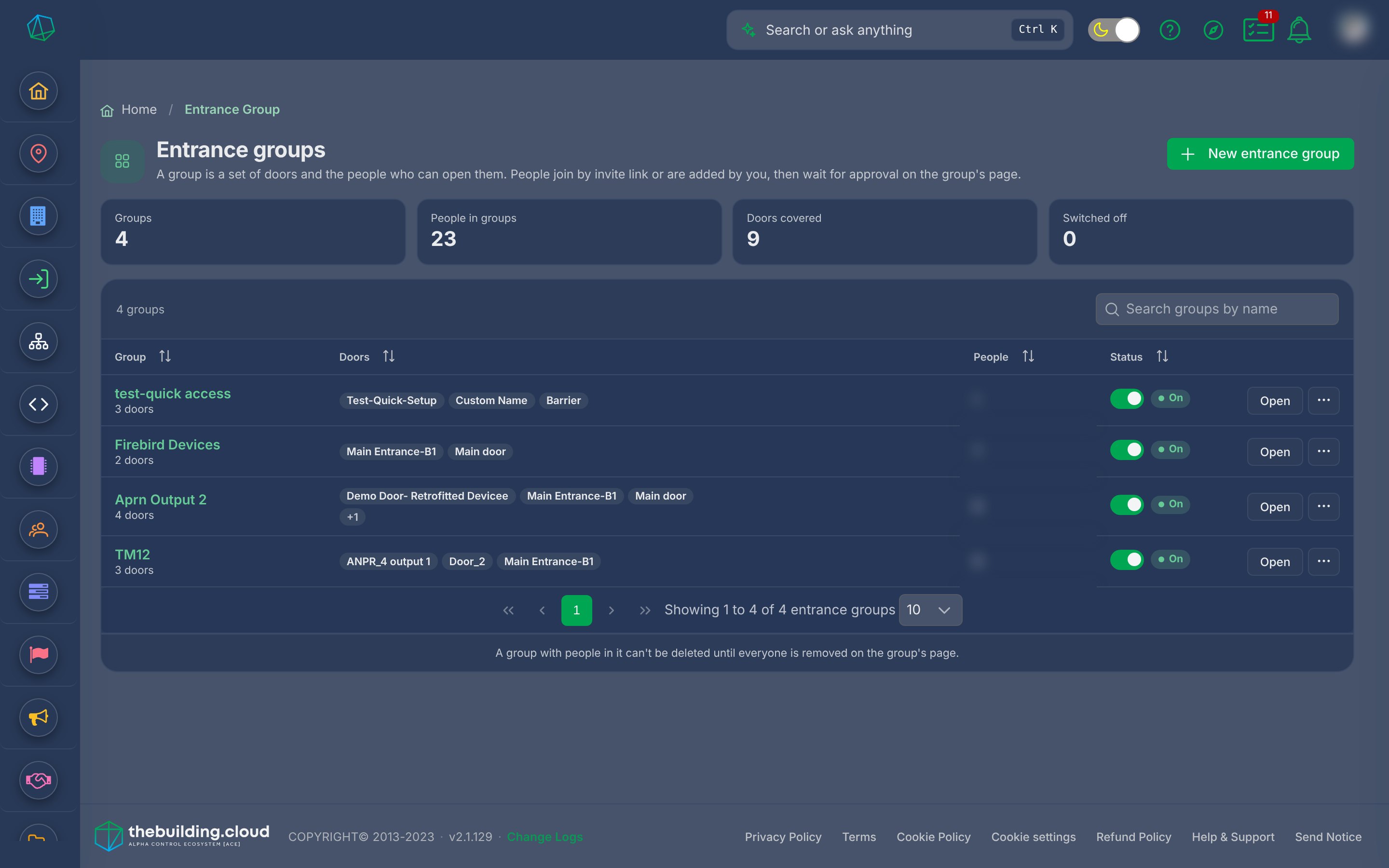
TheBuilding.Cloud’s access control dashboard uses entrance groups to define which doors people can open. Switching someone off, removing them from a door group or deleting them automatically removes their PINs, cards and QR codes from readers. Its video intercom lets residents answer visitors on mobile or web and unlock remotely.
For connected systems, involve your IT team before installation. NPSA recommends segregating access control from other IT systems wherever possible. Agree network ownership, update responsibilities and how installer access will be withdrawn.
Plan installation around acceptance tests
Access control system design and installation should start with a survey, not a hardware order. Record door condition, locking arrangements, cable routes, power, communications, accessibility and any fire-door restrictions.
Use this installation sequence in your supplier brief:
- Survey and define requirements. Record every opening, user group, security need and escape role.
- Approve the design. Agree hardware, permissions, interfaces, failure behaviour and applicable standards.
- Install and configure. Fit equipment and configure access rules, schedules and administrator accounts.
- Commission every entrance. Test authorised and rejected credentials, normal exit, emergency release, power loss and agreed connection failures.
- Accept and hand over. Collect records, train administrators and confirm maintenance and fault-response arrangements.
NPSA recommends commissioning before acceptance, covering every entrance and device as appropriate, integrated systems and power-failure behaviour. A successful test at the main entrance does not prove the cycle-store door works correctly.
Require a door and controller schedule, configuration records, test results, operating instructions and service schedule. Agree who handles an out-of-hours lockout and how administrators remove access urgently.
Protect access records and assess biometrics separately
An access event linked to an identifiable person is personal data. Define why you collect it, who may view or export it and when it will be deleted. An entry event does not prove someone remains inside.
The ICO’s storage limitation guidance explains that UK GDPR does not prescribe universal retention periods. Justify your schedule against the purpose, check that the system can support it and review whether records remain necessary.
Biometric recognition needs a lawful basis and a separate special-category processing condition. ICO guidance says it is highly likely to require a data protection impact assessment. Where relying on consent, provide genuine choice, withdrawal without detriment and a suitable alternative.
Distinguish a building’s biometric reader from a passkey confirmed on someone’s own phone. With TheBuilding.Cloud’s passkey door access, users receive an email invitation and set up their door key using their phone’s face, fingerprint or passcode method. Ask suppliers what data is collected and where processing happens rather than treating every fingerprint-related system as equivalent.
The ICO guidance cited here is marked under review following the Data (Use and Access) Act 2025. Check its current wording before finalising your policies.
Compare whole-life costs, not reader prices
A useful quotation prices the same door schedule and separates installation from ongoing operation. There is no meaningful installed price without assessing the openings and scope.
| Cost area | Include in the comparison |
|---|---|
| Physical works | Door repairs, locks, closers, readers, controllers, cabling and power supplies |
| Connectivity and software | Network work, cellular service, subscriptions, add-ons and usage charges |
| Administration | Training, resident onboarding, replacement credentials and permission reviews |
| Support and maintenance | Batteries, servicing, call-outs, updates and response arrangements |
| Future changes | Extra doors, data export, migration and replacement |
For software budgeting, TheBuilding.Cloud’s plans and billing details list Free at £0 a month, Pro at £95 a month and Enterprise at £150 a month. Plan limits, add-ons and Enterprise metered usage affect the comparison; these prices are not installed-system quotations.
Ask bidders to state exclusions explicitly. An inexpensive reader quote may omit the door repairs, electrical work or commissioning needed for a usable installation.
Where to start
Create a door-by-door brief before inviting quotations. Record who needs access, how they leave safely, what happens during failures and who manages changes.
Then ask suppliers to price that same brief and demonstrate the agreed scenarios before acceptance. Keep responsibility for maintenance, leavers and permission reviews with named people. The system remains secure only if the doors and daily procedures keep working together.
Frequently asked questions
What technologies are used in building access control systems?
What should building access control software do?
What does access control system installation involve?
Do building access systems work without the internet?
How much do building access control systems cost?
What should you specify for government building access control?
Sources
How we write
Our articles answer the questions people ask about running buildings. Each one is checked against our product documentation and reviewed by our team before it is published. Spotted something out of date? Tell us and we will fix it.


